Imagine 1.1.6
Description
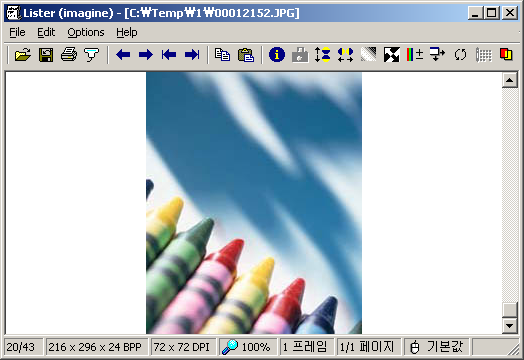
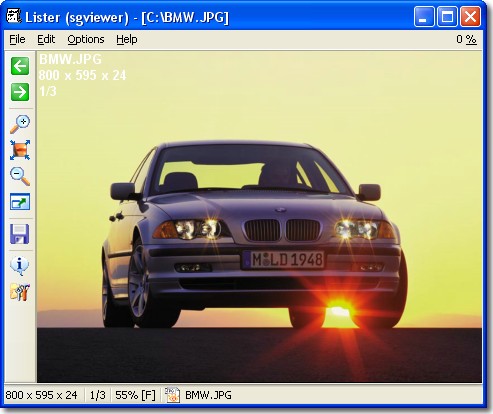
Imagine - Image & Animation Viewer for Windows[Features]
* View and save image/animation files with very fast speed
* Support for numerous image/animation file formats:
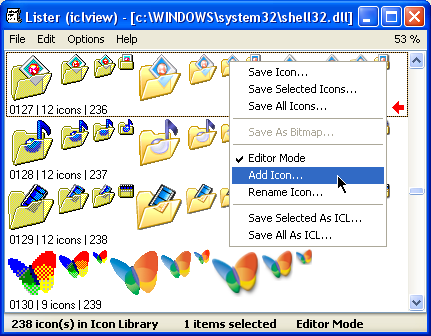
ANI, ANM, AVIF, BMP, CDR, CLP, CUR, DCM, DCX, DDS, EMF, EXR, FLC, FLI, GIF,
HDP, HDR, ICL, ICNS, ICO, JBG, JP2, JPC, JPG, LBM, MAC, MBM, MNG, PBM, PCD,
PCX, PDN, PGM, PIC, PNG, PPM, PSD, PSP, RAS, RLA, RLE, SGI, SPR, SVG, TGA,
TIF, WBMP, WEBP, WMF, WPG, XBM, XCF, XPM
* Support for digital camera raw image file formats:
3FR, ARW, CR2, CRW, DNG, ERF, KDC, MRW, NEF, ORF, RAF, RAW, SRW, SR2
* Support for numerous archive file formats:
ZIP, RAR, 7Z, ALZ, HV3, CBZ, CBR, CB7, ARJ, LZH, EGG, TAR, ISO, CAB
* Support for high dynamic range image file formats:
HDR, EXR, SXR, MXR
* Extract single/all frames from animation files
* Show detailed information of image/animation files
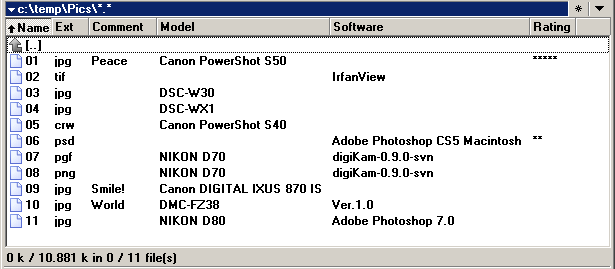
* Show Exif/IPTC information
* Show or hide transparency
* 64-bit version available
* Unicode version available
* Multilingual support:
English, German, Spanish, Russian, Danish, Korean, Japanese, Chinese, etc.
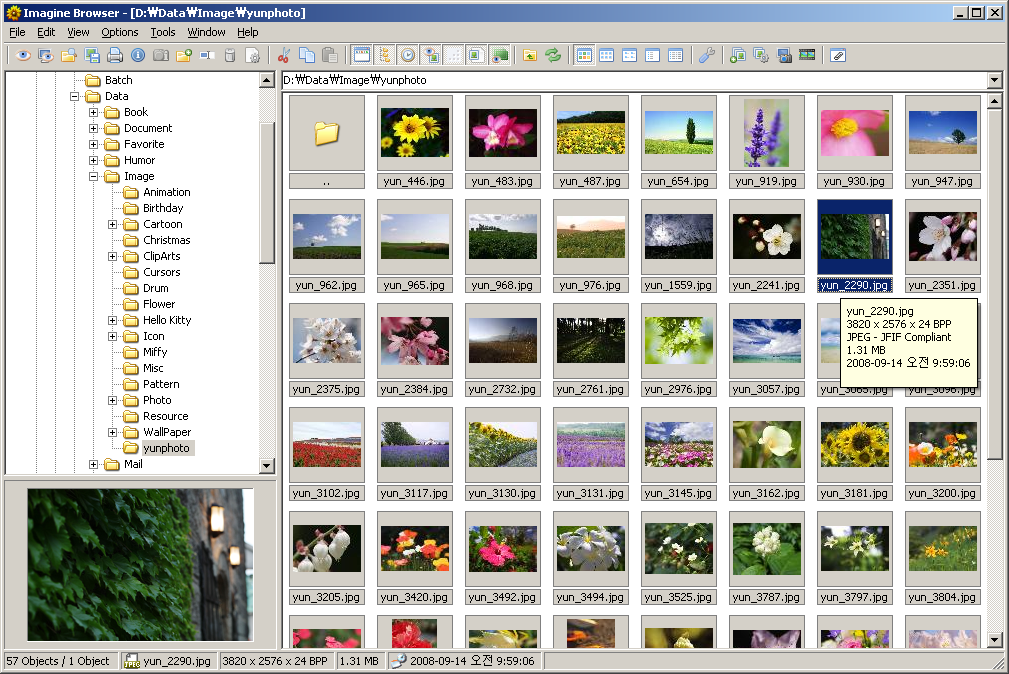
* Thumbnail browser
* Batch conversion
* Slide show
* Batch rename
* Capture screen
* Tiled view
Check textures for seamless tiling, very useful for game developers/modders
* Create animations
* Create multiple page images
* Manipulate and edit images:
Flip vertical and horizontal
Rotate left, right and free
Grayscale
Negative
Change color depth (1, 4, 8, 16, 24 and 32 bit)
Swap colors
Resize per pixel, percentage or standard dimensions.
Several resample filters available.
Effect filters, including a handy Preview browser
Import, export and edit palettes
Set and remove transparency
* Customizable shortcuts for Keyboard and Mouse
* Command line parameter support
* Shell extension support
* Add-on plugin support
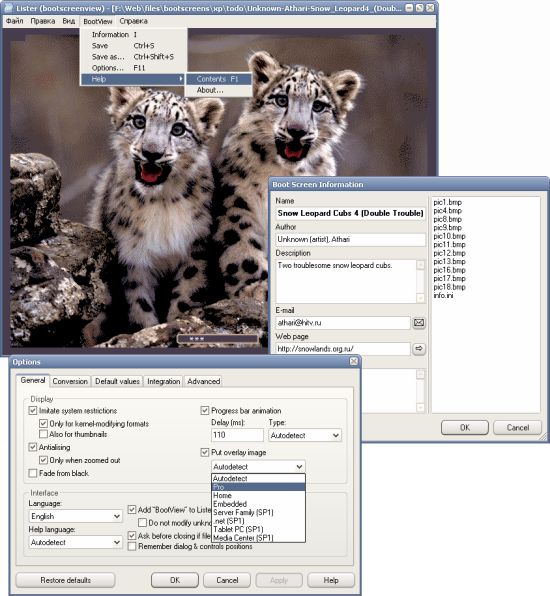
* Total Commander lister and packer plugin
* No write unnecessary registry (ini-based configuration)
* Fully optimized binaries (tiny, pure, fast, neat)
What’s new
v1.1.6, Aug 08 2023
- Added: Support for SVG, SVGZ (Scalable Vector Graphics) file format (plugin)
- Fixed: Setting wallpaper in Windows 7
v1.1.5, Aug 05 2023
- Added: Support for AVIF (AV1 Image Format) file format (plugin)
- Fixed: Small icons in High-DPI environment
v1.1.4, Apr 04 2022
- Added: Support for ICNS (Apple Icon Image Format) file format
v1.1.3, Feb 17 2022
- Added: Improved JPEG encoding/decoding speed in 64-bit version
(using CPU SIMD instructions via libjpeg-turbo)
v1.1.2, Feb 13 2022
- Added: Plugin interface - 'jpeg_mem_src'
v1.1.1, Jan 02 2020
- Added: Toolbar preferences - 'Button dimensions'
v1.1.0, Jul 31 2017
- Fixed: Support for High-DPI awareness
- Added: Command line parameter 'crop'
- Added: Transparency for XPM
v1.0.9, Nov 20 2012
- Added: Support for Digital camera raw image file format (plugin)
- Added: Batch rename
- Added: Support for double click action in mouse mode
- Added: Exif/IPTC/XMP/Comment are preserved while saving to JPEG file format
- Added: IPTC information
- Added: File type can be selected in save dialog via typing extension
- Added: Support for WebP (Google WebP Format) file format (plugin)
- Added: Support for HDR (Radiance High Dynamic Range Image) file format
- Added: Support for EXR, SXR, MXR (OpenEXR Image) file format (plugin)
- Added: Support for DICOM, DCM (DICOM Image) file format
- Added: Support for PDN (Paint.NET Image) file format
- Added: Command line parameter 'save'
- Added: Command line parameter 'jpegtran'
- Added: Percentage-based resizing is available in batch conversion
- Added: Percentage-based resizing is available in command line
- Added: Cropping supports undo, transparency and multiple frames
- Added: 'Command line parameters' topic in help file
- Added: 'Open with' in context menu of viewer
- Added: Plugins in subdirectories can be loaded
- Added: Archive icon in browser
- Fixed: Changed file names of 64-bit version
- Fixed: Changed file extension of plugin (plg,plg64)
- Fixed: Loading bug with files have '%' in their names
- Fixed: Browser refresh crash bug
- Fixed: Browser thumbnail cache crash bug
- Fixed: Browser view type change crash bug
- Fixed: Browser icon spacing problem in Windows 95
- Fixed: Archive file browsing crash bug
- Fixed: Opening archive file in network folder bug
- Fixed: Long delay with of network folder
- Fixed: Wrong detection of some ZIP files bug
- Fixed: Long MRUD item bug
- Fixed: Empty language selection bug
- Fixed: Duplicate items in shell extension context menu bug
- Fixed: Duplicate items in archive file bug
- Fixed: PBM/PGM/PPM wrong display bug
- Fixed: 'Exif Information' menu is integrated into 'Metadata information'
- Fixed: Corrections to Exif texts
- Fixed: Mouse wheel bug in Vista/Windows 7
- Fixed: 64-bit slide show executable crash bug
- Fixed: Changed name from 'Animation Factory' to 'Animation Editor'
v1.0.8, Sep 24 2011
- Added: Menu - 'JPEG lossless rotation'
- Added: Page navigator for multiple page images
- Added: CHM for help file
- Added: 'Application' tab in preferences dialog
- Added: Option 'Individual option per user'
- Added: Slide show options can be saved
- Added: Auto folder creation in batch conversion and capture screen
- Added: Support for WPG (WordPerfect Graphics) file format
- Added: Keep transparency when resized
- Added: ARJ, LZH, EGG, TAR, GZ, BZ2, ISO, CAB file support (plugin)
- Added: Private options for toolbars
- Added: Icons for 'Open with' menu items
- Fixed: Rename/Delete bug in folder tree
- Fixed: Scroll bar bug
- Fixed: Slide show executable bug in 64-bit version
- Fixed: Full screen mode in Total Commander Lister bug
v1.0.7, Jan 31 2010
- Added: Menu - 'Animation factory'
- Added: Command line parameter 'anim'
- Added: Print window is fully reformed
- Added: Menu - 'Show folders'
- Added: Resize selection area
- Added: 'Drag file' for mouse behavior
- Added: Copying to clipboard with transparency
- Added: 'View menu bar' can be saved
- Added: Parameter in 'Open with' can be customized
- Added: Latest used mouse mode can be saved
- Added: CBZ, CBR, CB7 extensions are supported
- Fixed: Multiple display monitor problem
- Fixed: File extension association problem in Vista/Windows 7
- Fixed: File rename/delete bug in Vista/Windows 7
- Fixed: Enhancement in ZIP handling routine
- Fixed: Next/Previous File bug
- Fixed: Shell extension bug
- Fixed: Browser bug in Windows 2000
- Fixed: Status bar bug in Vista/Windows 7
- Fixed: Batch conversion output file name bug
- Fixed: GIF bug
- Fixed: Full screen mode bug
- Fixed: Wrong diagnosis in Avira Antivir
- Removed: Extracting thumbnail in shell extension
v1.0.6, Jul 23 2009
- Added: File delete without confirmation option
- Added: Context menu for toolbar and status bar
- Added: ALZ file support (plugin)
- Fixed: File list bug
- Fixed: Slide show bug
v1.0.5, Jul 05 2009
- Added: ZIP file support
- Added: RAR file support (plugin)
- Added: 7Z file support (plugin)
- Added: HV3 file support (plugin)
- Added: Command in batch conversion
- Added: Menu - 'Open clipboard'
- Added: Option 'Hide scroll bars' in full screen
- Added: Browser thumbnail caching
- Added: Slide show effect
- Added: Icons in menu items
- Added: Centered zoom focus
- Added: Browser file list is more decorated
- Added: Transparency for browser preview
- Added: Internal optimizing with transparency routine
- Added: Column header can be clicked to sort file list in browser window
- Added: Column header position can be saved via 'Save position'
- Added: Command line parameter 'assocext' and 'dissocext'
- Added: Command line parameter 'regshlext' and 'unregshlext'
- Added: Confirm overwriting in batch conversion
- Added: History in copy dialog
- Added: Toolbar preferences - 'Wrap toolbar'
- Added: 'Dither output image' option in change color depth dialog
- Added: System menu - 'View menu bar'
- Added: Show current directory index in full screen
- Added: Support for MBM (Psion Series 5 Bitmap) file format
- Added: Old-JPEG TIFF compression method support
- Added: Unicode support for Total Commander plugins
- Fixed: Browser file list rename bug
- Fixed: Full screen mode bug
- Fixed: MRUD bug
- Fixed: Cursor bug
v1.0.4, Nov 14 2008
- Added: Browser window is fully reformed
- Added: Context menu in browser window
- Added: Exif-based rotated image is loaded directly
- Added: Support for PNG-embedded Windows icon files
- Added: Select index of icon according to desktop color
- Added: Support for drag'n'drop in browser window and most of dialogs
- Added: Support for list file in Slide show
- Added: Command line parameter 'slide'
- Added: Menu - 'Extract current page'
- Added: Menu - 'Extract all pages'
- Added: Menu - 'Crop'
- Added: Menu - 'Visit website'
- Added: Menu - 'Check for update'
- Added: New user-defined menu template
- Added: 'Center window' can be used with 'Don't fit window' option
- Added: BMP 32 bit alpha value
- Fixed: Exif-based rotated image scroll bar bug
- Fixed: Full screen mode bug
- Fixed: MRUD bug
- Fixed: JPEG bug
- Fixed: GIF bug
- Fixed: PCX bug
v1.0.3, May 24 2008
- Added: Slide show
- Added: File type 'Options' in Batch conversion & Capture screen dialog
- Added: Unique icons for each file type
- Removed: Menu - 'Export to AVI'
v1.0.2, May 04 2008
- Added: Support for APNG (Animated Portable Network Graphics) file format
- Added: Tiled view (allows to check textures for seamless tiling, very useful
for game developers/modders)
- Added: Menu - 'Version history'
- Added: Option 'Display load time'
- Added: Printing multiple page images
- Added: Improved scroll bar
- Fixed: Full screen mode at startup bug
- Fixed: Toggle fit bug
- Fixed: Browser window clipboard bug
- Fixed: Multiple page image bug
v1.0.1, Mar 09 2008
- Added: Option 'Toggle fit'
- Fixed: WMF/EMF zoom bug
- Fixed: Window preferences dialog bug
v1.0.0, Mar 02 2008
- Added: Capture screen
- Added: Customizable toolbar skin
- Added: Option 'Center window'
- Added: Option 'Fit window'
- Added: Option 'Fit image'
- Added: Option 'Cycle through end/begin of folder'
- Added: Option 'Hide cursor in full screen'
- Added: 'Fit image' routines fully rewritten
- Added: English language template fully rewritten
- Added: Translation information in language selection dialog
- Added: Versioning changed from 4 to 3 digits
- Added: Dropped beta status
- Fixed: Keyboard shortcut bug
- Fixed: Total Commander Lister fit option bug
- Fixed: Browser preferences dialog bug
- Fixed: GIF bug
- Fixed: XPM bug
v1.0.0.0 beta 10, Jan 13 2008
- Added: Changed license from Freeware to Donationware
- Added: Option 'Always on top'
- Fixed: Save dialog bug
v1.0.0.0 beta 9, Dec 09 2007
- Added: Improved progress bar
- Added: Menu - 'Keyboard shortcuts'
- Added: Command line parameter 'depth'
- Added: Command line parameter 'filter'
- Added: Command line parameter 'resize'
- Added: Command line parameter 'wallpaper'
- Added: Option 'Show full path in title bar'
- Added: Option 'Add extension with capital letters'
v1.0.0.0 beta 8, Nov 20 2007
- Fixed: BMP RLE encoding bug
- Fixed: Saving to BMP with packer plugin
v1.0.0.0 beta 7, Nov 09 2007
- Added: Dithering for 1/4 bit color depth conversion
- Added: More accurate colors on 8 bit color desktops
- Added: Improved status bar
- Fixed: Progress bar bug
v1.0.0.0 beta 6, Oct 07 2007
- Added: Improved browser loading speed
- Fixed: Printing bug
- Fixed: TGA grayscale image bug
- Fixed: Palette import bug
- Fixed: Browser window bug
v1.0.0.0 beta 5, Jun 30 2007
- Added: 'Command history' dialog
- Added: Improved status bar
v1.0.0.0 beta 4, May 06 2007
- Added: Improved filter browser preview speed
- Added: Option 'Undo' buffer
- Added: Option 'Display frequency per second'
- Added: Additional menus
- Fixed: Scroll bug
v1.0.0.0 beta 3, Dec 02 2006
- Added: Support for Total Commanders plugin function 'ListLoadNext'
v1.0.0.0 beta 2, Nov 04 2006
- Added: Option 'Full screen at startup'
- Added: Command line parameter 'fullscreen'
v1.0.0.0 beta 1, Oct 22 2006
- Added: Batch conversion
- Added: Improved shell extension, all frames of an animation are shown.
- Added: Command 'Cut'
- Fixed: Status bar tooltip bug
v0.9.7.0, Sep 07 2006
- Added: Alpha blend drawing routine rewritten
- Added: Display HTML color code as pixel color
- Fixed: 16 BPP 5:6:5 image clipboard bug
- Fixed: XNM bug
- Fixed: Transparent background mask bug
- Fixed: File list bug
v0.9.7.0 beta 13, Aug 19 2006
- Added: TWAIN support
- Added: Improved print dialog
v0.9.7.0 beta 12, Jul 29 2006
- Added: Support for ICL (Icon Library) file format
- Fixed: 'Rotate according to Exif' in shell extension
v0.9.7.0 beta 11, Jul 22 2006
- Added: Support for MNG (Multiple Network Graphics) file format
- Fixed: Crop bug
v0.9.7.0 beta 10, Jul 17 2006
- Added: Image information - Show DPI (Dots Per Inch) value
- Added: Cropping by scrolling
- Fixed: Current directory index bug
v0.9.7.0 beta 9, Jul 08 2006
- Added: Commands 'FileFirst', 'FileLast'
- Added: Improved status bar - Optionally show current directory index
- Added: Improved mouse configuration
v0.9.7.0 beta 8, Jun 08 2006
- Added: File open dialog - Preview image
- Added: Improved status bar
- Fixed: Icon bug in preference dialog
v0.9.7.0 beta 7, Mar 28 2006
- Added: Browser thumbnail size configurable
- Added: Shell extension - Menu image size configurable
- Added: Command line parameter support
v0.9.7.0 beta 6, Mar 04 2006
- Added: Support for JBIG (Joint Bi-level Image Experts Group) format saving,
requires additional plugin.
- Added: Images added to preferences dialog tabs
v0.9.7.0 beta 5, Feb 22 2006
- Added: GIF routine rewritten
- Added: Animation preferences
v0.9.7.0 beta 4, Feb 01 2006
- Added: Improved browser loading speed
- Added: Browser - Directory tree can be hidden
- Added: Browser preferences - 'Rotate according to Exif'
- Added: Status bar preferences - Drag status bar items with mouse
v0.9.7.0 beta 3, Jan 25 2006
- Added: Status bar preferences
- Added: Improved 'Display while loading' function, no resizing after loading.
- Added: Improved browser window
- Added: Transparency for thumbnails
- Added: Image information - Mask function can show 32 bit alpha value
- Added: Image information - File size information
- Added: Auto change zoom factor when entering full screen mode
- Fixed: PNG bug (16 bits per sample)
- Fixed: TIFF bug (16 bits per sample and tiled image)
- Fixed: PCX bug
- Fixed: Toolbar and status bar disappearing in full screen mode
v0.9.7.0 beta 2, Jan 08 2006
- Added: Menu - 'Open with'
- Added: Improved printing
v0.9.7.0 beta 1, Dec 19 2005
- Added: Mouse preferences
- Added: Command 'Lock zoom'
v0.9.0.0, Sep 16 2005
- Added: Unicode version available
- Added: Plugin SDK updated, v0.1.0.5
- Added: Built-in support for several file formats, previous plugins obsolete.
- Added: Improved shell extension
- Added: Redesigned preferences dialog
- Added: Option 'Ignore errors'
- Added: Option 'MRUD count'
- Added: Redesigned browser window
- Added: Menu in browser window
- Fixed: Shell extension crash bug
- Fixed: Filter browser dialog bug, Windows XP
- Fixed: Metafile bug
- Fixed: Preferences dialog font bug
- Fixed: Launch bug, Windows 95
- Fixed: Flickering Total Commander Lister window after size change
v0.9.0.0 beta 12, Jul 15 2005
- Added: Support for WMF (Windows Metafile) file format
- Added: Support for EMF (Windows Enhanced Metafile) file format
- Added: Zoom factor configurable
- Added: Command 'Create multiple page'
- Fixed: Scroll bug
v0.9.0.0 beta 11, Jul 06 2005
- Added: Support for MAC, MACP (Apple Macintosh MacPaint) file format
- Added: Support for RLA (Wavefront Raster Image) file format
- Added: Command 'Previous frame'
- Added: Command 'Rename'
- Added: Option 'Only one instance'
- Fixed: Exif bug
v0.9.0.0 beta 10, Apr 10 2005
- Added: Support for XCF (GIMP Bitmap) file format
- Fixed: Transparent image scroll bug
- Fixed: Thumbnail background color bug
- Fixed: 32 bit clipboard paste bug
- Fixed: Exif bug
v0.9.0.0 beta 9, Mar 10 2005
- Added: Plugin SDK updated, v0.1.0.2
- Added: Support for PSP (Paint Shop Pro Image) file format
- Added: Support for XBM (X10/X11 Bitmap) file format
- Added: Support for XPM (X11 Pixmap) file format
- Added: Support for ANM (DeluxePaint Animation) file format
- Added: Zoom/Fit routine rewritten
- Added: More internal optimizing
- Added: Resample filter for resizing
- Added: Option 'Rotate according to Exif'
- Added: Interface 'Font type' configurable
- Added: Browser tooltip
- Fixed: Flickering screen
- Fixed: Folder including more than 1024 image files bug
- Fixed: Rotation bug
- Fixed: Shortcut dialog bug
Version 0.9.0.0 beta 8 'Feb 10 2005
- Added: Plugin SDK available, v0.1.0.0
- Added: Support for DDS (DirectDraw Surface) file format
- Added: Improved preview color quality
- Added: Some internal optimizing
- Added: Application icon changed
- Added: Toolbar color changed
- Fixed: Transparent pixel color bug, Windows 9x
- Fixed: Browser - Treeview icon bug
- Fixed: Shell extension crash bug
- Fixed: CMYK TIFF display bug
v0.9.0.0 beta 7, Jan 22 2005
- Added: Support for Total Commander v6.5 thumbnail mode
v0.9.0.0 beta 6, Jan 08 2005
- Added: Support for antialiasing
v0.9.0.0 beta 5, Dec 27 2004
- Added: Shell extension context menu (preview images via Explorer
context menu)
- Added: Save toolbar settings to Imagine.ini
- Added: Save shortcut data to Imagine.ini
v0.9.0.0 beta 4, Dec 10 2004
- Added: Imagine.wlx renamed to Imagine.dll
- Added: Browser window decorated
- Added: Several file operations (Copy/Move)
- Added: Resizing (yet primitive)
- Added: Printing (yet primitive)
- Added: Help file (yet primitive)
v0.9.0.0 beta 3, Aug 28 2004
- Added: Browser window
- Added: Menu - 'Supported file formats'
- Added: Packer plugin for Total Commander can read Imagine.ini
- Added: Window preferences
v0.9.0.0 beta 2, Aug 14 2004
- Added: Packer plugin for Total Commander (Imagine.wcx)
- Added: Several translations
- Added: Option 'MRUD'
- Added: Option 'Center window'
- Added: Option 'Fit to image'
v0.9.0.0 beta 1, Aug 06 2004
- Added: Support for PIC, CEL (Autodesk Animator PIC) file format
- Added: File extension association dialog restructured
- Added: Run standalone executable without arguments
- Added: Command 'Save'
- Added: Command 'Close'
- Added: Command 'Clear clipboard'
v0.8.4.0, Jul 26 2004
- Added: Toolbar, customizable
- Added: Command 'Import palette'
- Fixed: Delete bug
v0.8.4.0 beta 3, Jul 14 2004
- Added: Support for CDR, CDT, PAT, CMX (CorelDRAW Drawing) file format
- Added: Standalone executable
- Added: Command 'Set/Clear transparency'
- Added: Saving to interlaced PNG file format
- Added: TGA 32 bit alpha value
- Fixed: JPEG bug
v0.8.4.0 beta 2, Mar 18 2004
- Added: 16 bit color depth conversion
- Added: Saving to Multiple Icon/Cursor file format
- Added: Show zoom factor for fitted image
- Added: Keyboard shortcuts configurable
- Added: More interface text translatable
- Added: Comments in language files
- Fixed: Multiple TIFF file format bugs
v0.8.4.0 beta 1, Feb 26 2004
- Added: Multilingual support
- Added: Saving to progressive JPEG file format
- Added: Improved image information
- Added: File list sorting
- Added: Option 'Display while loading'
- Added: Option 'Delete to Recycle Bin'
- Added: Command 'Reopen'
- Added: Command 'Paste'
- Added: Shortcut for Preferences reverted to 'Alt+Enter'
v0.8.0.0, Feb 07 2004
- Added: Support for DCX (Zsoft Multi-Page Paintbrush) file format
- Added: Support for WBMP, WAP, WBM (Wireless Bitmap) file format
- Added: Support for most common TIFF compression methods:
RAW, Packbits, CCITT, LZW, ZIP, JPEG, ThunderScan
- Added: Saving to TIFF file format
- Added: Support for Multiple page images (TIF, ICO, DCX)
- Added: Effect filter
- Added: Exif information
- Added: Full screen preferences
- Added: Information dialog restructured
- Added: Command 'Rotate free'
- Added: Command 'Export Palette'
- Added: Menu - 'Installed plugins'
- Added: Option 'Ask to overwrite file'
- Added: Option 'Don't notify end/begin of folder'
- Added: Zoom in/out using mouse wheel
- Added: Horizontal scrolling using mouse wheel
- Added: Zoom out beyond original image size
- Added: Improved refresh speed for zoomed images
- Added: Support for several palette file types
- Fixed: PCX bug
- Fixed: RLE bug
v0.7.3.0, Jan 01 2004
- Added: Support for Zoom in/out
- Added: Support for drag'n'drop
- Added: Command 'Open'
- Added: Option 'Fit only big images' re-added
- Fixed: Images containing alpha value display bug
- Fixed: 32 bit BMP with color mask display bug
- Fixed: Properties dialog opening bug, Windows NT
v0.7.0.1, Nov 24 2003
- Fixed: Runtime error, Windows XP
v0.7.0.0, Nov 22 2003
- Added: Support for JBG (Joint Bi-level Image Experts Group) file format
- Added: Support for ICO (Windows Icon) file format
- Added: Support for CUR (Windows Cursor) file format
- Added: Support for ANI (Windows Animated Cursor) file format
- Added: Support for CLP (Windows Clipboard) file format
- Added: Support for RLE (Utah RLE) file format
- Added: Support for Imagine plugins
- Added: BMP and ICO files can be viewed with Imagine plugin
- Added: Save to FLIC file format
- Added: Animation file saving changed to 'Save as', removed some of
the export options
- Added: Option 'Center Image'
- Added: Menu restructured
- Added: Use left mouse button to acquire pixel color information
- Added: Use right mouse button to scroll
- Added: Command 'View Next/Previous' image
- Added: Changed location of INI file, now same folder as Imagine.wlx
- Fixed: Keyboard shortcuts, Windows 9x
v0.6.0.0, Sep 06 2003
- Added: Support for RAS (Sun Raster Image) file format
- Added: Support for SGI, RGB, BW (Silicon Graphics Image) file format
- Added: Auto color conversion when saving file to different format
- Added: Command 'Change color depth'
- Added: Command 'Set as wallpaper'
- Added: Keyboard support for palette editing
- Added: Background preferences
- Fixed: Small scroll bug
v0.5.0.0, Aug 10 2003
- Added: Status bar
- Added: Save options
- Added: Show progress (save file/modify image)
- Added: Several shortcuts
v0.4.9.0, Aug 06 2003
- Added: Support for PBM (Portable Bitmap) file format
- Added: Support for PGM (Portable Graymap) file format
- Added: Support for PPM (Portable Pixelmap) file format
- Added: Support for PNG transparency
v0.4.8.0, Aug 02 2003
- Added: Save to PNG file format
v0.4.7.0, Aug 01 2003
- Added: Option 'Show transparency'
- Added: Support for PCD (Kodak PhotoCD) file format
- Added: Support for JPC, JP2, J2K (JPEG2000 Wavelet) file format
v0.4.1.1, Jul 28 2003
- Fixed: PNG bug
v0.4.1.0, Jul 28 2003
- Added: Command 'Edit Palette'
v0.4.0.0, Jul 24 2003
- Added: Option 'Fit only big images'
- Added: Command 'Vertical/Horizontal flip'
- Added: Command 'Grayscale'
- Added: Command 'Negative'
- Added: Command 'Swap colors'
- Added: Command 'Rotate'
v0.3.7.0, Jul 22 2003
- Fixed: GIF bug
- Fixed: Scroll bug
v0.3.0.0, Jul 16 2003
- First release
- Added: Support for SVG, SVGZ (Scalable Vector Graphics) file format (plugin)
- Fixed: Setting wallpaper in Windows 7
v1.1.5, Aug 05 2023
- Added: Support for AVIF (AV1 Image Format) file format (plugin)
- Fixed: Small icons in High-DPI environment
v1.1.4, Apr 04 2022
- Added: Support for ICNS (Apple Icon Image Format) file format
v1.1.3, Feb 17 2022
- Added: Improved JPEG encoding/decoding speed in 64-bit version
(using CPU SIMD instructions via libjpeg-turbo)
v1.1.2, Feb 13 2022
- Added: Plugin interface - 'jpeg_mem_src'
v1.1.1, Jan 02 2020
- Added: Toolbar preferences - 'Button dimensions'
v1.1.0, Jul 31 2017
- Fixed: Support for High-DPI awareness
- Added: Command line parameter 'crop'
- Added: Transparency for XPM
v1.0.9, Nov 20 2012
- Added: Support for Digital camera raw image file format (plugin)
- Added: Batch rename
- Added: Support for double click action in mouse mode
- Added: Exif/IPTC/XMP/Comment are preserved while saving to JPEG file format
- Added: IPTC information
- Added: File type can be selected in save dialog via typing extension
- Added: Support for WebP (Google WebP Format) file format (plugin)
- Added: Support for HDR (Radiance High Dynamic Range Image) file format
- Added: Support for EXR, SXR, MXR (OpenEXR Image) file format (plugin)
- Added: Support for DICOM, DCM (DICOM Image) file format
- Added: Support for PDN (Paint.NET Image) file format
- Added: Command line parameter 'save'
- Added: Command line parameter 'jpegtran'
- Added: Percentage-based resizing is available in batch conversion
- Added: Percentage-based resizing is available in command line
- Added: Cropping supports undo, transparency and multiple frames
- Added: 'Command line parameters' topic in help file
- Added: 'Open with' in context menu of viewer
- Added: Plugins in subdirectories can be loaded
- Added: Archive icon in browser
- Fixed: Changed file names of 64-bit version
- Fixed: Changed file extension of plugin (plg,plg64)
- Fixed: Loading bug with files have '%' in their names
- Fixed: Browser refresh crash bug
- Fixed: Browser thumbnail cache crash bug
- Fixed: Browser view type change crash bug
- Fixed: Browser icon spacing problem in Windows 95
- Fixed: Archive file browsing crash bug
- Fixed: Opening archive file in network folder bug
- Fixed: Long delay with of network folder
- Fixed: Wrong detection of some ZIP files bug
- Fixed: Long MRUD item bug
- Fixed: Empty language selection bug
- Fixed: Duplicate items in shell extension context menu bug
- Fixed: Duplicate items in archive file bug
- Fixed: PBM/PGM/PPM wrong display bug
- Fixed: 'Exif Information' menu is integrated into 'Metadata information'
- Fixed: Corrections to Exif texts
- Fixed: Mouse wheel bug in Vista/Windows 7
- Fixed: 64-bit slide show executable crash bug
- Fixed: Changed name from 'Animation Factory' to 'Animation Editor'
v1.0.8, Sep 24 2011
- Added: Menu - 'JPEG lossless rotation'
- Added: Page navigator for multiple page images
- Added: CHM for help file
- Added: 'Application' tab in preferences dialog
- Added: Option 'Individual option per user'
- Added: Slide show options can be saved
- Added: Auto folder creation in batch conversion and capture screen
- Added: Support for WPG (WordPerfect Graphics) file format
- Added: Keep transparency when resized
- Added: ARJ, LZH, EGG, TAR, GZ, BZ2, ISO, CAB file support (plugin)
- Added: Private options for toolbars
- Added: Icons for 'Open with' menu items
- Fixed: Rename/Delete bug in folder tree
- Fixed: Scroll bar bug
- Fixed: Slide show executable bug in 64-bit version
- Fixed: Full screen mode in Total Commander Lister bug
v1.0.7, Jan 31 2010
- Added: Menu - 'Animation factory'
- Added: Command line parameter 'anim'
- Added: Print window is fully reformed
- Added: Menu - 'Show folders'
- Added: Resize selection area
- Added: 'Drag file' for mouse behavior
- Added: Copying to clipboard with transparency
- Added: 'View menu bar' can be saved
- Added: Parameter in 'Open with' can be customized
- Added: Latest used mouse mode can be saved
- Added: CBZ, CBR, CB7 extensions are supported
- Fixed: Multiple display monitor problem
- Fixed: File extension association problem in Vista/Windows 7
- Fixed: File rename/delete bug in Vista/Windows 7
- Fixed: Enhancement in ZIP handling routine
- Fixed: Next/Previous File bug
- Fixed: Shell extension bug
- Fixed: Browser bug in Windows 2000
- Fixed: Status bar bug in Vista/Windows 7
- Fixed: Batch conversion output file name bug
- Fixed: GIF bug
- Fixed: Full screen mode bug
- Fixed: Wrong diagnosis in Avira Antivir
- Removed: Extracting thumbnail in shell extension
v1.0.6, Jul 23 2009
- Added: File delete without confirmation option
- Added: Context menu for toolbar and status bar
- Added: ALZ file support (plugin)
- Fixed: File list bug
- Fixed: Slide show bug
v1.0.5, Jul 05 2009
- Added: ZIP file support
- Added: RAR file support (plugin)
- Added: 7Z file support (plugin)
- Added: HV3 file support (plugin)
- Added: Command in batch conversion
- Added: Menu - 'Open clipboard'
- Added: Option 'Hide scroll bars' in full screen
- Added: Browser thumbnail caching
- Added: Slide show effect
- Added: Icons in menu items
- Added: Centered zoom focus
- Added: Browser file list is more decorated
- Added: Transparency for browser preview
- Added: Internal optimizing with transparency routine
- Added: Column header can be clicked to sort file list in browser window
- Added: Column header position can be saved via 'Save position'
- Added: Command line parameter 'assocext' and 'dissocext'
- Added: Command line parameter 'regshlext' and 'unregshlext'
- Added: Confirm overwriting in batch conversion
- Added: History in copy dialog
- Added: Toolbar preferences - 'Wrap toolbar'
- Added: 'Dither output image' option in change color depth dialog
- Added: System menu - 'View menu bar'
- Added: Show current directory index in full screen
- Added: Support for MBM (Psion Series 5 Bitmap) file format
- Added: Old-JPEG TIFF compression method support
- Added: Unicode support for Total Commander plugins
- Fixed: Browser file list rename bug
- Fixed: Full screen mode bug
- Fixed: MRUD bug
- Fixed: Cursor bug
v1.0.4, Nov 14 2008
- Added: Browser window is fully reformed
- Added: Context menu in browser window
- Added: Exif-based rotated image is loaded directly
- Added: Support for PNG-embedded Windows icon files
- Added: Select index of icon according to desktop color
- Added: Support for drag'n'drop in browser window and most of dialogs
- Added: Support for list file in Slide show
- Added: Command line parameter 'slide'
- Added: Menu - 'Extract current page'
- Added: Menu - 'Extract all pages'
- Added: Menu - 'Crop'
- Added: Menu - 'Visit website'
- Added: Menu - 'Check for update'
- Added: New user-defined menu template
- Added: 'Center window' can be used with 'Don't fit window' option
- Added: BMP 32 bit alpha value
- Fixed: Exif-based rotated image scroll bar bug
- Fixed: Full screen mode bug
- Fixed: MRUD bug
- Fixed: JPEG bug
- Fixed: GIF bug
- Fixed: PCX bug
v1.0.3, May 24 2008
- Added: Slide show
- Added: File type 'Options' in Batch conversion & Capture screen dialog
- Added: Unique icons for each file type
- Removed: Menu - 'Export to AVI'
v1.0.2, May 04 2008
- Added: Support for APNG (Animated Portable Network Graphics) file format
- Added: Tiled view (allows to check textures for seamless tiling, very useful
for game developers/modders)
- Added: Menu - 'Version history'
- Added: Option 'Display load time'
- Added: Printing multiple page images
- Added: Improved scroll bar
- Fixed: Full screen mode at startup bug
- Fixed: Toggle fit bug
- Fixed: Browser window clipboard bug
- Fixed: Multiple page image bug
v1.0.1, Mar 09 2008
- Added: Option 'Toggle fit'
- Fixed: WMF/EMF zoom bug
- Fixed: Window preferences dialog bug
v1.0.0, Mar 02 2008
- Added: Capture screen
- Added: Customizable toolbar skin
- Added: Option 'Center window'
- Added: Option 'Fit window'
- Added: Option 'Fit image'
- Added: Option 'Cycle through end/begin of folder'
- Added: Option 'Hide cursor in full screen'
- Added: 'Fit image' routines fully rewritten
- Added: English language template fully rewritten
- Added: Translation information in language selection dialog
- Added: Versioning changed from 4 to 3 digits
- Added: Dropped beta status
- Fixed: Keyboard shortcut bug
- Fixed: Total Commander Lister fit option bug
- Fixed: Browser preferences dialog bug
- Fixed: GIF bug
- Fixed: XPM bug
v1.0.0.0 beta 10, Jan 13 2008
- Added: Changed license from Freeware to Donationware
- Added: Option 'Always on top'
- Fixed: Save dialog bug
v1.0.0.0 beta 9, Dec 09 2007
- Added: Improved progress bar
- Added: Menu - 'Keyboard shortcuts'
- Added: Command line parameter 'depth'
- Added: Command line parameter 'filter'
- Added: Command line parameter 'resize'
- Added: Command line parameter 'wallpaper'
- Added: Option 'Show full path in title bar'
- Added: Option 'Add extension with capital letters'
v1.0.0.0 beta 8, Nov 20 2007
- Fixed: BMP RLE encoding bug
- Fixed: Saving to BMP with packer plugin
v1.0.0.0 beta 7, Nov 09 2007
- Added: Dithering for 1/4 bit color depth conversion
- Added: More accurate colors on 8 bit color desktops
- Added: Improved status bar
- Fixed: Progress bar bug
v1.0.0.0 beta 6, Oct 07 2007
- Added: Improved browser loading speed
- Fixed: Printing bug
- Fixed: TGA grayscale image bug
- Fixed: Palette import bug
- Fixed: Browser window bug
v1.0.0.0 beta 5, Jun 30 2007
- Added: 'Command history' dialog
- Added: Improved status bar
v1.0.0.0 beta 4, May 06 2007
- Added: Improved filter browser preview speed
- Added: Option 'Undo' buffer
- Added: Option 'Display frequency per second'
- Added: Additional menus
- Fixed: Scroll bug
v1.0.0.0 beta 3, Dec 02 2006
- Added: Support for Total Commanders plugin function 'ListLoadNext'
v1.0.0.0 beta 2, Nov 04 2006
- Added: Option 'Full screen at startup'
- Added: Command line parameter 'fullscreen'
v1.0.0.0 beta 1, Oct 22 2006
- Added: Batch conversion
- Added: Improved shell extension, all frames of an animation are shown.
- Added: Command 'Cut'
- Fixed: Status bar tooltip bug
v0.9.7.0, Sep 07 2006
- Added: Alpha blend drawing routine rewritten
- Added: Display HTML color code as pixel color
- Fixed: 16 BPP 5:6:5 image clipboard bug
- Fixed: XNM bug
- Fixed: Transparent background mask bug
- Fixed: File list bug
v0.9.7.0 beta 13, Aug 19 2006
- Added: TWAIN support
- Added: Improved print dialog
v0.9.7.0 beta 12, Jul 29 2006
- Added: Support for ICL (Icon Library) file format
- Fixed: 'Rotate according to Exif' in shell extension
v0.9.7.0 beta 11, Jul 22 2006
- Added: Support for MNG (Multiple Network Graphics) file format
- Fixed: Crop bug
v0.9.7.0 beta 10, Jul 17 2006
- Added: Image information - Show DPI (Dots Per Inch) value
- Added: Cropping by scrolling
- Fixed: Current directory index bug
v0.9.7.0 beta 9, Jul 08 2006
- Added: Commands 'FileFirst', 'FileLast'
- Added: Improved status bar - Optionally show current directory index
- Added: Improved mouse configuration
v0.9.7.0 beta 8, Jun 08 2006
- Added: File open dialog - Preview image
- Added: Improved status bar
- Fixed: Icon bug in preference dialog
v0.9.7.0 beta 7, Mar 28 2006
- Added: Browser thumbnail size configurable
- Added: Shell extension - Menu image size configurable
- Added: Command line parameter support
v0.9.7.0 beta 6, Mar 04 2006
- Added: Support for JBIG (Joint Bi-level Image Experts Group) format saving,
requires additional plugin.
- Added: Images added to preferences dialog tabs
v0.9.7.0 beta 5, Feb 22 2006
- Added: GIF routine rewritten
- Added: Animation preferences
v0.9.7.0 beta 4, Feb 01 2006
- Added: Improved browser loading speed
- Added: Browser - Directory tree can be hidden
- Added: Browser preferences - 'Rotate according to Exif'
- Added: Status bar preferences - Drag status bar items with mouse
v0.9.7.0 beta 3, Jan 25 2006
- Added: Status bar preferences
- Added: Improved 'Display while loading' function, no resizing after loading.
- Added: Improved browser window
- Added: Transparency for thumbnails
- Added: Image information - Mask function can show 32 bit alpha value
- Added: Image information - File size information
- Added: Auto change zoom factor when entering full screen mode
- Fixed: PNG bug (16 bits per sample)
- Fixed: TIFF bug (16 bits per sample and tiled image)
- Fixed: PCX bug
- Fixed: Toolbar and status bar disappearing in full screen mode
v0.9.7.0 beta 2, Jan 08 2006
- Added: Menu - 'Open with'
- Added: Improved printing
v0.9.7.0 beta 1, Dec 19 2005
- Added: Mouse preferences
- Added: Command 'Lock zoom'
v0.9.0.0, Sep 16 2005
- Added: Unicode version available
- Added: Plugin SDK updated, v0.1.0.5
- Added: Built-in support for several file formats, previous plugins obsolete.
- Added: Improved shell extension
- Added: Redesigned preferences dialog
- Added: Option 'Ignore errors'
- Added: Option 'MRUD count'
- Added: Redesigned browser window
- Added: Menu in browser window
- Fixed: Shell extension crash bug
- Fixed: Filter browser dialog bug, Windows XP
- Fixed: Metafile bug
- Fixed: Preferences dialog font bug
- Fixed: Launch bug, Windows 95
- Fixed: Flickering Total Commander Lister window after size change
v0.9.0.0 beta 12, Jul 15 2005
- Added: Support for WMF (Windows Metafile) file format
- Added: Support for EMF (Windows Enhanced Metafile) file format
- Added: Zoom factor configurable
- Added: Command 'Create multiple page'
- Fixed: Scroll bug
v0.9.0.0 beta 11, Jul 06 2005
- Added: Support for MAC, MACP (Apple Macintosh MacPaint) file format
- Added: Support for RLA (Wavefront Raster Image) file format
- Added: Command 'Previous frame'
- Added: Command 'Rename'
- Added: Option 'Only one instance'
- Fixed: Exif bug
v0.9.0.0 beta 10, Apr 10 2005
- Added: Support for XCF (GIMP Bitmap) file format
- Fixed: Transparent image scroll bug
- Fixed: Thumbnail background color bug
- Fixed: 32 bit clipboard paste bug
- Fixed: Exif bug
v0.9.0.0 beta 9, Mar 10 2005
- Added: Plugin SDK updated, v0.1.0.2
- Added: Support for PSP (Paint Shop Pro Image) file format
- Added: Support for XBM (X10/X11 Bitmap) file format
- Added: Support for XPM (X11 Pixmap) file format
- Added: Support for ANM (DeluxePaint Animation) file format
- Added: Zoom/Fit routine rewritten
- Added: More internal optimizing
- Added: Resample filter for resizing
- Added: Option 'Rotate according to Exif'
- Added: Interface 'Font type' configurable
- Added: Browser tooltip
- Fixed: Flickering screen
- Fixed: Folder including more than 1024 image files bug
- Fixed: Rotation bug
- Fixed: Shortcut dialog bug
Version 0.9.0.0 beta 8 'Feb 10 2005
- Added: Plugin SDK available, v0.1.0.0
- Added: Support for DDS (DirectDraw Surface) file format
- Added: Improved preview color quality
- Added: Some internal optimizing
- Added: Application icon changed
- Added: Toolbar color changed
- Fixed: Transparent pixel color bug, Windows 9x
- Fixed: Browser - Treeview icon bug
- Fixed: Shell extension crash bug
- Fixed: CMYK TIFF display bug
v0.9.0.0 beta 7, Jan 22 2005
- Added: Support for Total Commander v6.5 thumbnail mode
v0.9.0.0 beta 6, Jan 08 2005
- Added: Support for antialiasing
v0.9.0.0 beta 5, Dec 27 2004
- Added: Shell extension context menu (preview images via Explorer
context menu)
- Added: Save toolbar settings to Imagine.ini
- Added: Save shortcut data to Imagine.ini
v0.9.0.0 beta 4, Dec 10 2004
- Added: Imagine.wlx renamed to Imagine.dll
- Added: Browser window decorated
- Added: Several file operations (Copy/Move)
- Added: Resizing (yet primitive)
- Added: Printing (yet primitive)
- Added: Help file (yet primitive)
v0.9.0.0 beta 3, Aug 28 2004
- Added: Browser window
- Added: Menu - 'Supported file formats'
- Added: Packer plugin for Total Commander can read Imagine.ini
- Added: Window preferences
v0.9.0.0 beta 2, Aug 14 2004
- Added: Packer plugin for Total Commander (Imagine.wcx)
- Added: Several translations
- Added: Option 'MRUD'
- Added: Option 'Center window'
- Added: Option 'Fit to image'
v0.9.0.0 beta 1, Aug 06 2004
- Added: Support for PIC, CEL (Autodesk Animator PIC) file format
- Added: File extension association dialog restructured
- Added: Run standalone executable without arguments
- Added: Command 'Save'
- Added: Command 'Close'
- Added: Command 'Clear clipboard'
v0.8.4.0, Jul 26 2004
- Added: Toolbar, customizable
- Added: Command 'Import palette'
- Fixed: Delete bug
v0.8.4.0 beta 3, Jul 14 2004
- Added: Support for CDR, CDT, PAT, CMX (CorelDRAW Drawing) file format
- Added: Standalone executable
- Added: Command 'Set/Clear transparency'
- Added: Saving to interlaced PNG file format
- Added: TGA 32 bit alpha value
- Fixed: JPEG bug
v0.8.4.0 beta 2, Mar 18 2004
- Added: 16 bit color depth conversion
- Added: Saving to Multiple Icon/Cursor file format
- Added: Show zoom factor for fitted image
- Added: Keyboard shortcuts configurable
- Added: More interface text translatable
- Added: Comments in language files
- Fixed: Multiple TIFF file format bugs
v0.8.4.0 beta 1, Feb 26 2004
- Added: Multilingual support
- Added: Saving to progressive JPEG file format
- Added: Improved image information
- Added: File list sorting
- Added: Option 'Display while loading'
- Added: Option 'Delete to Recycle Bin'
- Added: Command 'Reopen'
- Added: Command 'Paste'
- Added: Shortcut for Preferences reverted to 'Alt+Enter'
v0.8.0.0, Feb 07 2004
- Added: Support for DCX (Zsoft Multi-Page Paintbrush) file format
- Added: Support for WBMP, WAP, WBM (Wireless Bitmap) file format
- Added: Support for most common TIFF compression methods:
RAW, Packbits, CCITT, LZW, ZIP, JPEG, ThunderScan
- Added: Saving to TIFF file format
- Added: Support for Multiple page images (TIF, ICO, DCX)
- Added: Effect filter
- Added: Exif information
- Added: Full screen preferences
- Added: Information dialog restructured
- Added: Command 'Rotate free'
- Added: Command 'Export Palette'
- Added: Menu - 'Installed plugins'
- Added: Option 'Ask to overwrite file'
- Added: Option 'Don't notify end/begin of folder'
- Added: Zoom in/out using mouse wheel
- Added: Horizontal scrolling using mouse wheel
- Added: Zoom out beyond original image size
- Added: Improved refresh speed for zoomed images
- Added: Support for several palette file types
- Fixed: PCX bug
- Fixed: RLE bug
v0.7.3.0, Jan 01 2004
- Added: Support for Zoom in/out
- Added: Support for drag'n'drop
- Added: Command 'Open'
- Added: Option 'Fit only big images' re-added
- Fixed: Images containing alpha value display bug
- Fixed: 32 bit BMP with color mask display bug
- Fixed: Properties dialog opening bug, Windows NT
v0.7.0.1, Nov 24 2003
- Fixed: Runtime error, Windows XP
v0.7.0.0, Nov 22 2003
- Added: Support for JBG (Joint Bi-level Image Experts Group) file format
- Added: Support for ICO (Windows Icon) file format
- Added: Support for CUR (Windows Cursor) file format
- Added: Support for ANI (Windows Animated Cursor) file format
- Added: Support for CLP (Windows Clipboard) file format
- Added: Support for RLE (Utah RLE) file format
- Added: Support for Imagine plugins
- Added: BMP and ICO files can be viewed with Imagine plugin
- Added: Save to FLIC file format
- Added: Animation file saving changed to 'Save as', removed some of
the export options
- Added: Option 'Center Image'
- Added: Menu restructured
- Added: Use left mouse button to acquire pixel color information
- Added: Use right mouse button to scroll
- Added: Command 'View Next/Previous' image
- Added: Changed location of INI file, now same folder as Imagine.wlx
- Fixed: Keyboard shortcuts, Windows 9x
v0.6.0.0, Sep 06 2003
- Added: Support for RAS (Sun Raster Image) file format
- Added: Support for SGI, RGB, BW (Silicon Graphics Image) file format
- Added: Auto color conversion when saving file to different format
- Added: Command 'Change color depth'
- Added: Command 'Set as wallpaper'
- Added: Keyboard support for palette editing
- Added: Background preferences
- Fixed: Small scroll bug
v0.5.0.0, Aug 10 2003
- Added: Status bar
- Added: Save options
- Added: Show progress (save file/modify image)
- Added: Several shortcuts
v0.4.9.0, Aug 06 2003
- Added: Support for PBM (Portable Bitmap) file format
- Added: Support for PGM (Portable Graymap) file format
- Added: Support for PPM (Portable Pixelmap) file format
- Added: Support for PNG transparency
v0.4.8.0, Aug 02 2003
- Added: Save to PNG file format
v0.4.7.0, Aug 01 2003
- Added: Option 'Show transparency'
- Added: Support for PCD (Kodak PhotoCD) file format
- Added: Support for JPC, JP2, J2K (JPEG2000 Wavelet) file format
v0.4.1.1, Jul 28 2003
- Fixed: PNG bug
v0.4.1.0, Jul 28 2003
- Added: Command 'Edit Palette'
v0.4.0.0, Jul 24 2003
- Added: Option 'Fit only big images'
- Added: Command 'Vertical/Horizontal flip'
- Added: Command 'Grayscale'
- Added: Command 'Negative'
- Added: Command 'Swap colors'
- Added: Command 'Rotate'
v0.3.7.0, Jul 22 2003
- Fixed: GIF bug
- Fixed: Scroll bug
v0.3.0.0, Jul 16 2003
- First release