MKS Integrity Browser 1.0.8.1
Description
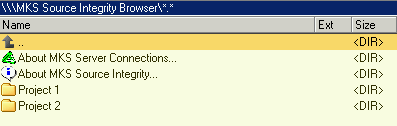
MKS Integrity Browser plugin is similiar to CVSBrowser and Visual SourceSafe file system plugins. It can be used to browse MKS Integrity projects and to view file members. Furthermore, you can view archive report, member information and project history.Installation of MKS Client Software is required. It is recommended to read the Readme for plugin usage and limitations.
What’s new
o Version 1.0.8.1
- fixed memory leaks
- removed MPRESS and UPX binary compression
o Version 1.0.8.0
- changed directory of mksbrowser.ini and mksbrowser.log
to same directory as wincmd.ini
- added 64 bit support
o Version 1.0.7.0
- added: member revision differences
o Version 1.0.6.1
- fixed: path to Lister (ListerPath) can have spaces
- fixed: backward slashes in MKS root projects are
converted to forward slashes when adding MKS root
projects (by F7)
- added: project settings can be saved as default
when adding MKS root projects (by F7)
o Version 1.0.6.0
- fixed assembling of the target MKS project and
member names
- fixed: any editor, lister or viewer can be used
as stand-alone Lister
o Version 1.0.5.0
- added dialog for adding an MKS root project to
mksbrowser.ini (by F7)
- added option PasswordCryptKey in section
[MKSBrowser Settings] of mksbrowser.ini for password
encryption / decryption
o Version 1.0.4.0
- added the following command line commands:
- config or setup: open mksbrowser.ini
- about: display About MKS Source Integrity message box
- servers: display message box about established MKS
Server Connections
- fixed potential access violations and buffer overflows
- added: basic support for EF Commander 4.5
o Version 1.0.3.6
- added: basic support for SpeedCommander 11: no more
calls to internal commands of Total Commander (e.g.
cm_ListInternalOnly)
- added: set ShowAboutMKS to 0 in mksbrowser.ini by DEL
or F8 on "About MKS Source Integrity..."
- added: set ShowAboutMKSServerConnections to 0 in
mksbrowser.ini by DEL or F8 on "About MKS Server
Connections..."
- fixed: do never popup About message box or message box
about established MKS Server Connections if search is
in progress
- fixed: detection of members, subprojects and MKS
messages
o Version 1.0.3.5 Beta
- added custom project icon library mksbrowser.icl
- fixed: remove superfluous CR characters in member information view
o Version 1.0.3.4 Beta
- fixed: remove superfluous CR characters in member view
o Version 1.0.3.3 Beta
- fixed: skip size calculation of an MKS project / directory
- fixed: pop error message if stand-alone Lister can not be started
- fixed: set default port number to 7001 (was 0)
o Version 1.0.3.2 Beta
- added options LogErrors, ShowMessages and UseCustomProjectIcons in section
[MKSBrowser Settings] of mksbrowser.ini
- added: remove project section from mksbrowser.ini by DEL or F8 on an MKS
root project directory
- finally fixed: assembling of the target MKS project name
o Version 1.0.3.1 Beta
- fixed: assembling of the target MKS project name
o Version 1.0.2.0
- added: display message box about established MKS Server Connections
- added: display archive report view by ALT+ENTER on a file
- added: display project history view by ALT+ENTER on a directory
- added: open mksbrowser.ini by ALT+ENTER on plugin root in "Network Neighborhood"
- added section 'MKSBrowser Settings' to mksbrowser.ini file with options: ListerPath, LogMKSCommands, MKSCommandTimeOut, ShowDisconnectMKSDlgAtExit, ShowAboutMKS and ShowAboutMKSServerConnections
- changed: display member information view (ENTER on a file) in internal lister instead of message box
- changed: connection timeout dialog offers possibility of continuing to connect
- fixed: increased size limit for number of projects in mksbrowser.ini
- fixed: project names in mksbrowser.ini must not exceed 260 characters
- fixed: ALT+ENTER in plugin root directory lead to access violation
- renamed mksbrowser.ini.template to mksbrowser.template.ini
o Version 1.0.1.0
- added: display message boxes for first time login to MKS Server
- added: ask for disconnecting and closing all MKS Integrity Client applications when exiting Total Commander
o Version 1.0.0.1
- first public version
- fixed memory leaks
- removed MPRESS and UPX binary compression
o Version 1.0.8.0
- changed directory of mksbrowser.ini and mksbrowser.log
to same directory as wincmd.ini
- added 64 bit support
o Version 1.0.7.0
- added: member revision differences
o Version 1.0.6.1
- fixed: path to Lister (ListerPath) can have spaces
- fixed: backward slashes in MKS root projects are
converted to forward slashes when adding MKS root
projects (by F7)
- added: project settings can be saved as default
when adding MKS root projects (by F7)
o Version 1.0.6.0
- fixed assembling of the target MKS project and
member names
- fixed: any editor, lister or viewer can be used
as stand-alone Lister
o Version 1.0.5.0
- added dialog for adding an MKS root project to
mksbrowser.ini (by F7)
- added option PasswordCryptKey in section
[MKSBrowser Settings] of mksbrowser.ini for password
encryption / decryption
o Version 1.0.4.0
- added the following command line commands:
- config or setup: open mksbrowser.ini
- about: display About MKS Source Integrity message box
- servers: display message box about established MKS
Server Connections
- fixed potential access violations and buffer overflows
- added: basic support for EF Commander 4.5
o Version 1.0.3.6
- added: basic support for SpeedCommander 11: no more
calls to internal commands of Total Commander (e.g.
cm_ListInternalOnly)
- added: set ShowAboutMKS to 0 in mksbrowser.ini by DEL
or F8 on "About MKS Source Integrity..."
- added: set ShowAboutMKSServerConnections to 0 in
mksbrowser.ini by DEL or F8 on "About MKS Server
Connections..."
- fixed: do never popup About message box or message box
about established MKS Server Connections if search is
in progress
- fixed: detection of members, subprojects and MKS
messages
o Version 1.0.3.5 Beta
- added custom project icon library mksbrowser.icl
- fixed: remove superfluous CR characters in member information view
o Version 1.0.3.4 Beta
- fixed: remove superfluous CR characters in member view
o Version 1.0.3.3 Beta
- fixed: skip size calculation of an MKS project / directory
- fixed: pop error message if stand-alone Lister can not be started
- fixed: set default port number to 7001 (was 0)
o Version 1.0.3.2 Beta
- added options LogErrors, ShowMessages and UseCustomProjectIcons in section
[MKSBrowser Settings] of mksbrowser.ini
- added: remove project section from mksbrowser.ini by DEL or F8 on an MKS
root project directory
- finally fixed: assembling of the target MKS project name
o Version 1.0.3.1 Beta
- fixed: assembling of the target MKS project name
o Version 1.0.2.0
- added: display message box about established MKS Server Connections
- added: display archive report view by ALT+ENTER on a file
- added: display project history view by ALT+ENTER on a directory
- added: open mksbrowser.ini by ALT+ENTER on plugin root in "Network Neighborhood"
- added section 'MKSBrowser Settings' to mksbrowser.ini file with options: ListerPath, LogMKSCommands, MKSCommandTimeOut, ShowDisconnectMKSDlgAtExit, ShowAboutMKS and ShowAboutMKSServerConnections
- changed: display member information view (ENTER on a file) in internal lister instead of message box
- changed: connection timeout dialog offers possibility of continuing to connect
- fixed: increased size limit for number of projects in mksbrowser.ini
- fixed: project names in mksbrowser.ini must not exceed 260 characters
- fixed: ALT+ENTER in plugin root directory lead to access violation
- renamed mksbrowser.ini.template to mksbrowser.template.ini
o Version 1.0.1.0
- added: display message boxes for first time login to MKS Server
- added: ask for disconnecting and closing all MKS Integrity Client applications when exiting Total Commander
o Version 1.0.0.1
- first public version