CD/DVD Burning Plugin 0.9.3
Description
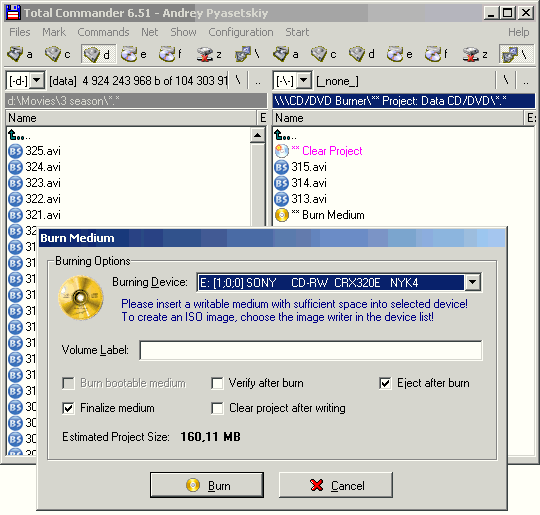
The Total Commander CD/DVD Burning Plugin (TCBurner) makes burning CDs and DVDs as easy and comfortable as possible for Total Commander users.Burn CDs and DVDs directly from Total Commander's directory structure, by displaying commands and burning projects as pseudo-directories and pseudo-files.
Burn the following types of projects: Data CDs/DVDs, Video DVDs, Audio CDs, Planned types: ISO/CUE, VideoCD, Super Video CD, UDF Data CD
Burn the following types of media:CD-R/RW, DVD+R/RW, DVD-R/RW, DVD-RAM
Erase rewritable media, modes Fast and Complete
Display information about available burning devices (brand, vendor, product ID) and inserted media (type, mode, number of sessions, used and free space).
What’s new
Major new features:
[+] The plugin itself now supports multi-language through a .locale file. Those
are stored in a subdir "Lang" under the plugin dir. You can choose the
language to use in the configuration dialog. You can also make your own
language file by editing the "english.locale" file which contains some
remarks. (If you do so, it would be nice if you sent your language file to
the developer for distribution!).
[+] The plugin now supports .lst files created by the DiskDir plugin. If you
copy such a file (the whole file, not some contents!) to the Data-CD/DVD
project, you're queried if you wish the plugin to interpret the .lst as
a list file and put all files listed in it in the project instead of the
list file itself.
[+] Data and Audio Project contents can now be saved to disk, by executing
pseudo-file commands, and automatically at plugin init/shutdown
[+] Added "Estimated Free Space" entry to project directories. Total media
space is either retrieved from a media inserted in a selectable burner, or
(if not possible - no device inserted, burner busy etc.) based on a preset
or user-definable media type (execute the Free Space pseudo-file to change
those settings). Device/preset size is stored in configuration for each
project type. In case of oversize, a warning icon and text is displayed.
[+] Verify function re-made: wrote an own verify replacing the FoxBurner
internal one. Advantages: faster, more stable, waits for media re-insert
if it was ejected, can verify Data+VideoDVD Projects, verifies only files
actually in the project
[+] Configuration file is now searched for in the following folders, the first
folder where it is found (top-down) is used. If it cannot be found, a new
file with default settings is created in the first listed folder.
[wincmd-ini-path]\tcburner.ini
[wincmd-ini-path]\tcburner\tcburner.ini
[plugin-path]\tcburner.ini
[wincmd-path]\tcburner.ini
[+] The plugin itself now supports multi-language through a .locale file. Those
are stored in a subdir "Lang" under the plugin dir. You can choose the
language to use in the configuration dialog. You can also make your own
language file by editing the "english.locale" file which contains some
remarks. (If you do so, it would be nice if you sent your language file to
the developer for distribution!).
[+] The plugin now supports .lst files created by the DiskDir plugin. If you
copy such a file (the whole file, not some contents!) to the Data-CD/DVD
project, you're queried if you wish the plugin to interpret the .lst as
a list file and put all files listed in it in the project instead of the
list file itself.
[+] Data and Audio Project contents can now be saved to disk, by executing
pseudo-file commands, and automatically at plugin init/shutdown
[+] Added "Estimated Free Space" entry to project directories. Total media
space is either retrieved from a media inserted in a selectable burner, or
(if not possible - no device inserted, burner busy etc.) based on a preset
or user-definable media type (execute the Free Space pseudo-file to change
those settings). Device/preset size is stored in configuration for each
project type. In case of oversize, a warning icon and text is displayed.
[+] Verify function re-made: wrote an own verify replacing the FoxBurner
internal one. Advantages: faster, more stable, waits for media re-insert
if it was ejected, can verify Data+VideoDVD Projects, verifies only files
actually in the project
[+] Configuration file is now searched for in the following folders, the first
folder where it is found (top-down) is used. If it cannot be found, a new
file with default settings is created in the first listed folder.
[wincmd-ini-path]\tcburner.ini
[wincmd-ini-path]\tcburner\tcburner.ini
[plugin-path]\tcburner.ini
[wincmd-path]\tcburner.ini