TCChibiOSFS - Total Commander File System Plugin 1.0.20
Description
TCChibiOSFS — Total Commander File System PluginWFX plugin for Total Commander for connecting ChibiOS-based USB devices via serial shell. Detected devices:
Device Firmware VID/PID Plugin behavior
HackRF One + PortaPack Mayhem ≥ 2.0 1D50 : 6018 fully accessible (shell)
HackRF One (bare) Standard firmware 1D50 : 6089 display only, no shell
Flipper Zero Stock or custom 0483 : 5740 fully accessible (shell)
A bare HackRF One (without PortaPack) is detected and displayed, but marked as HackRF One (COMx, no shell) and cannot be entered. The standard firmware interface is libhackrf/USB bulk, not serial. The entry is purely informational.
Features
The root level lists only HackRF and Flipper devices. Other COM ports (CH340, FTDI, virtual ports from software) are filtered out:
ChibiOS Devices\\
├── PortaPack (COM5) <- enterable, Mayhem shell
├── HackRF One (COM8, no shell) <- info only, not enterable
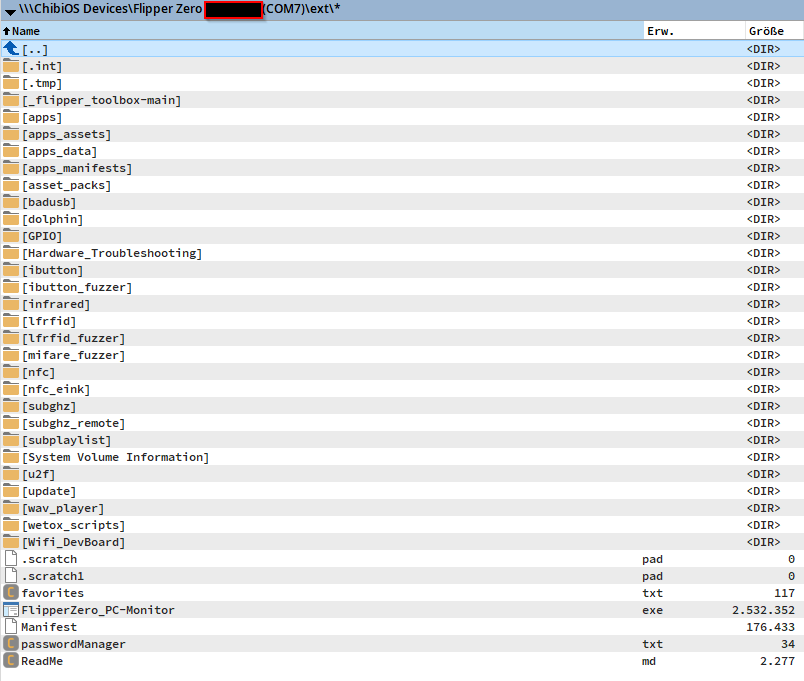
└── Flipper Zero AM1TELTE (COM7) <- enterable, name from USB ID
The Flipper name (AM1TELTE in the example) comes from the Windows instance ID (FLIP_AM1TELTE for VID_0483&PID_5740). If more than one Flipper is connected, this makes them easy to distinguish reliably.
Changing into a directory = open connection (automatically)
TC Disconnect button = close connection cleanly
TC file commands: Copy (F5), Move (F6), Delete (F8), Rename (Shift+F6), New directory (F7)
Binary transfer:
PortaPack: fopen + frb / fwb (fast binary I/O)
Flipper: storage read_chunks / storage write_chunk
File size: from filesize or storage stat
Timestamps: Flipper via storage timestamp (PortaPack provides none)
Progress display with cancel function
Requirements
Windows 7 or newer
Total Commander 9.0 or newer (64-bit)
Mayhem firmware ≥ 2.0 on HackRF/PortaPack
Flipper Zero with current firmware (Stock, Unleashed, Momentum, Xtreme — all okay)
USB cable (the usual kind)
What’s new
fixed upload to portapack, again