Uninstaller64 1.0.1
Description
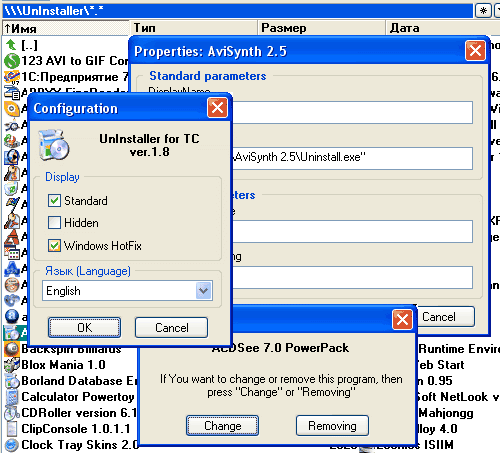
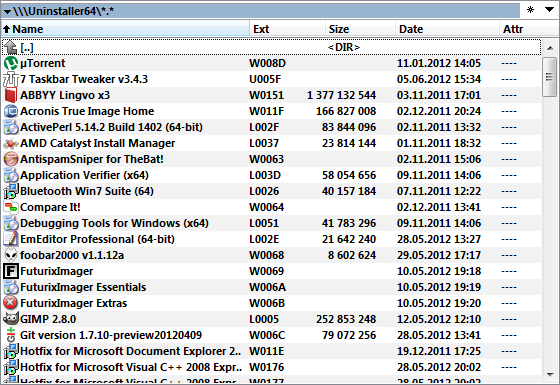
This plugin allows to view the list of installed applications directly in the Total Commander panel, view detailed information about each uninstallation entry, launch deinstallation and forcibly delete invalid entries. The plugin was developed as replacement for the UnInstaller plugin which have not been updated for very long time and no longer suits the needs of modern systems, supporting neither Unicode, nor 64-bit architecture. The plugin Uninstaller64 provides the same functionality extending it according to the latest innovations both in Windows architecture and in Total Commander.What’s new
Update for version 1.0.1 (25.06.2012):
1. Added German translation (TychoBarfy).
2. Added Spanish translation (Victor Emmanuel).
3. Added Danish translation (Peter Madsen).
4. Added French translation (Christophe Faure).
5. Added Hungarian translation (Bluestar).
Version 1.0.1 (11.06.2012):
1. Fixed: The plugin did not remove the element from list after uninstallation.
2. Fixed: Faulty error message after successful deleting of an entry.
3. Fixed: In some cases the list of installed applications was incomplete.
4. Added: Experimental: Now MSI entries without corresponding auxiliary registry key are also marked hidden.
Version 1.0.0 (9.06.2012):
This is first public release. Differences from UnInstaller 1.8.1:
1. 64-bit version is available.
2. Full Unicode support.
3. Listing of both 32- and 64-bit uninstallation entries (no matter which TC version is used).
4. Improved design of the HTML document with information about an uninstallation entry.
5. Improved method of searching icons to display in TC panel.
6. Options to confirm uninstallation.
7. Improved date/time of the application installation.
8. Show estimated application size also in Windows Vista/7.
9. Support background operations.
10. Content data fields with basic information about uninstallation entries.
11. Option where to store plugin settings.
12. When deinstalling applications or deleting uninstallation entries, the plugin does not change the other entries' pseudo-extensions; therefore user does not have to reread the list each time, and the cursor in TC panel does not jump to the beginning of the list.
13. When deleting a key, auxiliary keys are also deleted from the registry.
14. When opening the Properties dialog, it becomes read-only if the user does not have write access to the corresponding registry key.
15. [Not implemented] The HTML information dump does not show extended information about Windows hotfixes.
1. Added German translation (TychoBarfy).
2. Added Spanish translation (Victor Emmanuel).
3. Added Danish translation (Peter Madsen).
4. Added French translation (Christophe Faure).
5. Added Hungarian translation (Bluestar).
Version 1.0.1 (11.06.2012):
1. Fixed: The plugin did not remove the element from list after uninstallation.
2. Fixed: Faulty error message after successful deleting of an entry.
3. Fixed: In some cases the list of installed applications was incomplete.
4. Added: Experimental: Now MSI entries without corresponding auxiliary registry key are also marked hidden.
Version 1.0.0 (9.06.2012):
This is first public release. Differences from UnInstaller 1.8.1:
1. 64-bit version is available.
2. Full Unicode support.
3. Listing of both 32- and 64-bit uninstallation entries (no matter which TC version is used).
4. Improved design of the HTML document with information about an uninstallation entry.
5. Improved method of searching icons to display in TC panel.
6. Options to confirm uninstallation.
7. Improved date/time of the application installation.
8. Show estimated application size also in Windows Vista/7.
9. Support background operations.
10. Content data fields with basic information about uninstallation entries.
11. Option where to store plugin settings.
12. When deinstalling applications or deleting uninstallation entries, the plugin does not change the other entries' pseudo-extensions; therefore user does not have to reread the list each time, and the cursor in TC panel does not jump to the beginning of the list.
13. When deleting a key, auxiliary keys are also deleted from the registry.
14. When opening the Properties dialog, it becomes read-only if the user does not have write access to the corresponding registry key.
15. [Not implemented] The HTML information dump does not show extended information about Windows hotfixes.