VisualSpace 2.0b
Description
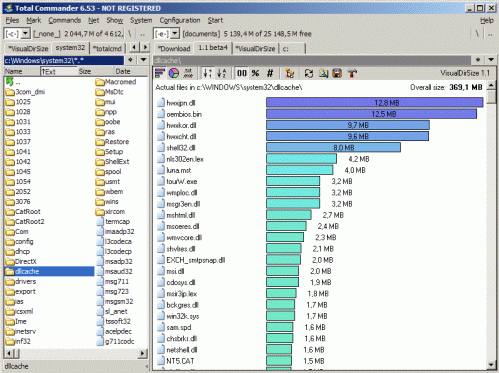
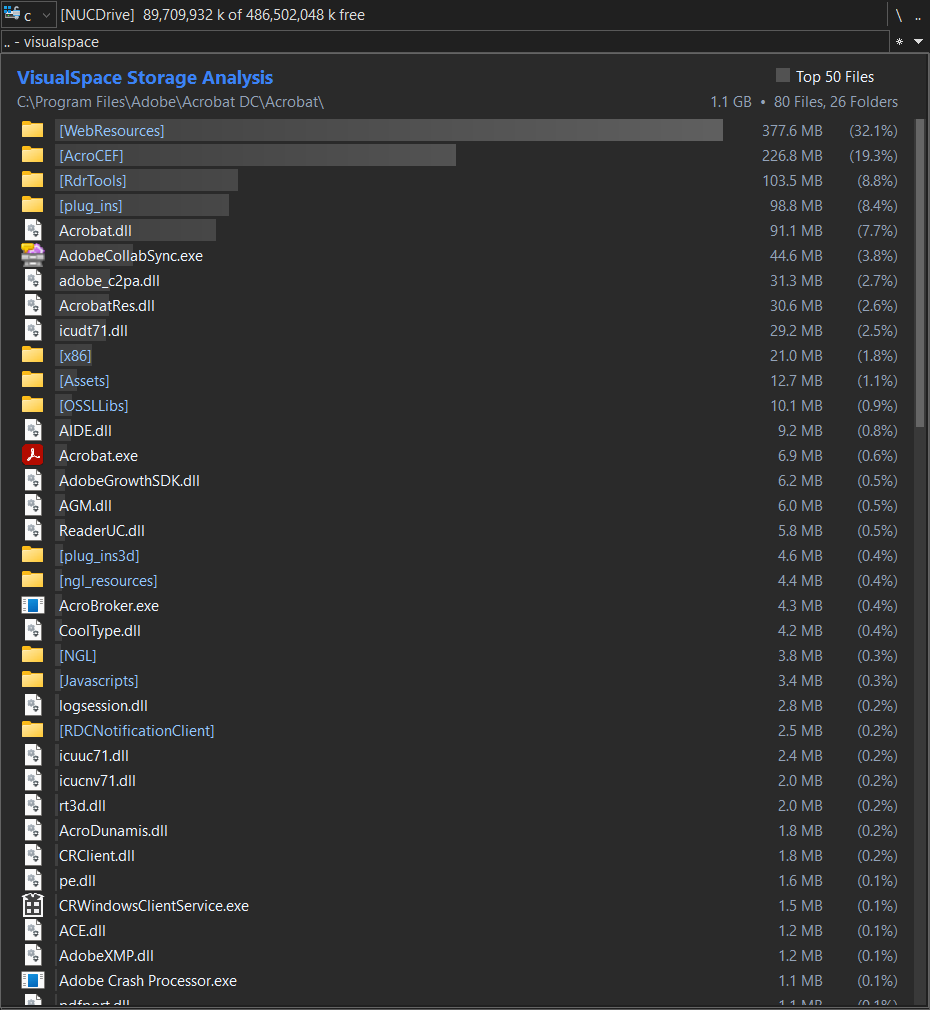
VisualSpace is a Lister plugin (.wlx / .wlx64, 32-bit and 64-bit) for Total Commander that analyzes the disk space usage of a folder and displays the results as a list of gradient bars showing relative file and folder sizes.Key features:
•Scans folders on a background thread, so Total Commander's interface stays responsive even when scanning large or deep folder structures (e.g. C:\Windows or a large OneDrive folder).
•Can optionally use the Everything search tool (voidtools) to retrieve folder sizes, file counts, and the Top Files list directly from its index instead of scanning, cutting large folders from tens of seconds down to near-instant.
•Shows a live counter of files and folders discovered while the scan is running.
•Displays each top-level file and folder in the target directory as a gradient bar sized relative to its disk usage, along with its total size.
•Also includes an alternative treemap ("size map") view of the same results, as a block-based visualization, with a choice of several visual styles.
•Optional sortable column headers (name, extension, file count, size, percentage) and a live search box for quickly narrowing the displayed results by name.
•Includes a "Top Files" toggle that switches the view to just the largest files found anywhere within the scanned folder tree, regardless of which subfolder they are in.
•Right-clicking a file or folder jumps the other Total Commander panel directly to that item and selects it, even if it was found several subfolders deep. Archive-type files (such as .zip, .xlsx, .docx) are selected rather than opened as a virtual folder.
•Automatically skips reparse points (symbolic links, junctions, mount points) to avoid circular scans and inflated totals.
•Only activates when the cursor is on a folder; if the cursor is on a file, Total Commander's normal file preview is used instead.
•Supports folder paths longer than the standard 260-character Windows limit, useful for deeply nested cloud-sync folders.
•Automatically matches Total Commander's own Dark Mode setting, switching between a dark and a light color theme accordingly; can also be forced to one theme regardless of Total Commander's setting.
•Scales correctly at any Windows display scaling setting (100%, 125%, 150%, etc.) - layout, spacing, and icon size adjust along with text, not just the fonts.
•Fully configurable via a VisualSpace.cfg file placed alongside the plugin: colors for both the dark and light theme, fonts, headers, search, treemap style, bold/icon display options, Everything integration, the number of files shown in the Top Files list, and the maximum folder recursion depth.
What’s new
Version History
v2.0b
* Fixed percentage formatting (list column and treemap tooltip) to follow the same thousands/decimal separator as the filesize column.
* Fixed header row alignment between the "Top Files" checkbox and the treemap toggle button, and made it more consistent across DPI scaling and font sizes.
v2.0a
* Added a SizeDisplay setting (Auto/GB/MB/KB/B) to show every size in one fixed unit instead of the default automatic per-item unit.
* Added size and count formatting that follows Total Commander's own thousands/decimal separators, falling back to the Windows locale default.
* Added a JumpToPane setting (Same/Other) so the right-click jump can target the panel hosting the plugin itself or the opposite panel.
v2.0
* Added optional sortable headers above the results (Headers setting); click a column header to sort by it.
* Added an optional search box (Searchbox setting), to search within the displayed results (not within subfolders).
* Added a treemap view ([Treemap] section), as an alternative view to see results.
* Added optional small fancy visual tweaks.
* Fixed minor cosmetic issues.
v1.8a
* Fixed slow performance when running Total Commander as Administrator while Everything itself isn't running as Administrator.
* Fixed typos in the file-count label ("[1 Files]").
v1.8
* Added a real recursive file count for folders sized via Everything's own index, instead of just the generic "[Everything]" label.
* Fixed a missing DarkMode= key in wincmd.ini incorrectly following Windows' own system theme instead of defaulting to light.
* Fixed ignoring Total Commander's RedirectSection= convention (redirecting a config section's real keys to a different ini file).
v1.7a
* Added FontName=Auto support for matching Total Commander's own file list font weight (wincmd.ini FontWeight=), not just its face and size.
* Fixed Total Commander's Dark Mode toggle not updating the background color live when switched while a folder was open in Quick View.
v1.7
* Added a ShowExeIcons setting in VisualSpace.cfg (Y/N/Auto) to control whether .exe/.lnk files show their own real icon or a shared generic program icon; Auto follows Total Commander's own equivalent setting.
* .exe/.lnk files with no icon of their own now fall back to Windows' own generic "program" icon instead of the plain file icon.
* Fixed some .exe/.lnk files showing the generic icon instead of their own real icon in the normal folder view.
* Fixed row icons at 16px sometimes looking cropped; icons at that size are now sourced from a real 16px icon instead of being scaled down from 32px.
* .exe/.lnk files now get a distinct icon when ColorIcons=N (flat icon mode).
* Added a DirBrackets setting in VisualSpace.cfg (Y/N/Auto) to wrap folder names in square brackets, matching Total Commander's own equivalent option.
* Added a TCListIcons setting in VisualSpace.cfg (Y/N/Auto) to show folders, generic files/programs, and archives using Total Commander's own classic icon set instead of Explorer's; Auto follows Total Commander's own OldListIcons setting.
v1.6a
* Fixed the "Top Files" checkbox background color in the light theme.
* Fixed ThemeMode=Auto sometimes defaulting to the dark theme incorrectly.
v1.6
* Files now show their real icon for each file type (PDF, Excel, .exe, etc.) instead of a single generic file icon.
* Added FontName=Auto: automatically matches Total Commander's own file list font.
* Added IconSize=Auto: automatically matches Total Commander's own file list icon size.
* Added RowHeight=Auto (new default): automatically matches Total Commander's own row spacing; can also be set manually.
* General cosmetic and layout polish, so VisualSpace's appearance more closely tracks Total Commander's own.
v1.5
* Simplified the Everything integration: it connects directly and falls back to the normal scan automatically if Everything isn't available or doesn't have an answer.
* Fixed the layout not scaling correctly on Windows displays set to anything other than 100% scaling (125%, 150%, etc.).
* Added a Dark/Light theme system. VisualSpace automatically matches Total Commander's own Dark Mode setting (Configuration -> Color -> Dark Mode).
* Added a [ThemeLight] section in VisualSpace.cfg alongside the existing [ThemeDark] section.
* Added a separate configurable color for the "Top N Files" label text in both themes.
* Added a BarScaleMode setting: bars now default to showing the largest item at 100%.
* Added an option to show a small icon instead of the "[Everything]" text next to accelerated folders, either in the count column or as an overlay on the folder icon.
* Fixed the scrollbar not using the configured background/theme colors.
* Fixed the mouse cursor not always displaying correctly over the plugin's window.
* Changed default settings: Everything is now enabled by default (Everything=Y), since it already falls back safely when unavailable.
v1.4
* Added optional integration with the Everything search tool (voidtools). Folder sizes and the Top Files list are retrieved directly from Everything's own index instead of being calculated by scanning. Requires Everything 1.4.1 or later with "Index folder size" enabled in its own settings.
* Added an Everything=Y/N setting under a new [Everything] section in VisualSpace.cfg to enable this.
* Added a ShowEverythingLabel=Y/N setting to show or hide the "[Everything]" label shown next to accelerated folders' file counts.
v1.3
* Added a 32-bit build (VisualSpace.wlx) alongside the existing 64-bit build (VisualSpace.wlx64).
* Files and folders now use separate, configurable name colors instead of sharing one color.
* Added a BoldFolderNames setting in VisualSpace.cfg to show folder names in bold (the "[N Files]" count next to the name always stays regular weight).
* Added a ColorIcons setting in VisualSpace.cfg to switch between full-color Windows-style folder/file icons and flat single-color versions.
v1.2
* Added support for folder paths longer than the standard 260-character Windows limit.
* Added a MaxFolderDepth setting in VisualSpace.cfg to control the folder recursion limit (default: 15).
* Plugin now only activates on folders; on files, Total Commander's normal file preview is used instead.
* Fixed the folder path display being clipped at the bottom while a scan is in progress.
v1.1
* Added right-click on a file or folder to jump the other Total Commander panel to that location and select it.
* Fixed right-clicking an archive-type file (e.g. .zip, .xlsx, .docx) opening it as a folder instead of selecting it.
* Fixed the total size in the header appearing truncated on very large scans.
* Added thousands separators to file and folder counts.
* Improved rendering performance of the gradient bars.
v1.0 initial release
* asynchronous folder scanning, gradient size visualization, Top Files filter, reparse point handling, and click-to-navigate.
v2.0b
* Fixed percentage formatting (list column and treemap tooltip) to follow the same thousands/decimal separator as the filesize column.
* Fixed header row alignment between the "Top Files" checkbox and the treemap toggle button, and made it more consistent across DPI scaling and font sizes.
v2.0a
* Added a SizeDisplay setting (Auto/GB/MB/KB/B) to show every size in one fixed unit instead of the default automatic per-item unit.
* Added size and count formatting that follows Total Commander's own thousands/decimal separators, falling back to the Windows locale default.
* Added a JumpToPane setting (Same/Other) so the right-click jump can target the panel hosting the plugin itself or the opposite panel.
v2.0
* Added optional sortable headers above the results (Headers setting); click a column header to sort by it.
* Added an optional search box (Searchbox setting), to search within the displayed results (not within subfolders).
* Added a treemap view ([Treemap] section), as an alternative view to see results.
* Added optional small fancy visual tweaks.
* Fixed minor cosmetic issues.
v1.8a
* Fixed slow performance when running Total Commander as Administrator while Everything itself isn't running as Administrator.
* Fixed typos in the file-count label ("[1 Files]").
v1.8
* Added a real recursive file count for folders sized via Everything's own index, instead of just the generic "[Everything]" label.
* Fixed a missing DarkMode= key in wincmd.ini incorrectly following Windows' own system theme instead of defaulting to light.
* Fixed ignoring Total Commander's RedirectSection= convention (redirecting a config section's real keys to a different ini file).
v1.7a
* Added FontName=Auto support for matching Total Commander's own file list font weight (wincmd.ini FontWeight=), not just its face and size.
* Fixed Total Commander's Dark Mode toggle not updating the background color live when switched while a folder was open in Quick View.
v1.7
* Added a ShowExeIcons setting in VisualSpace.cfg (Y/N/Auto) to control whether .exe/.lnk files show their own real icon or a shared generic program icon; Auto follows Total Commander's own equivalent setting.
* .exe/.lnk files with no icon of their own now fall back to Windows' own generic "program" icon instead of the plain file icon.
* Fixed some .exe/.lnk files showing the generic icon instead of their own real icon in the normal folder view.
* Fixed row icons at 16px sometimes looking cropped; icons at that size are now sourced from a real 16px icon instead of being scaled down from 32px.
* .exe/.lnk files now get a distinct icon when ColorIcons=N (flat icon mode).
* Added a DirBrackets setting in VisualSpace.cfg (Y/N/Auto) to wrap folder names in square brackets, matching Total Commander's own equivalent option.
* Added a TCListIcons setting in VisualSpace.cfg (Y/N/Auto) to show folders, generic files/programs, and archives using Total Commander's own classic icon set instead of Explorer's; Auto follows Total Commander's own OldListIcons setting.
v1.6a
* Fixed the "Top Files" checkbox background color in the light theme.
* Fixed ThemeMode=Auto sometimes defaulting to the dark theme incorrectly.
v1.6
* Files now show their real icon for each file type (PDF, Excel, .exe, etc.) instead of a single generic file icon.
* Added FontName=Auto: automatically matches Total Commander's own file list font.
* Added IconSize=Auto: automatically matches Total Commander's own file list icon size.
* Added RowHeight=Auto (new default): automatically matches Total Commander's own row spacing; can also be set manually.
* General cosmetic and layout polish, so VisualSpace's appearance more closely tracks Total Commander's own.
v1.5
* Simplified the Everything integration: it connects directly and falls back to the normal scan automatically if Everything isn't available or doesn't have an answer.
* Fixed the layout not scaling correctly on Windows displays set to anything other than 100% scaling (125%, 150%, etc.).
* Added a Dark/Light theme system. VisualSpace automatically matches Total Commander's own Dark Mode setting (Configuration -> Color -> Dark Mode).
* Added a [ThemeLight] section in VisualSpace.cfg alongside the existing [ThemeDark] section.
* Added a separate configurable color for the "Top N Files" label text in both themes.
* Added a BarScaleMode setting: bars now default to showing the largest item at 100%.
* Added an option to show a small icon instead of the "[Everything]" text next to accelerated folders, either in the count column or as an overlay on the folder icon.
* Fixed the scrollbar not using the configured background/theme colors.
* Fixed the mouse cursor not always displaying correctly over the plugin's window.
* Changed default settings: Everything is now enabled by default (Everything=Y), since it already falls back safely when unavailable.
v1.4
* Added optional integration with the Everything search tool (voidtools). Folder sizes and the Top Files list are retrieved directly from Everything's own index instead of being calculated by scanning. Requires Everything 1.4.1 or later with "Index folder size" enabled in its own settings.
* Added an Everything=Y/N setting under a new [Everything] section in VisualSpace.cfg to enable this.
* Added a ShowEverythingLabel=Y/N setting to show or hide the "[Everything]" label shown next to accelerated folders' file counts.
v1.3
* Added a 32-bit build (VisualSpace.wlx) alongside the existing 64-bit build (VisualSpace.wlx64).
* Files and folders now use separate, configurable name colors instead of sharing one color.
* Added a BoldFolderNames setting in VisualSpace.cfg to show folder names in bold (the "[N Files]" count next to the name always stays regular weight).
* Added a ColorIcons setting in VisualSpace.cfg to switch between full-color Windows-style folder/file icons and flat single-color versions.
v1.2
* Added support for folder paths longer than the standard 260-character Windows limit.
* Added a MaxFolderDepth setting in VisualSpace.cfg to control the folder recursion limit (default: 15).
* Plugin now only activates on folders; on files, Total Commander's normal file preview is used instead.
* Fixed the folder path display being clipped at the bottom while a scan is in progress.
v1.1
* Added right-click on a file or folder to jump the other Total Commander panel to that location and select it.
* Fixed right-clicking an archive-type file (e.g. .zip, .xlsx, .docx) opening it as a folder instead of selecting it.
* Fixed the total size in the header appearing truncated on very large scans.
* Added thousands separators to file and folder counts.
* Improved rendering performance of the gradient bars.
v1.0 initial release
* asynchronous folder scanning, gradient size visualization, Top Files filter, reparse point handling, and click-to-navigate.