EverySearch 1.2
Description
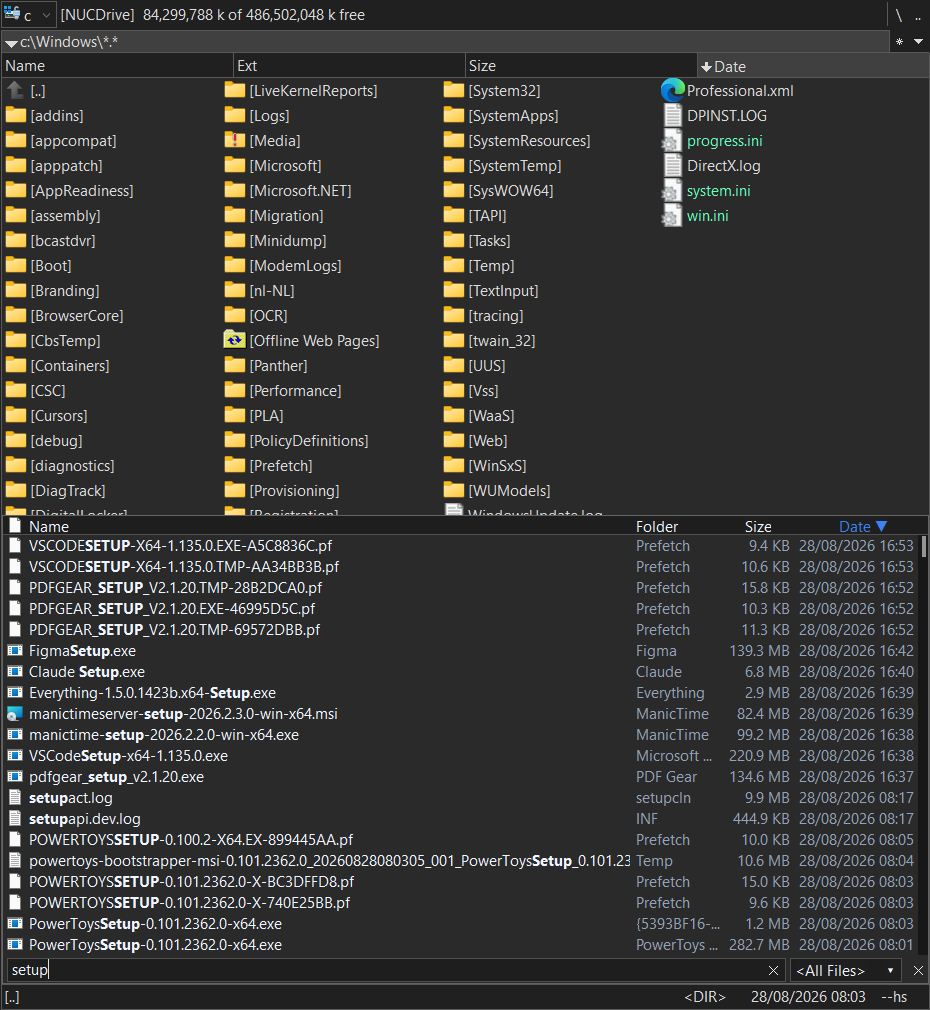
EverySearch (Proof of concept) is a combined content/file-system plugin (.wdx / .wdx64, 32-bit and 64-bit) for Total Commander that opens a live search box overlaid directly on the active panel, powered by a running Everything (voidtools) instance. Search results can be pushed directly in the Total Commander panel listing.Key features:
•Press Ctrl+Alt+F (the letter is configurable) to open the search box on top of the active panel; results appear and update instantly while typing, sourced directly from a running Everything instance - no separate search window.
•Selected or all results can be fed into a real, browsable Total Commander panel listing, the same way Total Commander's own search "Feed to listbox" works: Enter replaces the listing with the current selection, Ctrl+Enter adds to it instead, so results from several separate searches can be combined into one listing.
•Right-clicking a result offers jumping straight to its location in the active panel, or explicitly showing just that result or all results in the panel.
•A folder result can be browsed straight into, behaving like the real folder it stands for - open files, copy things out, keep browsing deeper.
•Sortable result columns (Name, Folder, Size, Date), a filter dropdown that mirrors whatever filters are set up in Everything itself, and keyboard multi-select with Shift+Up/Down.
•The part of a result's name matching the current search text is shown in bold, the same way Everything's own results list highlights matches.
•Automatically matches Total Commander's own Dark Mode setting, switching between a dark and a light color theme accordingly.
•Deleting a result is refused by default, so a real file can't be deleted by accident from the search box; this can be turned on via a config setting.
•Fully configurable via an EverySearch.cfg file placed alongside the plugin: which edge of the panel the search box docks to, the hotkey letter, result count and sort order, date/time display format, and activity logging.
What’s new
Version History
v1.2
* Fixed support for portable Everything installs (and a portable filters.csv).
* Fixed RedirectSection support for the [Shortcuts] and [FileSystemPlugins] sections.
* Fixed getting back to the real folder after opening \\\EverySearch (instead of staying there).
* Fixed folders showing "" instead of their real size.
* Fixed the hover tooltip for folders to show the full path.
* Fixed scrolling artifacts in the results list.
* Added an easy way to search from the current folder, using path:.
v1.1
* Fixed the search overlay not following Total Commander's own window when moved or resized.
* Added a "Path" column in \\\EverySearch results, showing each result's real folder location.
v1.0 POC (Proof of Concept) release
* Live Ctrl+Alt+F search overlay powered by Everything.
* Instant-as-you-type results.
* Feed selected or all results into a Total Commander panel listing (replace with Enter, append with Ctrl+Enter).
* Right-click jump-to-location for folder browsing.
* Sortable columns.
v1.2
* Fixed support for portable Everything installs (and a portable filters.csv).
* Fixed RedirectSection support for the [Shortcuts] and [FileSystemPlugins] sections.
* Fixed getting back to the real folder after opening \\\EverySearch (instead of staying there).
* Fixed folders showing "" instead of their real size.
* Fixed the hover tooltip for folders to show the full path.
* Fixed scrolling artifacts in the results list.
* Added an easy way to search from the current folder, using path:.
v1.1
* Fixed the search overlay not following Total Commander's own window when moved or resized.
* Added a "Path" column in \\\EverySearch results, showing each result's real folder location.
v1.0 POC (Proof of Concept) release
* Live Ctrl+Alt+F search overlay powered by Everything.
* Instant-as-you-type results.
* Feed selected or all results into a Total Commander panel listing (replace with Enter, append with Ctrl+Enter).
* Right-click jump-to-location for folder browsing.
* Sortable columns.