TOTALCMD.NET
ENG RUS
Plugins › Tools & Utilities

Camp 1.4

⚙️ Windows system 🎵 Audio & music Tools & Utilities Freeware

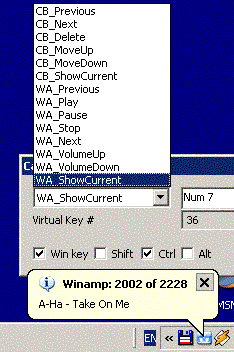
Screenshot: Camp

Description

Camp 1.4
Very simple clipboard maneger + fast winamp use.

Description:
1) Selecting key for each action.
2) You can turn off Baloons ..,
3) Saving configuration to %path to program%/camp.ini
4) Automatic delete of the same elements.

Requerments:
If You OS isn't XP - download this
(this update is for displaying tooltips as a baloons...)
You need msvcrt70.dll to start program
200kb of RAM

mailto:destman@tut.by
WMZ to: Z497761853700

What’s new

Camp 1.4
- For programmers: display virtual key :)
- Winamp : display current playing track

Camp 1.3
- Add configuration utility
- Now you can select modifyers for each key

Camp 1.2
- Add %temp% macro in path ...
- Add new buttons for winamp (look keys.txt)

Camp 1.1ab
- On errors - don't exit, just say about error ...
- Now you can disable\enable Clibpoard viewing.

Camp 1.0
- I refuse from using Winamp plugins(they are too buggy). Now sending
to Winamp Window messages - play next/previous track.
- Reduse using of memory to 200kb.

Camp 1.0ab
- Simple use of Winamp plug-ins
- Now you can shange path to 'SCD' directory.
- About keys read in keys.txt
- About configuration read cft.txt

Camp 0.1a
- Add saving settings to camp.ini
- Add on/off balloons
- Make 4 bind modes
- Fix one bug (send wrong message to clipboard viewers :)
- Saving/loading keyborard confguration to camp.ini. For key codes look to "keycodes.txt".

Camp 0.1ab
- Now you can select from 2 types binding to keyboard:
"win key + .."
"CTRL+SHIFT+ALT+..." (for those ho have not win key :).
- If you press ctrl+c of file(s) in TC - they whill displayed correctly in baloon

Camp 0.0
- Add pull down menu (by right mouse clicl);
- Add filter for repeated elements.
- Add function "Clear All".

Camp 0.0a
Fix bug whith language. Now is working good :)
More by Destman

File Redirector 5.4

📂 File operations File System Plugins (WFX) Freeware

Catalogs files from different disks in a single database, so they can be browsed, commented, grouped by type and launched even when the disk is offline. Supports base compression, several paths per file and M3U export.

Destman 20 Nov 2004 ↓ 41,654

Mod2Wav 0.5 beta

🎵 Audio & music Packer Plugins (WCX) Freeware

Opens tracker music modules as archives: XM files (version $0104) and MOD files (M.K., 6CHN, 8CHN) and mixes them down to WAV. WAV mixing currently works only for MOD.

Destman 16 Jun 2004 ↓ 19,274

Similar plugins

Registry 5.2

⚙️ Windows system File System Plugins (WFX) Freeware x64

Lets you browse and edit the Windows registry as a file system in Total Commander: search, create, copy, delete and edit keys and values, export, view, change permissions and work with a remote registry.

Vitaly Knyazev 4 Aug 2012 ↓ 167,525

SnipClip 1.9

⚙️ Windows system Tools & Utilities x64

Turns the Total Commander clipboard into a searchable, permanent virtual panel with pinned StickySnips, merged text blocks, automatic screenshot capture and an F3 list editor.

Native2904 4 Nov 2026 ↓ 1,721

Wlx2Explorer 1.6.0

⚙️ Windows system Tools & Utilities Open source x64

Lets you use Total Commander Lister plugins directly from Windows Explorer, so files can be previewed there with the same plugins. Requires .NET Framework 4.0.

AlexanderPro 4 Nov 2026 ↓ 6,670

RedOHM 19.06.19

⚙️ Windows system File System Plugins (WFX) Freeware x64

Shows system hardware information as a virtual file system, using the Open Hardware Monitor library: temperatures, voltages, frequencies and fan speeds, depending on hardware support. Output is customizable via JSON config.

Alexander Myasnikov 19 Jun 2019 ↓ 5,419

RegHive 0.2

⚙️ Windows system Lister Plugins (WLX) x64

Opens offline registry hive files such as NTUSER.DAT, SOFTWARE and SYSTEM in Lister with F3, showing a key tree and values table, with search and a simple comparison of two hives. Read-only.

Native2904 24 Sep 2026 ↓ 724

Services2 0.8.1

⚙️ Windows system File System Plugins (WFX) Freeware x64

Lists, controls and manages Windows services from the file panel: change states and properties, delete services, analyze executables, manage remote systems and show PIDs. Supports Unicode, custom columns and 32/64-bit.

Dalai 24 Jun 2019 ↓ 37,815