HugginFace Virtual FileSystem 1.6
Description
Native Total Commander file system plugin for browsing Hugging Face models, organizations, collections, and repository files as a virtual folder tree.Video of usage:
https://github.com/mikinko/HuggingFace_WFX
What It Does
Browse Hugging Face organizations as model folders.
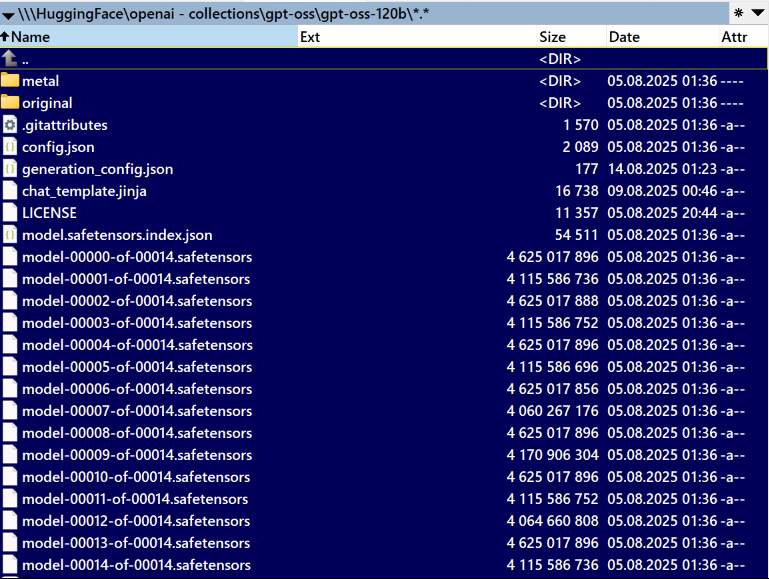
Browse organization collections and the AI models inside them.
Pin a single model repository as a top-level folder.
View small files directly with Total Commander's viewer.
Copy model files to local storage with Total Commander's normal copy flow.
Use an optional Hugging Face API token for private or gated repositories.
Cache listings locally for faster repeated browsing.
Browsing Modes:
Models
Collections
Single model
What’s new
1.6 (2026-11-04)
v1.6
- Much faster downloads. Large files are fetched over up to 8 parallel connections, with a separate disk-writer thread — no more slowdown on multi-GB files. Broken connections resume from where they stopped, and an expired download link is renewed automatically.
- Resume. An aborted or failed copy keeps what was downloaded; copy again and choose *Resume* in TC's overwrite dialog. Resumed files are verified against HuggingFace's sha256.
- Fast folder opening. Repos are listed one folder at a time (no more waiting for the whole tree of a huge dataset), and every folder you have seen is served from the cache.
- Ctrl+R refreshes. Re-reading a folder fetches it again from HuggingFace if it is older than 90 seconds; normal browsing keeps using the cache.
- [Clear all caches] row at the root, next to [Settings] and [Add New Entry].
- Real dates everywhere. Model folders in org listings and collections show the model's last change; inside a repo every file shows its own last commit and every folder the latest change within it — sort by date to see what was updated recently. (Folders with more than 500 items, e.g. dataset shards, show the repo's date instead to stay fast.)
- Config folder setting. Where favorites.json lives is set in Settings and stored in hf_wfx.ini next to the plugin (see *Data Locations*).
- Duplicate protection. Adding an entry that already exists shows a warning instead of creating name (2); duplicates in older configs are repaired on load.
- Collection folder names are made safe for Windows (no /, : …) and kept unique; rate-limit answers from HuggingFace (HTTP 429) are waited out and retried.
- Removed the "Enable offline cache" checkbox — caching is controlled globally by the cache folder and TTL.
- temporary folder for download model, not save
- export/import settings
- added collections into repo save
- speed, caching and other fixes
v1.6
- Much faster downloads. Large files are fetched over up to 8 parallel connections, with a separate disk-writer thread — no more slowdown on multi-GB files. Broken connections resume from where they stopped, and an expired download link is renewed automatically.
- Resume. An aborted or failed copy keeps what was downloaded; copy again and choose *Resume* in TC's overwrite dialog. Resumed files are verified against HuggingFace's sha256.
- Fast folder opening. Repos are listed one folder at a time (no more waiting for the whole tree of a huge dataset), and every folder you have seen is served from the cache.
- Ctrl+R refreshes. Re-reading a folder fetches it again from HuggingFace if it is older than 90 seconds; normal browsing keeps using the cache.
- [Clear all caches] row at the root, next to [Settings] and [Add New Entry].
- Real dates everywhere. Model folders in org listings and collections show the model's last change; inside a repo every file shows its own last commit and every folder the latest change within it — sort by date to see what was updated recently. (Folders with more than 500 items, e.g. dataset shards, show the repo's date instead to stay fast.)
- Config folder setting. Where favorites.json lives is set in Settings and stored in hf_wfx.ini next to the plugin (see *Data Locations*).
- Duplicate protection. Adding an entry that already exists shows a warning instead of creating name (2); duplicates in older configs are repaired on load.
- Collection folder names are made safe for Windows (no /, : …) and kept unique; rate-limit answers from HuggingFace (HTTP 429) are waited out and retried.
- Removed the "Enable offline cache" checkbox — caching is controlled globally by the cache folder and TTL.
- temporary folder for download model, not save
- export/import settings
- added collections into repo save
- speed, caching and other fixes