Startups 0.4.0
Description
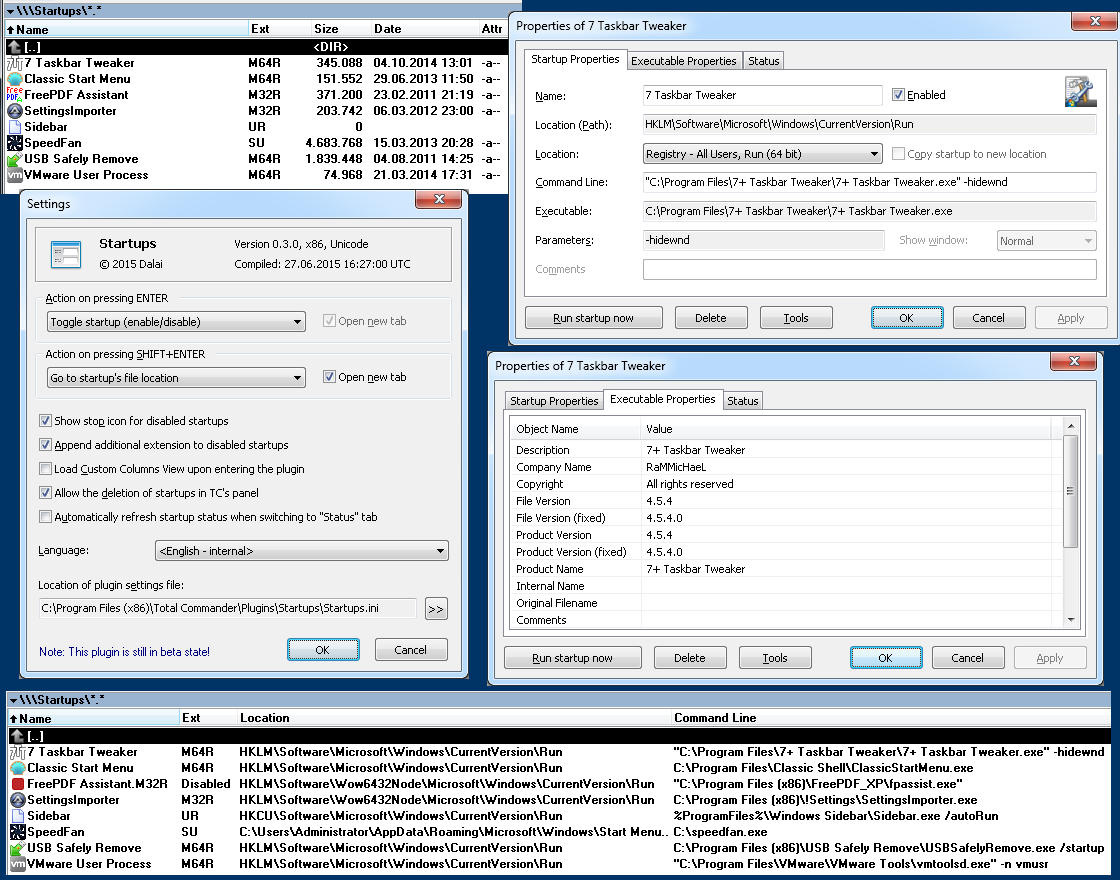
Startups is a file-system plugin that can list, disable, analyze, edit and delete system startups that are located in the Registry or Start Menu.Features:
- List system startups that are located in the Registry (HKCU, HKLM in Run and RunOnce, respectively) and Start Menu folders (All Users and current user)
- Disable startups so they don't start automatically, but can easily be re-enabled
- Run startups manually on request
- Delete startups
Advanced Features:
- Manage startups in 32 and 64 bit Registry branches on 64 bit Windows
- Show correct executable information in the file list of Total Commander (32 bit) on Windows 64 bit, i.e. file date/time and sizes
- Show information about the executable like file size, company name, file version, description and so on
- Edit startups, e.g. command line parameters, name etc.
- Ability to show startups with the same name in different locations as each startup will have a unique name.
- Copy or move startups to a different location, even across Registry and Start Menu (with some limitations)
- Unicode capable
- 64 Bit version to use in Total Commander x64
- Translation to other languages possible (Danish, English, German and Russian included in the package)
- Support for custom columns (default view available)
- View and edit properties specific to Start Menu shortcuts like comments and window state
- Check if a startup is currently running, with matching process names and matching command lines
- Jump to the startup's executable with Enter and/or Shift+Enter
System Requirements
- Windows 2000 or later, both 32 and 64 bit
- Total Commander 7.50 or later, both 32 and 64 bit
What’s new
Version 0.4.0 [2015-11-20]
[+] Added another Russian translation, thanks to alex3f!
[+] Added option Monitor to [Startups] section. See
readme for details
[*] Fixed wrong placement of dialogs on multi-monitor
systems. Previously the dialogs were placed on the
primary monitor, now they will be placed on the active
monitor (the one TC is displayed on)
[+] Plugin settings dialog: The translator's name (or more
precisely the contents of the Translator key) of every
language file will now be shown next to the language
file name
Version 0.3.1 [2015-07-21]
[!] No public release!
[+] Startup properties dialog: Added button to browse for
a file, with options to replace the command line,
append it to the command line or insert it at the
cursor position
[+] Startup properties dialog: Added warning that is shown
in case the executable is not found
[+] Added option to use Vista style open dialogs, see
readme for explanation
[+] Added Russian translation, thanks to Sergey Alekseev!
[+] Added Danish translation, thanks to petermad!
[*] Made all dialogs wider to account for longer
translations
[*] Return icons to TC in requested size. Previously, the
plugin's internal icons were always large, all others
were small.
[*] Show empty directory in case no startups are found
[*] Handle some more errors to avoid some exceptions
Version 0.3.0 [2015-06-28]
- Initial public release
[+] Added another Russian translation, thanks to alex3f!
[+] Added option Monitor to [Startups] section. See
readme for details
[*] Fixed wrong placement of dialogs on multi-monitor
systems. Previously the dialogs were placed on the
primary monitor, now they will be placed on the active
monitor (the one TC is displayed on)
[+] Plugin settings dialog: The translator's name (or more
precisely the contents of the Translator key) of every
language file will now be shown next to the language
file name
Version 0.3.1 [2015-07-21]
[!] No public release!
[+] Startup properties dialog: Added button to browse for
a file, with options to replace the command line,
append it to the command line or insert it at the
cursor position
[+] Startup properties dialog: Added warning that is shown
in case the executable is not found
[+] Added option to use Vista style open dialogs, see
readme for explanation
[+] Added Russian translation, thanks to Sergey Alekseev!
[+] Added Danish translation, thanks to petermad!
[*] Made all dialogs wider to account for longer
translations
[*] Return icons to TC in requested size. Previously, the
plugin's internal icons were always large, all others
were small.
[*] Show empty directory in case no startups are found
[*] Handle some more errors to avoid some exceptions
Version 0.3.0 [2015-06-28]
- Initial public release