VSCopy 1.18
Description
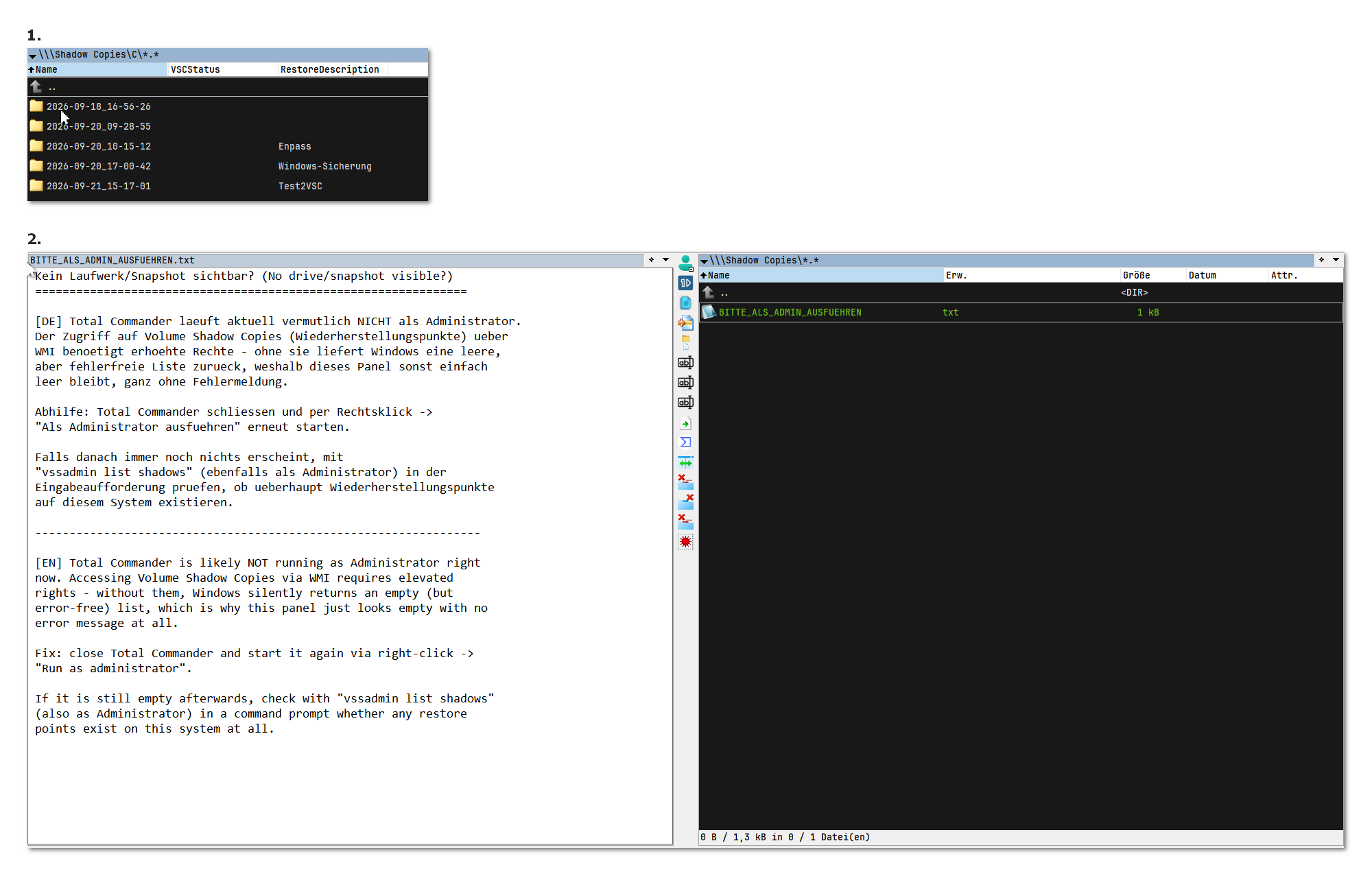
WFX plugin to browse Volume Shadow Copies in Total Commander.- Browse Drive → Snapshot → Files, extract files
- Status column VSCStatus (New/Modified/Unchanged) vs. the previous snapshot
32-bit + Create restore point
Important: Total Commander must be run as Administrator!!!
What’s new
- Optional RestoreDescription column shows the System Restore point's description, if one exists
- Column labels are translatable via VSCPlugin.lng
- Shows a hint file in the panel if TC isn't running as Administrator
###
- Fixed: .lng translation now follows TC's actual convention (detects current language via wincmd.ini's LanguageIni= key)
- Fixed: admin-rights hint file encoding (was unreadable in some viewers) - now UTF-8, and its filename/text are translatable via .lng too
- Fixed: renamed network entry from an earlier internal "VSCpy" to "VSCopy" for consistency
- Added: recommended combined VSCStatus / Description custom column is now set up automatically - no manual config needed
- Fixed: a folder now correctly shows "Modified" when a file/folder was added or removed directly inside it
- Minor internal cleanup
###
- Fixed: internal setup-tracking parameter (SetupVer) no longer written into wincmd.ini
- Icon revised
###
- Fixed: the snapshot folder name was displaying the creation time in UTC instead of local time
###
- Added: 32-bit build (VSCPlugin.wfx) alongside the 64-bit one. Win32_ShadowCopy/SystemRestore are 64-bit-only WMI providers, so a 32-bit process now explicitly requests the 64-bit provider via IWbemContext to work around that.
- Added: create a named System Restore point directly from the plugin - via a virtual entry at the plugin root, the network entry's Properties dialog, or the rp command line. Handles Windows' one-point-per-24h throttle (asks whether to override it for that one point).
- Fixed: a race condition where the plugin could report "no restore point appeared" even though one was created successfully - the new point can take a second or two to become visible via WMI right after creation; the check now retries for a few seconds instead of checking once immediately.
- Column labels are translatable via VSCPlugin.lng
- Shows a hint file in the panel if TC isn't running as Administrator
###
- Fixed: .lng translation now follows TC's actual convention (detects current language via wincmd.ini's LanguageIni= key)
- Fixed: admin-rights hint file encoding (was unreadable in some viewers) - now UTF-8, and its filename/text are translatable via .lng too
- Fixed: renamed network entry from an earlier internal "VSCpy" to "VSCopy" for consistency
- Added: recommended combined VSCStatus / Description custom column is now set up automatically - no manual config needed
- Fixed: a folder now correctly shows "Modified" when a file/folder was added or removed directly inside it
- Minor internal cleanup
###
- Fixed: internal setup-tracking parameter (SetupVer) no longer written into wincmd.ini
- Icon revised
###
- Fixed: the snapshot folder name was displaying the creation time in UTC instead of local time
###
- Added: 32-bit build (VSCPlugin.wfx) alongside the 64-bit one. Win32_ShadowCopy/SystemRestore are 64-bit-only WMI providers, so a 32-bit process now explicitly requests the 64-bit provider via IWbemContext to work around that.
- Added: create a named System Restore point directly from the plugin - via a virtual entry at the plugin root, the network entry's Properties dialog, or the rp command line. Handles Windows' one-point-per-24h throttle (asks whether to override it for that one point).
- Fixed: a race condition where the plugin could report "no restore point appeared" even though one was created successfully - the new point can take a second or two to become visible via WMI right after creation; the check now retries for a few seconds instead of checking once immediately.