NuCov 1.21.54 Beta RC 2
Description
It converts images using IrfanView.Requeriments:
IrfanView 3.91
Visual Basic 6 Runtimes.
Installation:
Copy nucov.exe together to I_VIEW32.EXE, create a button in the Total Commander's button bar and you *MUST* add %L under parameters in uppercase
Now you can drag & drop images over Nucov's icon and press Enter or click the button.
It's quick and easy to convert images.
What’s new
Latest News:
Nucov 1.21.54 Beta RC2
+Allow Vertical Resizing
+Allow Multiples Instances 'Thanks C.Ghisler
+Show Percent completed 'Thanks Strike
+New Scroll Bar for Jpg compression
+Fixed Msg when command line empty 'Thanks C.Ghisler
Nucov 1.20.47 RC 2 Hotfix
+Fixed When drop only one file, doesn't show name
Nucov 1.20.46 RC 2
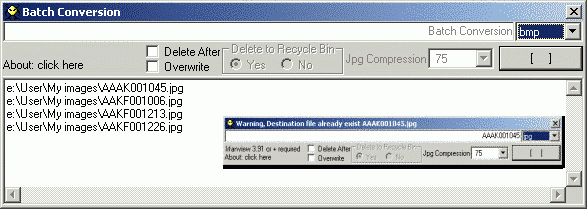
+Added Progress bar for batch conversion (It show files already converted by Irfan)
Nucov 1.20.44 RC 1
+Added Batch Conversion (when %L parameter is used in TC, wich send to nucov a file with your selection)
+Added Few image formats more, already supported by Irfanview
+Added Delete Files Check Box (To recycle bin or directly or delete files without moving them to recycle bin)
+Added Overwrite files Check Box (BEEP when overwrite is not selected, and file already exist)
Special Thanks to(alphabetically)Gerd, Ghisler, Oergon and Strike! And Gral. Geo, Sil and Xboy
Nucov 1.21.54 Beta RC2
+Allow Vertical Resizing
+Allow Multiples Instances 'Thanks C.Ghisler
+Show Percent completed 'Thanks Strike
+New Scroll Bar for Jpg compression
+Fixed Msg when command line empty 'Thanks C.Ghisler
Nucov 1.20.47 RC 2 Hotfix
+Fixed When drop only one file, doesn't show name
Nucov 1.20.46 RC 2
+Added Progress bar for batch conversion (It show files already converted by Irfan)
Nucov 1.20.44 RC 1
+Added Batch Conversion (when %L parameter is used in TC, wich send to nucov a file with your selection)
+Added Few image formats more, already supported by Irfanview
+Added Delete Files Check Box (To recycle bin or directly or delete files without moving them to recycle bin)
+Added Overwrite files Check Box (BEEP when overwrite is not selected, and file already exist)
Special Thanks to(alphabetically)Gerd, Ghisler, Oergon and Strike! And Gral. Geo, Sil and Xboy