pdfOCR 0.9
Description
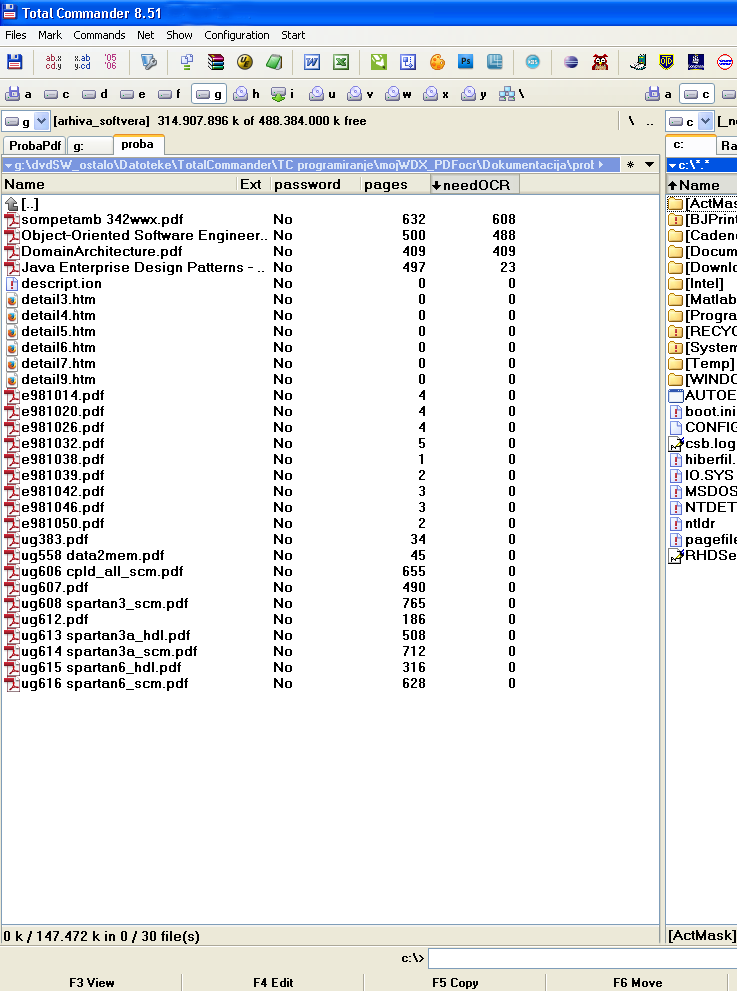
• Purpose:pdfOCR is wdx plugin that discovers how many pages of PDF file in current directory needs character recognition (OCR), i.e. how many pages in PDF file have no searchable text in their layout. This is mostly needed when one is preparing PDF files for one’s documentation or archiving system. Generally in one’s work with PDF files they need to be transformed from scanned version to text searchable form before they are included in any documentation to allow for manual or automatic text search. The pdfOCR plugin for Total Commander fulfils a librarian’s need by presenting the number of pages that are images only with no text contained. The number of scanned pages are presented in the column “needOCR”. By comparing the needOCR number of pages with the number of total pages one can decide if a PDF file needs additional OCR processing.
• Possible usage:
- discover pdf documents which need to be OCR-ed for the first time
- discover PDF documents which are password protected and consequently not available for OCR processing
- discover PDF documents that was not properly OCR processed because of low resolution or similar causes
- discover PDF documents not properly formatted.
• Columns:
password – YES if PDF file is either encrypted as a whole or it has limited rights. Please note that if a PDF file is encrypted the values of columns “pages” and “needOCR” are not evaluated and are fixed to 0.
pages – total number of pages in PDF file.
needOCR – estimated number of pages which are in scanned form with no searchable text.
• Version: 0.9beta.
• Limitations:
- Unicode file names – in this version they are not supported, so please use only ANSI names. If non ANSI names are used the numbers of pages will be negative or very high number.
- Speed – plugin is relatively slow, so when you activate this plugin in a panel of Total Commander please be patient until the analyzing is finished and you get your cursor ready again.
• Use case example:
First change your current directory to folder where you have some pdf files. Use the Configure custom columns option of Total Commander (right click to Name line in Total Commander panel) to define and display this plugin’s columns: password, pages and needOCR. Wait while pdf files are analyzed and you get your cursor ready. Then clicks the needOCR column to sort needOCR pages, mark the desired files that need OCR processing and switch to Brief or other display i.e. any faster plugin before manipulating the marked files.
• Installation:
Open wdx_pdfOCR_xxx.rar and you will be asked for installation destination directory.
• License: for non-commercial applications.
• Bugs:
negative page numbers or very high page numbers: that usually happen if pdf is not properly formatted. In that case the following procedure is suggested to try: 1) open the pdf file in any pdf reader that can read pdf and re-save the pdf file 2) rename the offending pdf file temporarily with active plugin to force it to reread it.
• Future versions:
If there would be larger interest in this plugin I shall consider building much faster version.
What’s new
ver 0.9 - first public version.