Plugin Manager for Total Commander 1.0.9
Description
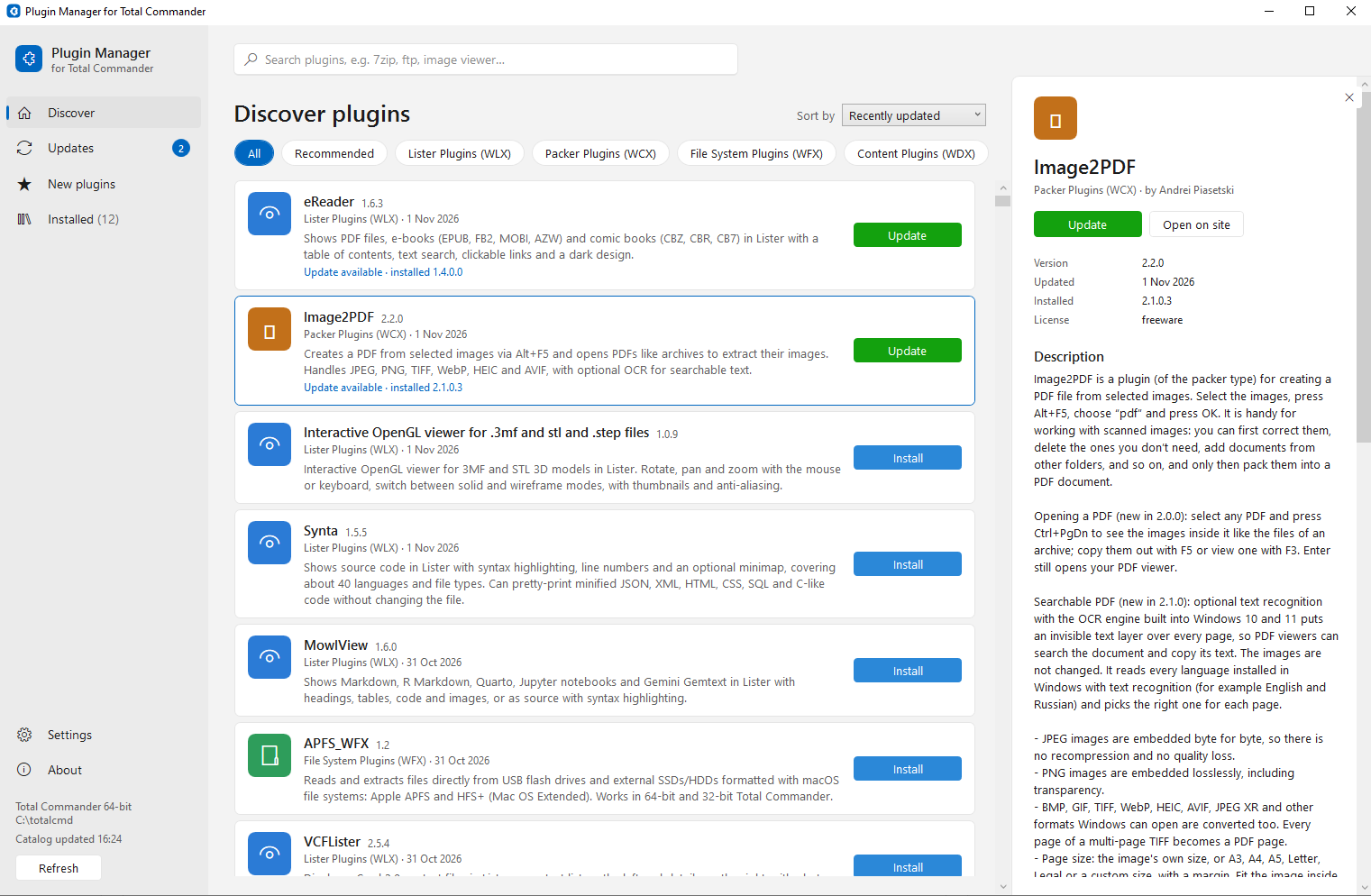
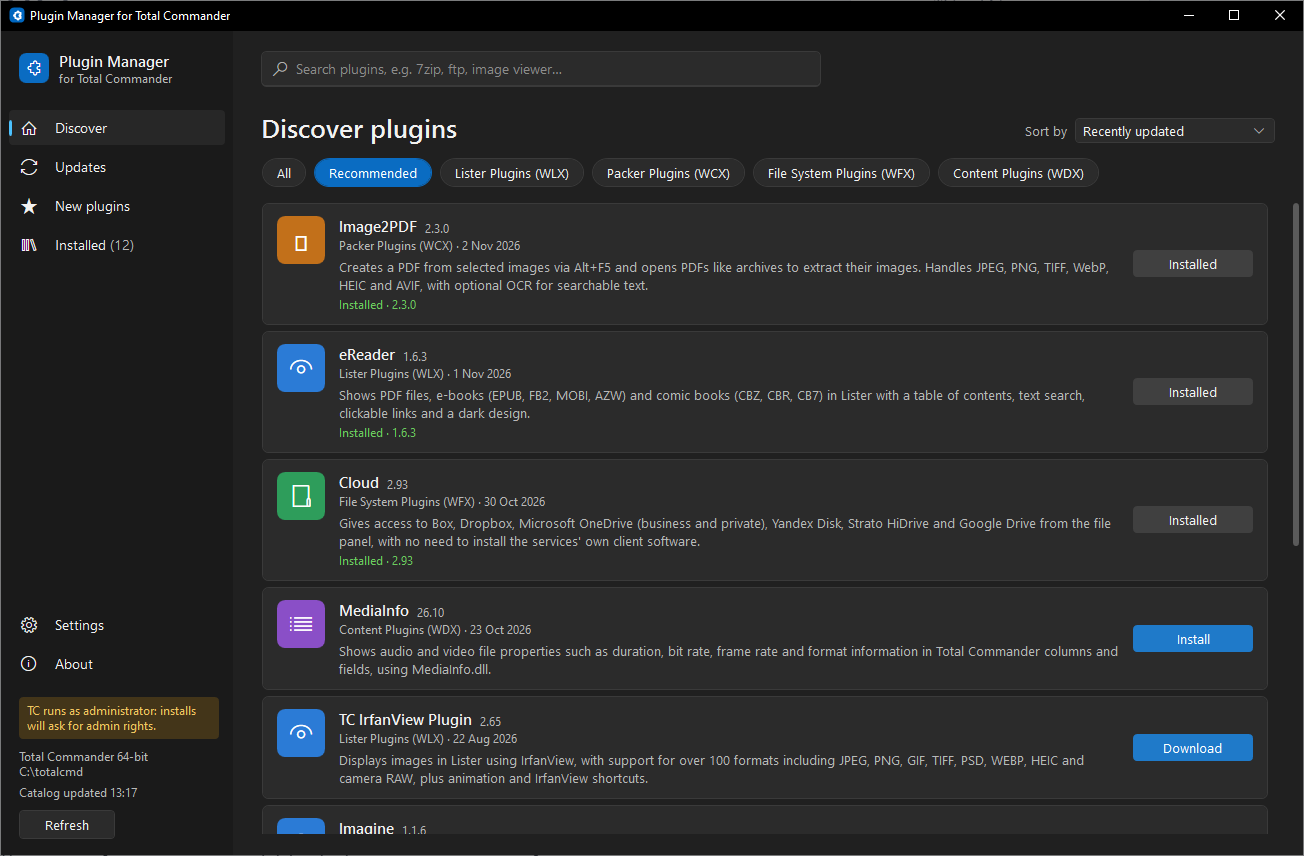
Plugin Manager for Total Commander is a small program for finding, installing and updating Total Commander plugins.Browse the totalcmd.net plugin catalog like an app store: search, categories, recommended and new plugins. Install any plugin in one click, see which installed plugins have updates, and update them one by one. Total Commander installs the plugins itself: pick a plugin, press Install, and TC shows its usual "install this plugin?" dialog.
Discover:
- The whole totalcmd.net catalog with short descriptions in English or Russian.
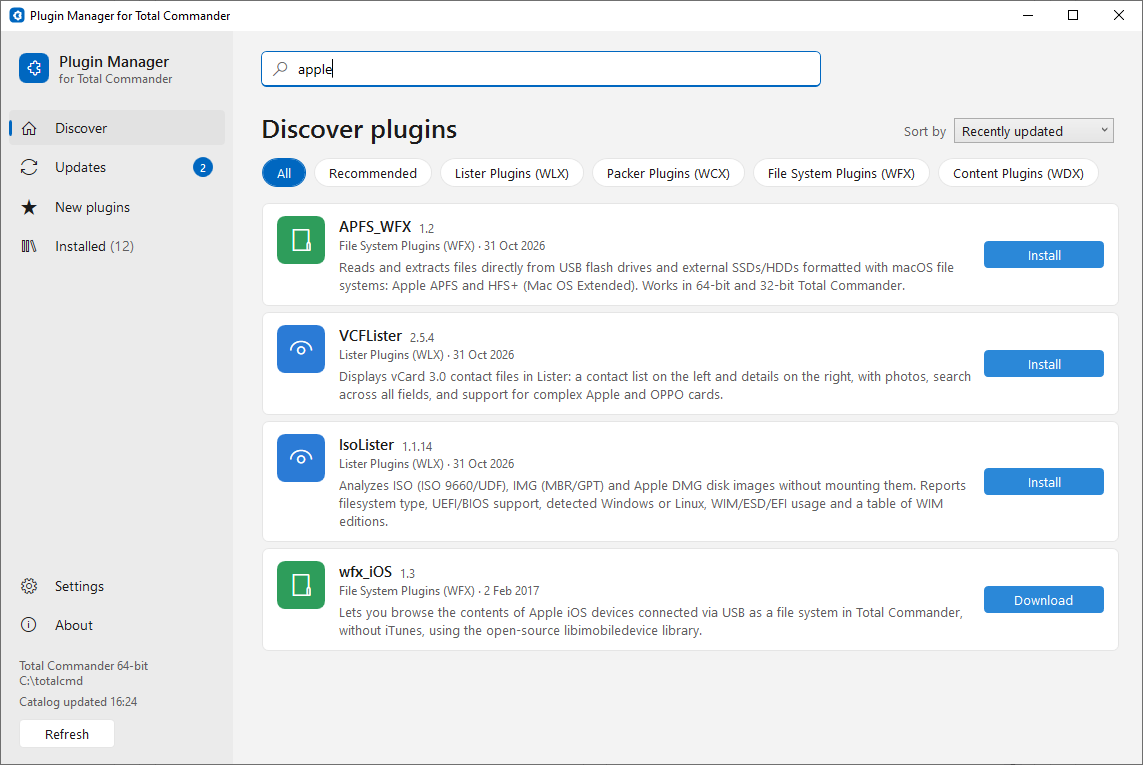
- Search by name and short description; filter by the site's categories; Recommended and New plugins.
- Sort by recently updated, name or number of downloads.
- Each plugin's full description, what's new, author, version and release date, with a link to its page on the site.
- Plugins that don't fit your Total Commander (for example 32-bit only when you use TC 64-bit) are marked, or can be hidden.
Install and update:
- One click to install, from zip and RAR archives. The manager downloads the archive, checks it against the catalog's checksum and hands it to Total Commander, which installs and registers the plugin the usual way. Your wincmd.ini is never edited by the manager. Plugins that TC can't install automatically (no installer file in the archive, or packed in 7z) get a Download button instead: the archive is saved for you to install by hand.
- Works whether TC is running or not, and with TC started as administrator.
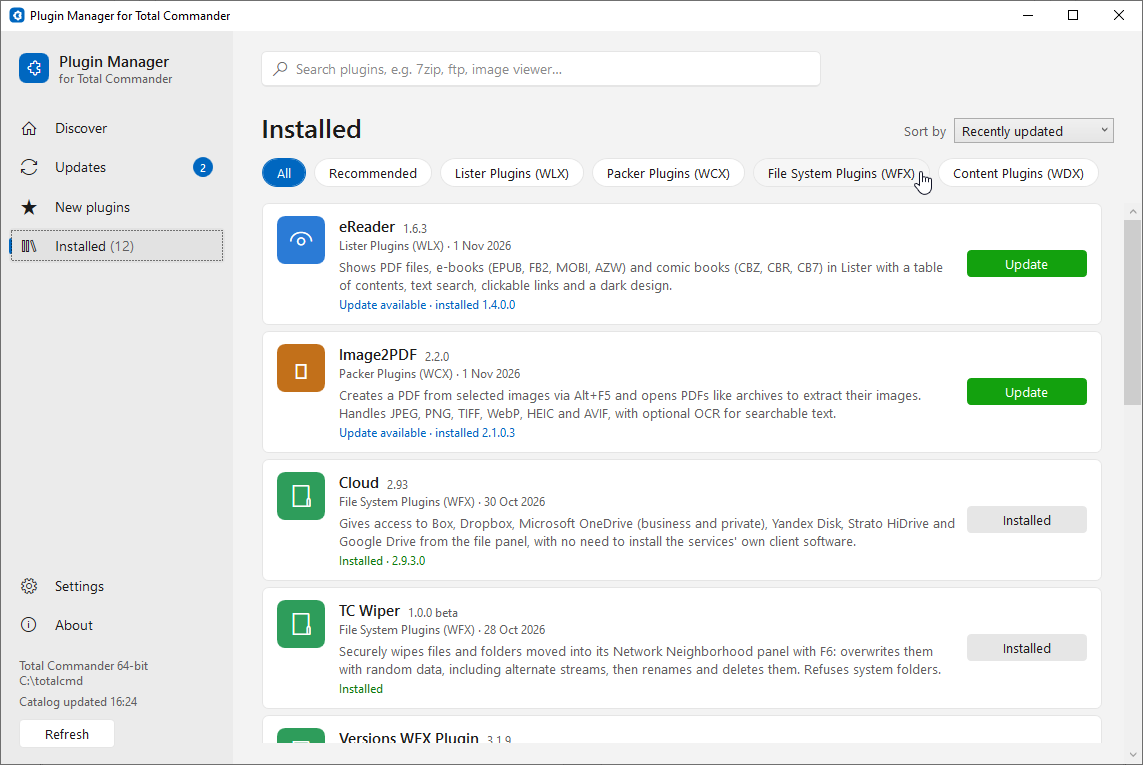
- Installed: every plugin found in your Total Commander, with its version. The version is recognised by the plugin file itself, so plugins installed or updated by hand show correctly.
- Updates: installed plugins that have a newer version in the catalog. Update them one by one, right from the list.
- Every downloaded archive is kept in your Downloads folder, or in a folder you choose.
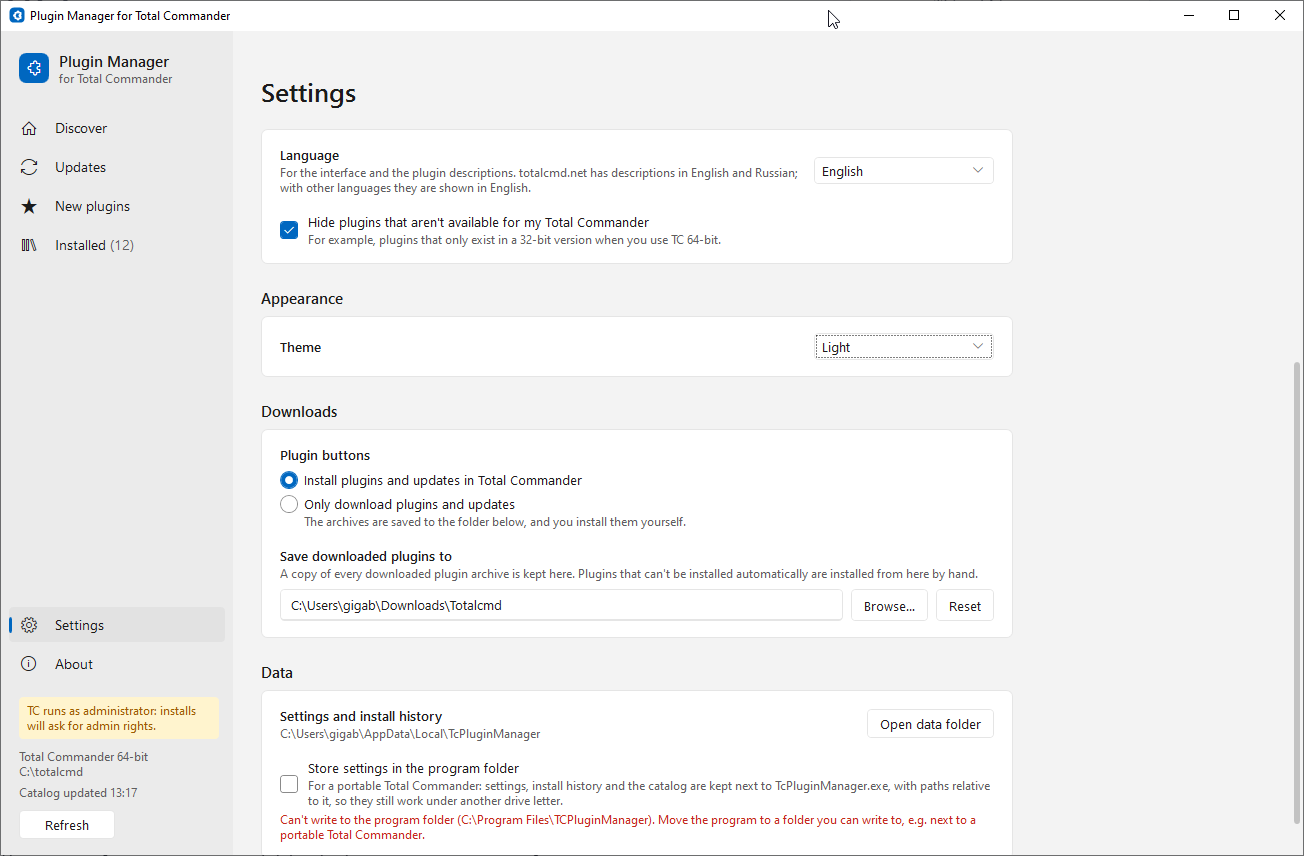
- Prefer to install yourself? Switch the plugin buttons to "Only download": they save the archive instead, one plugin at a time.
- The manager updates itself too: when a new version is out, it offers to install it.
Interface in English, Russian, Polish, French, German, Spanish, Czech, Italian, Dutch and Slovak, with a light and a dark theme.
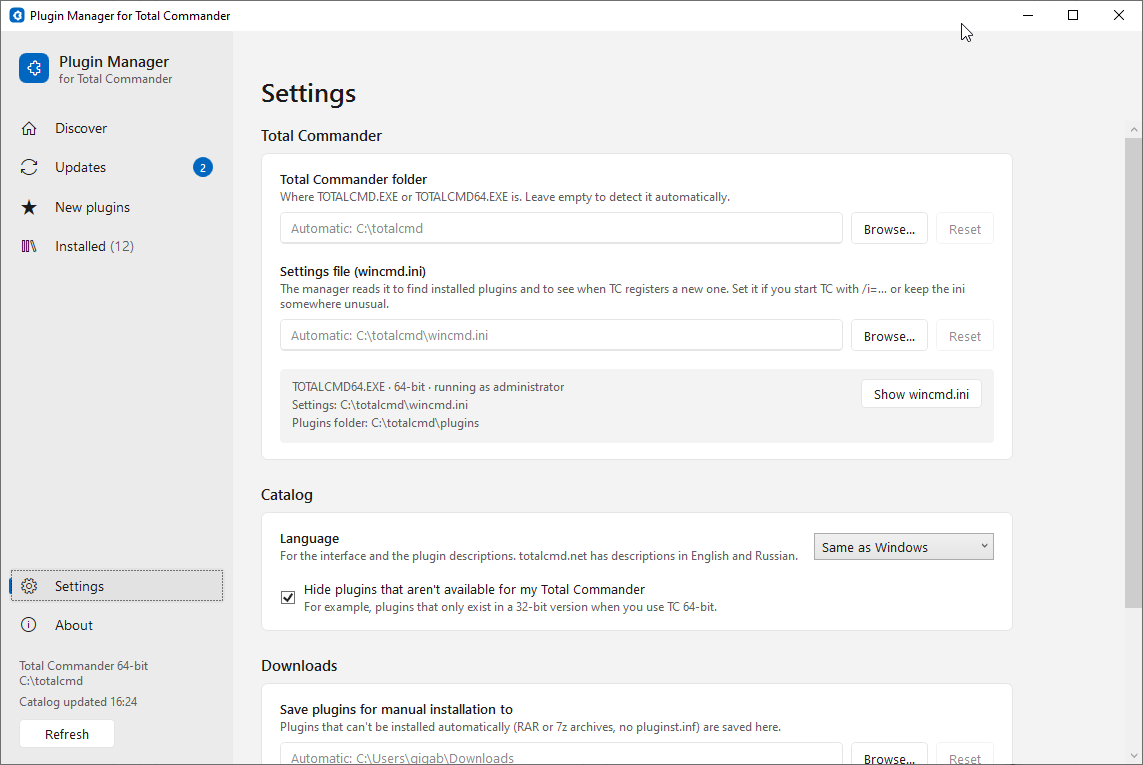
Settings: the Total Commander folder and wincmd.ini are found automatically and can be changed; install or only download; download folder; interface language and light or dark theme (each can follow Windows). For a portable Total Commander, the settings can be kept in the program folder, with paths relative to it. The manager reads wincmd.ini the way Total Commander does, including RedirectSection and %COMMANDER_PATH%; started from Total Commander's button bar, it uses that Total Commander's settings file. The window opens where you left it.
Privacy: to count how many people use the manager, the catalog request includes the app version and a random install ID. Nothing else about you or your computer is sent.
No installation needed: unpack the zip into any folder and run TcPluginManager.exe. Requires .NET Framework 4.8, which is part of Windows 10 and 11. Freeware.
What’s new
1.0.9 (2026-11-11)
- With the Russian interface, the catalog and plugins are downloaded from wincmd.ru, which works better on networks in Russia. New setting in Settings > Catalog: "Download server" (Automatic, totalcmd.net or wincmd.ru). If one site doesn't respond, the manager tries the other.
1.0.8 (2026-11-08)
- New setting in Settings > Downloads: "Keep my plugin settings when updating" (off by default). Many plugins ship their settings file (for example plugin.ini) in the package, and Total Commander's installer replaces your configured copy with it. With the setting on, the manager backs up the settings files you changed before an update and puts them back afterwards; an .ini also gets the settings that are new in the new version. The new version's file is kept next to it as .new, and a backup stays in the manager's data folder. If the plugin folder needs administrator rights, Windows asks for permission once more to put the files back.
- New setting in Settings > Downloads: "After a download". Show the saved archive in Explorer (as before), in Total Commander, or don't open anything.
- Fixed: updating a plugin could open a second Plugin Manager window, when Total Commander was showing the manager's own folder. The manager now waits until Total Commander shows the download folder before it starts the install.
1.0.7 (2026-11-08)
- Installed lists every plugin registered in your Total Commander, also the ones that aren't in the totalcmd.net catalog. They show their name, type and version, and the plugin file in the details.
- Installed works without the catalog too: if it can't be downloaded (for example on the first run without internet access), the manager still reads wincmd.ini and lists your plugins.
1.0.6 (2026-11-07)
- Updates and downloads go one by one, right from the list: the Update all and Download all buttons are gone. Each install is Total Commander's own dialog, which you answer for each plugin.
- The Refresh button is green.
1.0.5 (2026-11-07)
- New category: Tools & Utilities. Each one has Download (the file is saved to your downloads folder) and Open on site.
- Faster start: the manager opens on Installed, and the catalog is downloaded at launch only if it was last checked more than 8 hours ago. Refresh is now at the top right, with the time of the last check under it ("Catalog updated 2 hours ago").
- Starting with a big downloaded 7z archive no longer makes the window wait several seconds.
- In a small window, texts no longer overlap: the sort and filter controls move under the title, and the plugin details open over the list.
- The window title shows the manager's version.
1.0.4 (2026-11-04)
- The window opens where you left it: the manager remembers its position, size and whether it was maximized. If that place is no longer on screen (a monitor was disconnected), the window opens on a visible one.
- 64-bit-only plugins whose installer file names the 64-bit plugin file (for example TorrentLister.wlx64) now install in one click on 64-bit Total Commander.
- Installed plugins are found in more setups:
- sections moved to another file with RedirectSection= (also =1 with AlternateUserIni=);
- paths with %COMMANDER_PATH%, %COMMANDER_INI%, %COMMANDER_INI_PATH%, %COMMANDER_DRIVE% or %COMMANDER_EXE%, and relative paths;
- portable Total Commander with UseIniInProgramDir= in its wincmd.ini;
- started from Total Commander (button bar or start menu), the manager uses the wincmd.ini of that Total Commander. The wincmd.ini path in Settings can also use %COMMANDER_PATH%.
1.0.3 (2026-11-02)
- Plugins in RAR archives that TC can't install automatically (no pluginst.inf inside) now show Download right away, instead of Install that ended in "saved for manual install".
- Plugins packed in 7z show Download: the manager can't install from 7z.
- More plugins install in one click: the catalog now reads installer files saved in UTF-16, which the manager already supports.
1.0.2
- Plugins packed in RAR archives install in one click too.
- Every downloaded plugin archive is kept in your Downloads folder, or the folder set in Settings > Downloads.
- New setting in Settings > Downloads: "Only download plugins and updates". The buttons then save the archive and you install it yourself; the Updates page gets Download all.
- Plugins installed or updated by hand are recognised: the manager identifies the installed version by the plugin file itself.
- Portable mode: Settings > Data > "Store settings in the program folder" keeps the settings next to the program, with relative paths, for a portable Total Commander.
- Switching between Discover, Updates, New plugins and Installed now clears the search and the category filter.
1.0.1
- Dark theme. Choose Light, Dark or Same as Windows in Settings > Appearance.
- New interface languages: Polish, French, German, Spanish, Czech, Italian, Dutch and Slovak.
1.0.0
First release.
- With the Russian interface, the catalog and plugins are downloaded from wincmd.ru, which works better on networks in Russia. New setting in Settings > Catalog: "Download server" (Automatic, totalcmd.net or wincmd.ru). If one site doesn't respond, the manager tries the other.
1.0.8 (2026-11-08)
- New setting in Settings > Downloads: "Keep my plugin settings when updating" (off by default). Many plugins ship their settings file (for example plugin.ini) in the package, and Total Commander's installer replaces your configured copy with it. With the setting on, the manager backs up the settings files you changed before an update and puts them back afterwards; an .ini also gets the settings that are new in the new version. The new version's file is kept next to it as .new, and a backup stays in the manager's data folder. If the plugin folder needs administrator rights, Windows asks for permission once more to put the files back.
- New setting in Settings > Downloads: "After a download". Show the saved archive in Explorer (as before), in Total Commander, or don't open anything.
- Fixed: updating a plugin could open a second Plugin Manager window, when Total Commander was showing the manager's own folder. The manager now waits until Total Commander shows the download folder before it starts the install.
1.0.7 (2026-11-08)
- Installed lists every plugin registered in your Total Commander, also the ones that aren't in the totalcmd.net catalog. They show their name, type and version, and the plugin file in the details.
- Installed works without the catalog too: if it can't be downloaded (for example on the first run without internet access), the manager still reads wincmd.ini and lists your plugins.
1.0.6 (2026-11-07)
- Updates and downloads go one by one, right from the list: the Update all and Download all buttons are gone. Each install is Total Commander's own dialog, which you answer for each plugin.
- The Refresh button is green.
1.0.5 (2026-11-07)
- New category: Tools & Utilities. Each one has Download (the file is saved to your downloads folder) and Open on site.
- Faster start: the manager opens on Installed, and the catalog is downloaded at launch only if it was last checked more than 8 hours ago. Refresh is now at the top right, with the time of the last check under it ("Catalog updated 2 hours ago").
- Starting with a big downloaded 7z archive no longer makes the window wait several seconds.
- In a small window, texts no longer overlap: the sort and filter controls move under the title, and the plugin details open over the list.
- The window title shows the manager's version.
1.0.4 (2026-11-04)
- The window opens where you left it: the manager remembers its position, size and whether it was maximized. If that place is no longer on screen (a monitor was disconnected), the window opens on a visible one.
- 64-bit-only plugins whose installer file names the 64-bit plugin file (for example TorrentLister.wlx64) now install in one click on 64-bit Total Commander.
- Installed plugins are found in more setups:
- sections moved to another file with RedirectSection= (also =1 with AlternateUserIni=);
- paths with %COMMANDER_PATH%, %COMMANDER_INI%, %COMMANDER_INI_PATH%, %COMMANDER_DRIVE% or %COMMANDER_EXE%, and relative paths;
- portable Total Commander with UseIniInProgramDir= in its wincmd.ini;
- started from Total Commander (button bar or start menu), the manager uses the wincmd.ini of that Total Commander. The wincmd.ini path in Settings can also use %COMMANDER_PATH%.
1.0.3 (2026-11-02)
- Plugins in RAR archives that TC can't install automatically (no pluginst.inf inside) now show Download right away, instead of Install that ended in "saved for manual install".
- Plugins packed in 7z show Download: the manager can't install from 7z.
- More plugins install in one click: the catalog now reads installer files saved in UTF-16, which the manager already supports.
1.0.2
- Plugins packed in RAR archives install in one click too.
- Every downloaded plugin archive is kept in your Downloads folder, or the folder set in Settings > Downloads.
- New setting in Settings > Downloads: "Only download plugins and updates". The buttons then save the archive and you install it yourself; the Updates page gets Download all.
- Plugins installed or updated by hand are recognised: the manager identifies the installed version by the plugin file itself.
- Portable mode: Settings > Data > "Store settings in the program folder" keeps the settings next to the program, with relative paths, for a portable Total Commander.
- Switching between Discover, Updates, New plugins and Installed now clears the search and the category filter.
1.0.1
- Dark theme. Choose Light, Dark or Same as Windows in Settings > Appearance.
- New interface languages: Polish, French, German, Spanish, Czech, Italian, Dutch and Slovak.
1.0.0
First release.