AI Process Terminate 2.0.1
Description
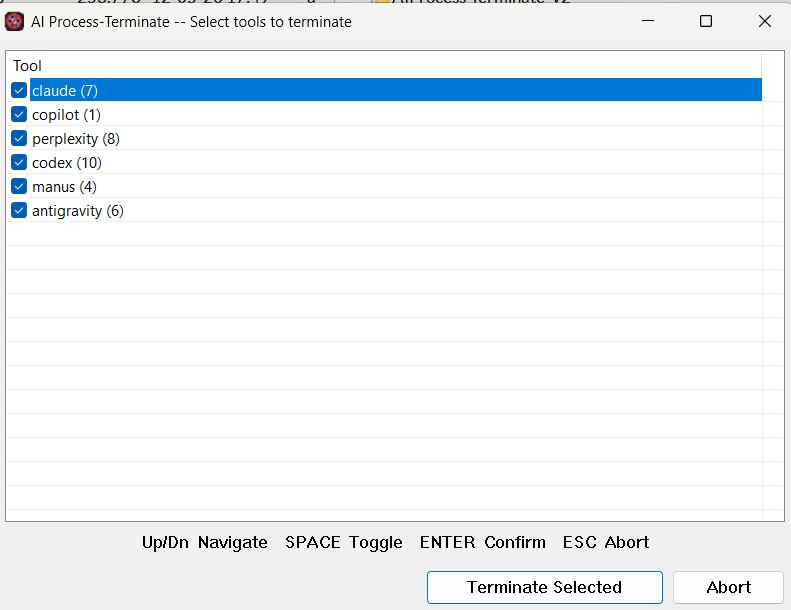
A lightweight Windows utility that terminates desktop AI assistant processes (Claude, Copilot, Perplexity, Codex, …) in one shot — no admin rights needed.Why
AI desktop apps (Claude, Copilot, Perplexity, Codex and similar) are known to accumulate background processes over time. This can cause:
• System slowdowns — high CPU or RAM pressure from idle AI workers.
• Frozen or unresponsive UI — the app gets stuck but its processes keep running and holding resources.
• GPU saturation — local model runners keep the GPU busy even when the app window is closed.
Killing them from Task Manager is tedious when there are 5–15 scattered processes per tool. AI Process-Terminate groups them by tool and removes the whole tree in one keypress.
What it does
1.Scans all running processes for names that partially match any known AI tool keyword.
2.Groups matches by tool and shows a compact dialog — one row per tool, with the number of running instances in parentheses, e.g. claude (9).
3.Lets you choose which tools to terminate; the others are left untouched.
4.Drains all instances in a loop (up to 20 iterations, 200 ms apart) so that processes that respawn are caught and killed too.
Only processes owned by the current user are affected. System processes and processes owned by other users are skipped gracefully.
What’s new
[2.0.1]
•fix: wait briefly after successful process termination so the drain loop does not immediately rescan processes that Windows is still tearing down
•fix: clarify the max-iteration error when matching processes keep respawning or cannot finish terminating
•fix: compile sources as UTF-8 so Unicode text in dialogs and documentation strings is preserved in MSVC builds
[2.0.0]
•add: target process list moved to AIProcess-Terminate.ini — edit keywords without recompiling; falls back to built-in defaults if file is absent
•add: application icon embedded in the executable (7 sizes: 16 – 256 px)
•add: Windows manifest — asInvoker UAC, Common Controls v6, Per-Monitor DPI v2, Windows 10/11 compatibility
•add: VERSIONINFO resource — file/product version and description visible in Explorer → Properties → Details
•add: resizable dialog — all controls reflow on resize; minimum size enforced at 400×280
•add: Per-Monitor DPI v2 support — layout constants and initial window size scale with monitor DPI; adapts on DPI change (WM_DPICHANGED)
•add: Total Commander integration — pluginst.inf + AIProcess-Terminate.bar for one-click button bar install
•change: default dialog size increased from 520×320 to 640×460 (at 96 DPI)
•change: build script auto-detects Visual Studio via vswhere.exe; honours any pre-sourced vcvarsall variant
•fix: wait briefly after successful process termination so the drain loop does not immediately rescan processes that Windows is still tearing down
•fix: clarify the max-iteration error when matching processes keep respawning or cannot finish terminating
•fix: compile sources as UTF-8 so Unicode text in dialogs and documentation strings is preserved in MSVC builds
[2.0.0]
•add: target process list moved to AIProcess-Terminate.ini — edit keywords without recompiling; falls back to built-in defaults if file is absent
•add: application icon embedded in the executable (7 sizes: 16 – 256 px)
•add: Windows manifest — asInvoker UAC, Common Controls v6, Per-Monitor DPI v2, Windows 10/11 compatibility
•add: VERSIONINFO resource — file/product version and description visible in Explorer → Properties → Details
•add: resizable dialog — all controls reflow on resize; minimum size enforced at 400×280
•add: Per-Monitor DPI v2 support — layout constants and initial window size scale with monitor DPI; adapts on DPI change (WM_DPICHANGED)
•add: Total Commander integration — pluginst.inf + AIProcess-Terminate.bar for one-click button bar install
•change: default dialog size increased from 520×320 to 640×460 (at 96 DPI)
•change: build script auto-detects Visual Studio via vswhere.exe; honours any pre-sourced vcvarsall variant