TOTALCMD.NET
ENG RUS
Plugins › Packer Plugins (WCX)

FileFactory 0.3 beta
📂 File operations 📝 Text & code Packer Plugins (WCX) Freeware

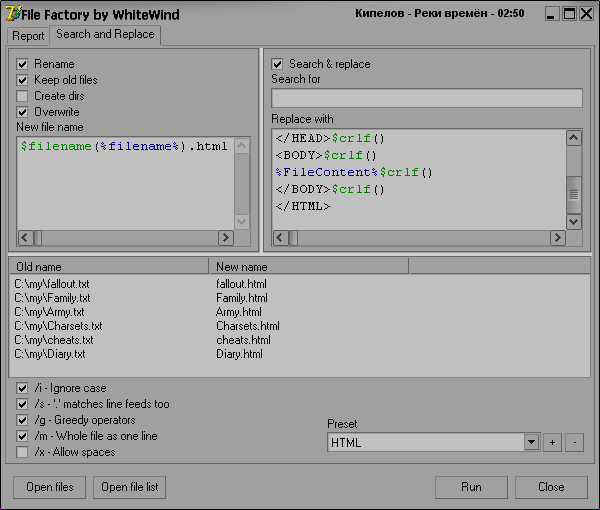
Screenshot: FileFactory

Description

Plugin for TotalCommander and separate application, intended for complex file processing, such as search and replace with regular expressions, file name and search results formatting using easy but powerfull script language, support for TotalCommander WDX plugins, report generation.
WARNING! While program version is unstable, I strongly recommend you to back up your files before using Multi-rename and Search and Replace!

Please report errors and suggestions on forum.

Web site

What’s new

[+] New
[*] Bugfix

Version 0.1 alpha
[First version]

Version 0.2 alpha
[+] Added splitters between scripts on the Report tab
[*] Program do not close if IniPath registry key is present but empty
[*] When adding files through Open files button S&R does not work
[*] When closing functions completion proposal with '(' key, text ')(' is added
[*] "/x Allow space" changed to "/x Allow explaining spaces"
[+] Now you can change the /r modifier
[+] "Clear" button added
[*] "Search for" field is now multiline
[+] Now Esc key closes program
[*] If report extension is .ff_dummy when archiving from TC it changes to .html
[*] Documentation slightly reworked

Version 0.3 beta
[*] $RegEx function does not react on modifiers checkboxes
[+] %S&R#% and %RegEx#% changed to %#% and %R#% respectively
[+] Now you can set preset through TC "Pack files" dialog
[+] Hotkeys assigned
[*] Comments in function parameters
[+] Command line parameters
[+] Added option "Space works as \s+"
[+] Regular expressions now can be disabled in Search & Replace
[+] WDX plugins can also be stored in FF.ini
[+] Functions added: $CR(), $LF()
[+] Variable added: %FileNumber%
[+] Tab-order corrected
[*] If wincmd.ini is not found, program raises an excepion
[+] FF.EXE now is wrapper only, so plugin size greatly decreased
[+] Support for different languages
[+] Russian translation
[*] Small bugfixes
More by WhiteWind

Image Info 1.42

🖼️ Images & graphics Content Plugins (WDX) Freeware

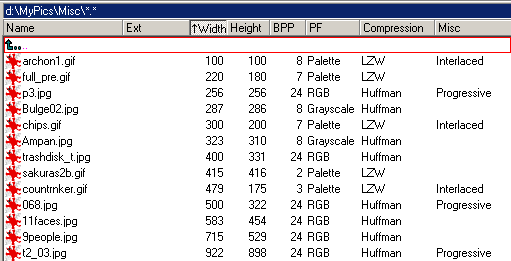
Provides image properties as content fields: width, height, bits per pixel, pixel format, compression and extras like progressive JPEG or interlaced GIF. Handles BMP, TGA, GIF, JPEG, PNG, PSD, PCX and TIFF.

WhiteWind 21 Jul 2005 ↓ 24,966

Similar plugins

EverySearch 1.4

📂 File operations Content Plugins (WDX) Freeware x64

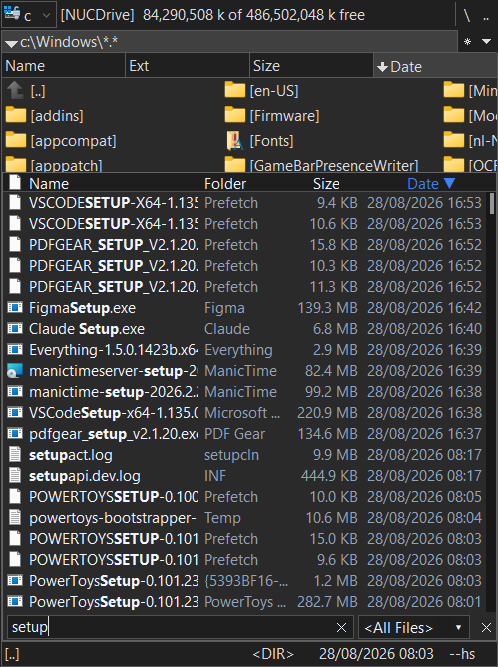
Live search box on top of the active Total Commander panel, powered by Everything (voidtools): results update while typing and can be fed into a real panel listing, opened, viewed or jumped to.

4FR Young 7 Nov 2026 ↓ 1,292

VirtualPanel 2.0.7.1372

📂 File operations File System Plugins (WFX) Freeware x64

Provides a virtual temporary panel that keeps links to files and folders in list files, so they behave like real files. Supports m3u import/export, scripts, logging and drag-and-drop.

MVV 1 May 2019 ↓ 90,359

SetFolderDate 1.5

📂 File operations Tools & Utilities Freeware

Sets the timestamp of folders and archives from the newest or oldest file inside them, and sets the timestamp of files from the filename or metadata.

van Dusen 19 Jul 2011 ↓ 10,158

DiskDir Extended 1.68

📂 File operations Packer Plugins (WCX) Freeware x64

Creates a list file of all selected files and directories including subdirs, and also lists contents of archives such as ARJ, ACE, CAB, JAR, RAR, ZIP, TAR, TGZ, TBZ and ISO.

Peter Trebaticky 3 Jan 2015 ↓ 95,916

CopyTree 1.3.0.328

📂 File operations Packer Plugins (WCX) Freeware x64

Copies and moves files from Branch View or search results while keeping the folder structure, with a choice of how many levels to keep, include/exclude masks, multi-threading and directory timestamp copying.

MVV 11 Apr 2020 ↓ 58,765

SpaceFit 1.0

📂 File operations Tools & Utilities Freeware x64

Fills a USB stick as full as possible, from the files you mark in Total Commander. Mark more on the left than will fit. SpaceFit finds the combination that fills the stick on the right best, and marks exactly those files. Then press F5. Done.

Native2904 1 Nov 2026 ↓ 113