Clear History TC 1.5
Description
Clear History Total CommanderThis program allows to delete history from file Wincmd.ini and Wcx_ftp.ini
(file names can be customized)
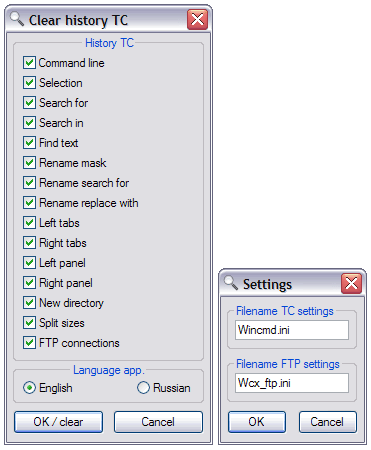
In file Wincmd.ini deletes (at will):
History command line
History selection
History search for
History search in
History find text
History rename mask
History rename search for
History rename replace with
History left tabs
History right tabs
History left panel
History right panel
History new directory
History split sizes
At presence of the file Wcx_ftp.ini deletes (at will):
History FTP join (not netlist)
The Patterns of the files and rest patterns do not delete!
For working the program necessary to do following:
Extract archive in one folder c Wincmd.ini file or folder, located next to Wincmd.ini
Run CH4TC.exe
Choose necessary history for removing and press "OK / clear"
Command line:
If start program with a parameter /all ALL history deletes from Wincmd.ini and Wcx_ftp.ini without showing window program
If you run with a parameter /set remove story of Wincmd.ini and Wcx_ftp.ini without a display window, using the previously saved settings for clearing.
Start program with a parameter /reg for searching files settings on record from registry
To change the filenames of files Wincmd.ini Wcx_ftp.ini run with a parameter /ini
It Is Recommended start the program under switched off Total Commander, since Total Commander writes certain history in file Wincmd.ini when closing.
Program was tested under OS Windows ME, Windows XP and Total Commander version 6.x, 7.x
What’s new
1.0
First version
1.1
Now program in the beginning searches for the files of the adjustment Wincmd.ini and Wcx_ftp.ini in its directory, under their absence searches for in the beginning on 1 level above, afterwards on 2 levels above.
Possible create the file in directory with TC, in her to create else one file and place there program.
The first founded files of the adjustment TC are Processed.
1.2
Adjusting the program are now saved in file of the adjustment in file with program. When start the program with key /all adjustment are ignored and cleaned whole history TC.
Added english language. Adjusting the language of the program come into play under following start the program.
In menu "About" added information, where is found file Wincmd.ini
1.3
Small decorative change
1.4
Added new parameter /reg for searching files settings on record from registry
1.5
Now you can change the file names are set TC for clearing. To do this, run the program with parameter /ini and window settings to edit file names.
You need only specify the names of files with the extension, rather than the path to the files. For example: Totalcmd.ini At the names of the files found in the registry, this setting is not affected.
Added parameter /set When you use the program runs without a display window, using the previously saved settings for clearing.
First version
1.1
Now program in the beginning searches for the files of the adjustment Wincmd.ini and Wcx_ftp.ini in its directory, under their absence searches for in the beginning on 1 level above, afterwards on 2 levels above.
Possible create the file in directory with TC, in her to create else one file and place there program.
The first founded files of the adjustment TC are Processed.
1.2
Adjusting the program are now saved in file of the adjustment in file with program. When start the program with key /all adjustment are ignored and cleaned whole history TC.
Added english language. Adjusting the language of the program come into play under following start the program.
In menu "About" added information, where is found file Wincmd.ini
1.3
Small decorative change
1.4
Added new parameter /reg for searching files settings on record from registry
1.5
Now you can change the file names are set TC for clearing. To do this, run the program with parameter /ini and window settings to edit file names.
You need only specify the names of files with the extension, rather than the path to the files. For example: Totalcmd.ini At the names of the files found in the registry, this setting is not affected.
Added parameter /set When you use the program runs without a display window, using the previously saved settings for clearing.