NTFS Links 1.30
Description
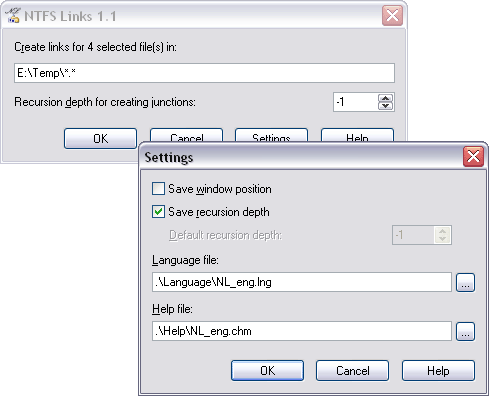
This program allows to create hard links and junctions on NTFS volumes directly from Total Commander. The program can be installed in Start menu or on the buttonbar and is called for creating links on the selected files/folders in the opposite panel, i.e. it behaves absolutely identically to the commands of copying (F5), moving (F6) and so on. The feature of the program: you can set nesting level for subfolders, on which the program will create junctions (see help for details).The program allows to read/save settings either in system registry, or in INI-files; it is multilingual (there are English, Russian, Ukranian, German languages and two Spanish dialects in archive).
For installing the program, just set the following command-line parameters:
"%WL" "%T\" /i=ini_file_name
(parameter /i is optional). For details see English help file (.\Help\NL_eng.chm), topic "Program Setup".
ATTENTION!
Some programs, specifically Windows Explorer, cannot recognize junctions correctly! That's why when you try to remove a junction from Explorer, all the contents of the original directory will be removed! This is NOT a bug of NTFS Links, it is a feature of the programs that cannot work correctly with junctions. Please, check you application for correctness before using it with junctions!
Total Commander works correctly with junctions, that's why it is strongly recommended to use it instead of Windows Explorer.
What’s new
Version 1.30
1. The program is now Unicode-capable.
2. Added 64-bit version.
3. Added option for blocking the main TC window (emulating behaviour of standard copy/move dialogs).
4. Path to the configuration file (/i=) now supports environment variables.
5. Default language is now English.
6. Various minor improvements.
7. Removed file with language strings description.
Version 1.21
1. Added Polish interface language.
2. Small interface bug fixed.
Version 1.2
1. Added possibility of working with whole partitions. One can either mount the volume as a single mount point, or use it for usual recursive links creating, as any other usual folder.
2. Bug fixed: some error messages were in Russian always, even when using correct language file.
3. In the Settings dialog pressing the "..." buttons now cause opening the dialog with correct initial folder (Language for language files, Help for help files).
1. The program is now Unicode-capable.
2. Added 64-bit version.
3. Added option for blocking the main TC window (emulating behaviour of standard copy/move dialogs).
4. Path to the configuration file (/i=) now supports environment variables.
5. Default language is now English.
6. Various minor improvements.
7. Removed file with language strings description.
Version 1.21
1. Added Polish interface language.
2. Small interface bug fixed.
Version 1.2
1. Added possibility of working with whole partitions. One can either mount the volume as a single mount point, or use it for usual recursive links creating, as any other usual folder.
2. Bug fixed: some error messages were in Russian always, even when using correct language file.
3. In the Settings dialog pressing the "..." buttons now cause opening the dialog with correct initial folder (Language for language files, Help for help files).