ReDate Addon 1.1.7.2
Description
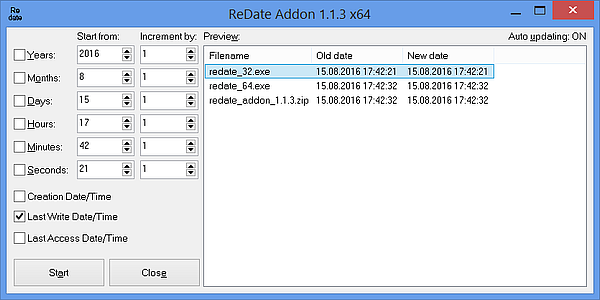
New version of utility based on work by Roman Korcek (http://www.totalcmd.net/plugring/redate_addon.html).The ReDate Addon is something like the counter [C] in TC's Multi-Rename Tool, however, it is for file dates (and times). Using ReDate you can change the dates of multiple files incrementally (or randomly).
What’s new
1.1.7.2
- updated manifest for better HiDPI support
1.1.7.1
- icon changed
1.1.7
- fixed date convert error with nonstandard system date separators (like '. ')
1.1.6.1
- fixed window size on multimonitor systems
1.1.6
- milliseconds added
1.1.5
- fixed Access Violation error
1.1.4
- fixed behavior when files from far far future was stop file processing
1.1.3
- very long filenames support (use %WL parameter in button settings)
- fixed some errors
1.1.2
- fixed bug when files added in wrong order
1.1.1
- Unicode filenames support (use %UL parameter in button settings)
- 64-bit version
- Creation, Last Access, Last Write Date/Time change
- fixed some errors
1.04 beta
- it should now be possible to directly enter a numerical value into the spinedit fields without needing to press the up or down keys/buttons. It wasn't implemented before because Delphi's integrated debugger always caught the exception EConvertError when the field was empty (eg after pressing Del). However, it seems that outside Delphi everything works allright, so I enabled it
- in 1.01 I forgot to fix the Preview when updating after a redate operation
- possibly fixed a bug with FAT precision (+/- 2 seconds) on NTFS systems (where it should be 0.1 microseconds) that caused files to get timestamps rounded to an even seconds count; please test this if you can
- this is a beta release mainly because I am not certain if the new date handling which is supposed to fix the NTFS problems really works and because the changed source looks ugly and is not fully commented yet
1.04 beta 2
- added some return value checks when opening files to make debugging (hopefully) easier
- when none of the checkboxes are checked then clicking on a file in the Preview causes the Start from fields to be filled with this file's date and time
- the Start from fields get their initial values from the timestamp of the first file in the file list or from the file under cursor in TC if %P%N is specified as the second parameter for ReDate
1.04 (19 Apr 2004)
- official release of 1.04
- updated manifest for better HiDPI support
1.1.7.1
- icon changed
1.1.7
- fixed date convert error with nonstandard system date separators (like '. ')
1.1.6.1
- fixed window size on multimonitor systems
1.1.6
- milliseconds added
1.1.5
- fixed Access Violation error
1.1.4
- fixed behavior when files from far far future was stop file processing
1.1.3
- very long filenames support (use %WL parameter in button settings)
- fixed some errors
1.1.2
- fixed bug when files added in wrong order
1.1.1
- Unicode filenames support (use %UL parameter in button settings)
- 64-bit version
- Creation, Last Access, Last Write Date/Time change
- fixed some errors
1.04 beta
- it should now be possible to directly enter a numerical value into the spinedit fields without needing to press the up or down keys/buttons. It wasn't implemented before because Delphi's integrated debugger always caught the exception EConvertError when the field was empty (eg after pressing Del). However, it seems that outside Delphi everything works allright, so I enabled it
- in 1.01 I forgot to fix the Preview when updating after a redate operation
- possibly fixed a bug with FAT precision (+/- 2 seconds) on NTFS systems (where it should be 0.1 microseconds) that caused files to get timestamps rounded to an even seconds count; please test this if you can
- this is a beta release mainly because I am not certain if the new date handling which is supposed to fix the NTFS problems really works and because the changed source looks ugly and is not fully commented yet
1.04 beta 2
- added some return value checks when opening files to make debugging (hopefully) easier
- when none of the checkboxes are checked then clicking on a file in the Preview causes the Start from fields to be filled with this file's date and time
- the Start from fields get their initial values from the timestamp of the first file in the file list or from the file under cursor in TC if %P%N is specified as the second parameter for ReDate
1.04 (19 Apr 2004)
- official release of 1.04