TCResticBrowser 2.3.2
Description
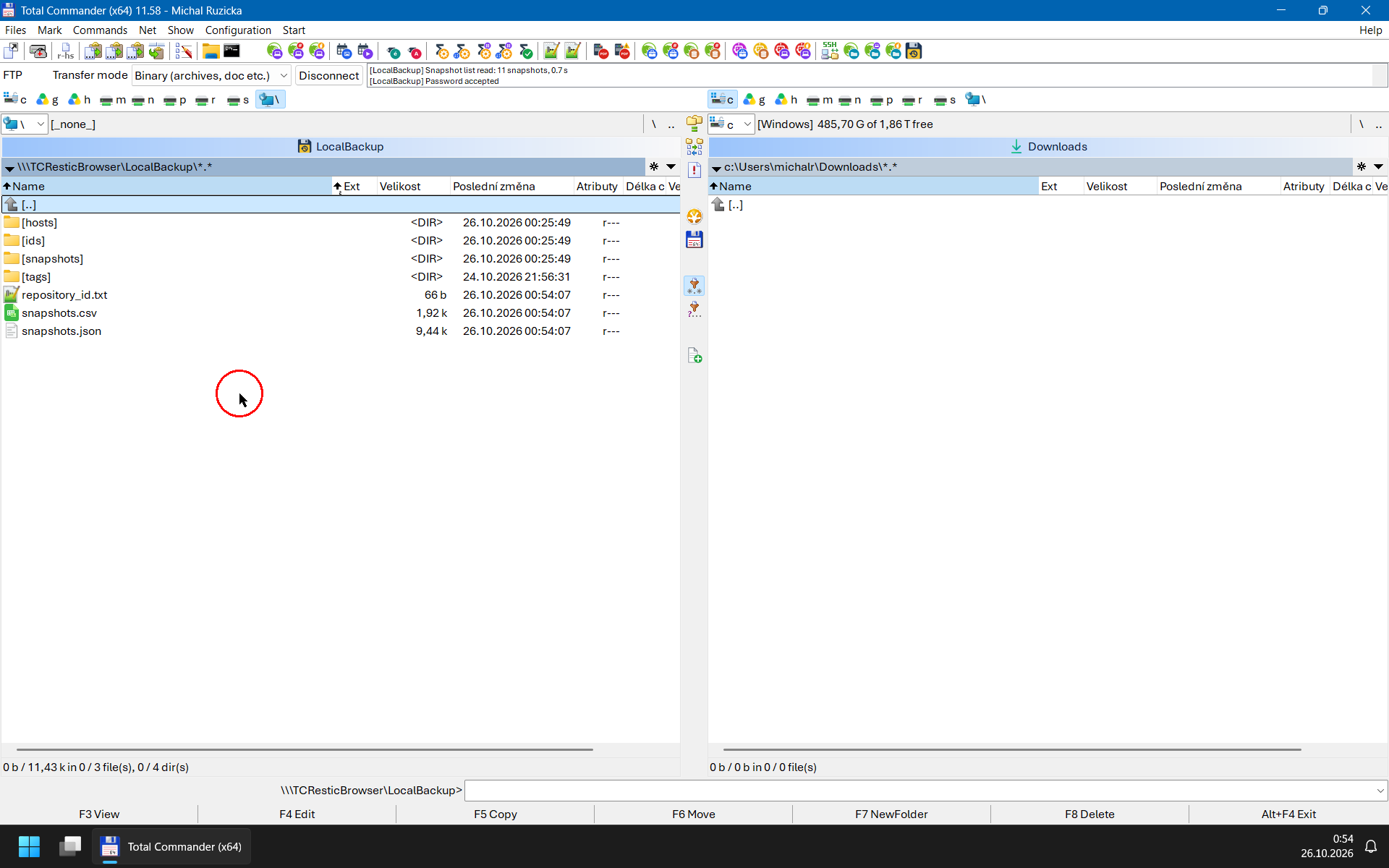
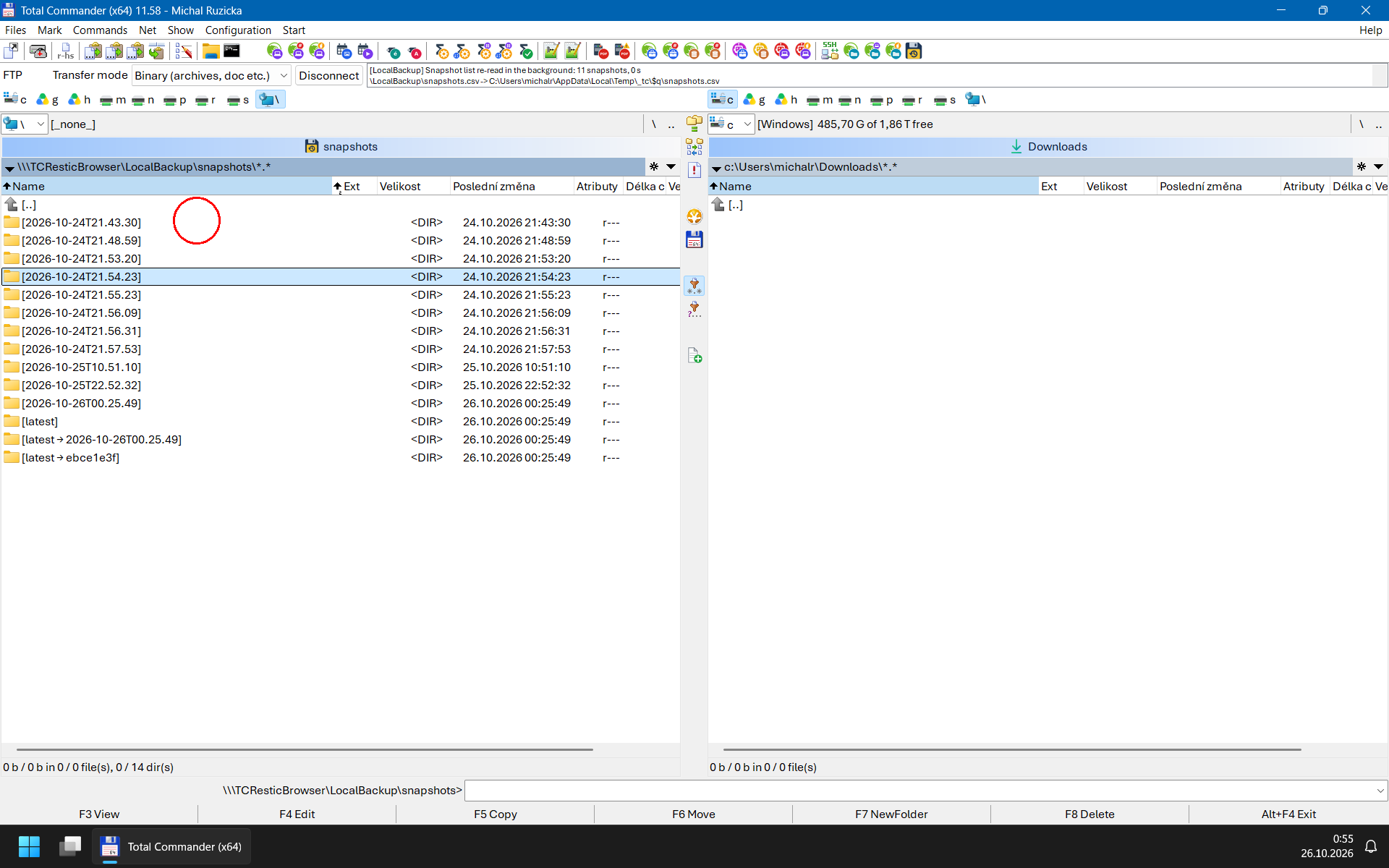
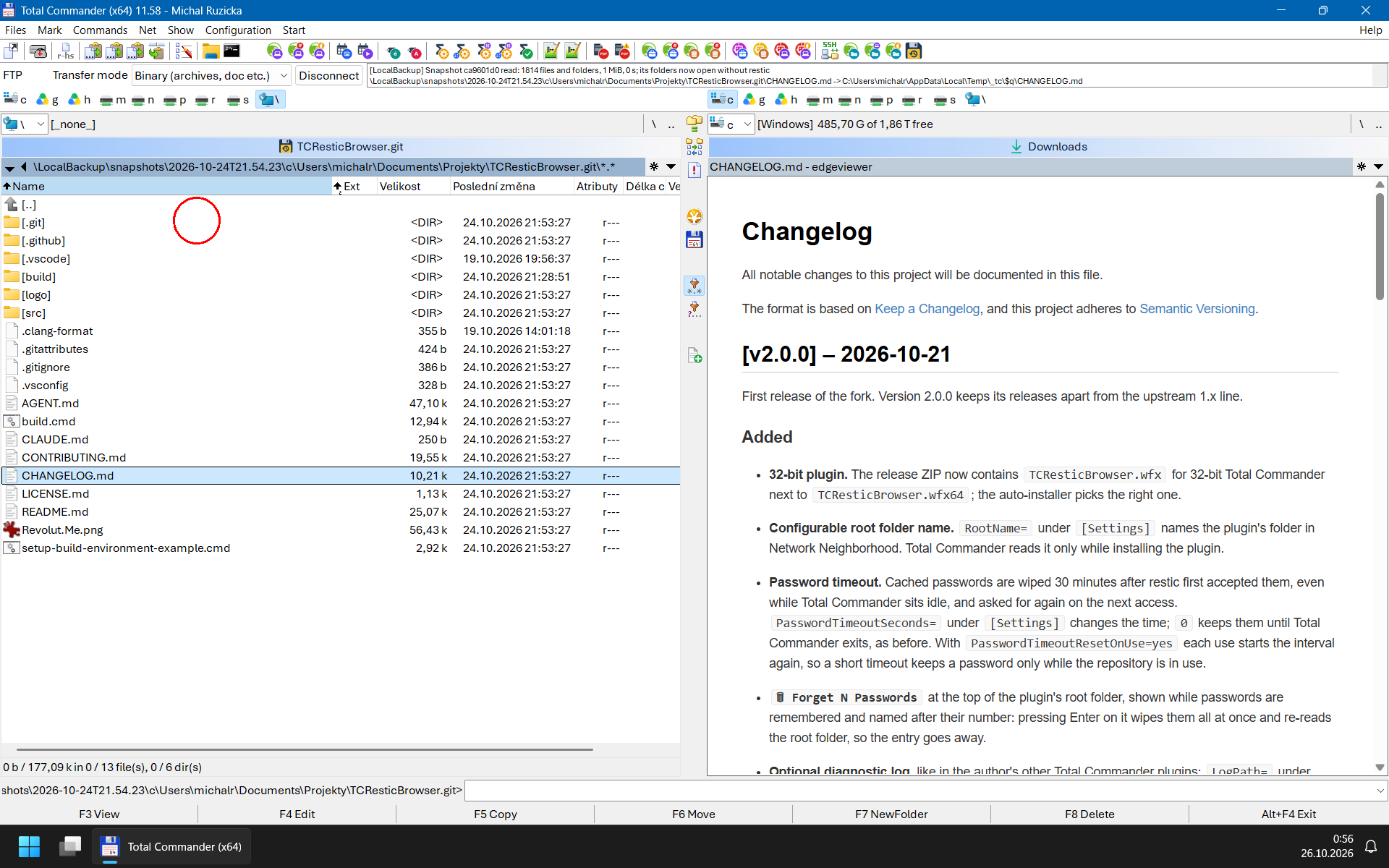
The plugin adds \\\TCResticBrowser to Network Neighborhood (the name is configurable). Its top level lists the repositories configured in TCResticBrowser.ini; inside each one you find its snapshots arranged the way restic mount shows them - by ID, by time, by host and by tag - and inside a snapshot the backed-up directory tree. Everything is strictly read-only: the plugin runs the official restic.exe to list and extract data and never modifies a repository.Key Features
- Fast Browsing of Large and Remote Repositories: Every restic run costs about a second before it prints anything (deriving the key from the password and loading the repository index), more for big or remote (e.g. S3) repositories. The plugin therefore reads each repository's snapshot list once and answers from it at once, re-reading it in the background once it is a minute old (as often as restic mount does), and when you enter a snapshot it reads the list of all its files and folders in the background with a single restic ls. Until that is done, each folder is listed on its own (restic ls <snapshot> <path>), as fast as before; afterwards every folder of the snapshot opens instantly and restic runs only to copy or view files. See What Is Instant and What Takes a While and Snapshot Cache.
- Native File & Folder Extraction (F5, F3, Ctrl+Q):
- Copy individual files or entire directory trees out of any snapshot using F5 (preserving original modification timestamps and 64-bit file sizes).
- Inspect files directly with Total Commander's Lister (F3) or Quick View (Ctrl+Q).
- Constant-memory streaming (64 KB chunks via restic dump --no-lock) into a temporary file with atomic replacement on completion: an interrupted or failed overwrite never corrupts or deletes your existing local file.
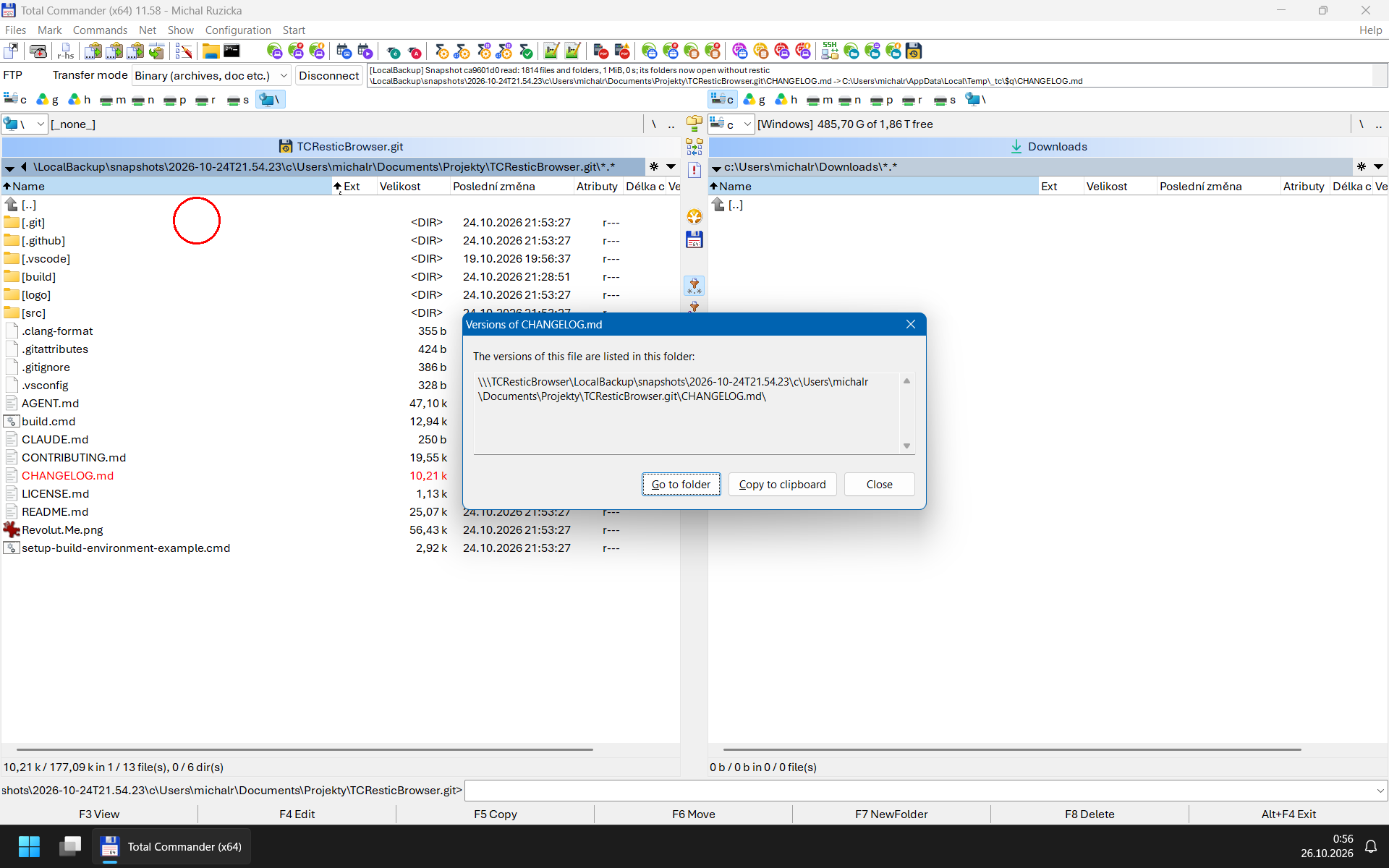
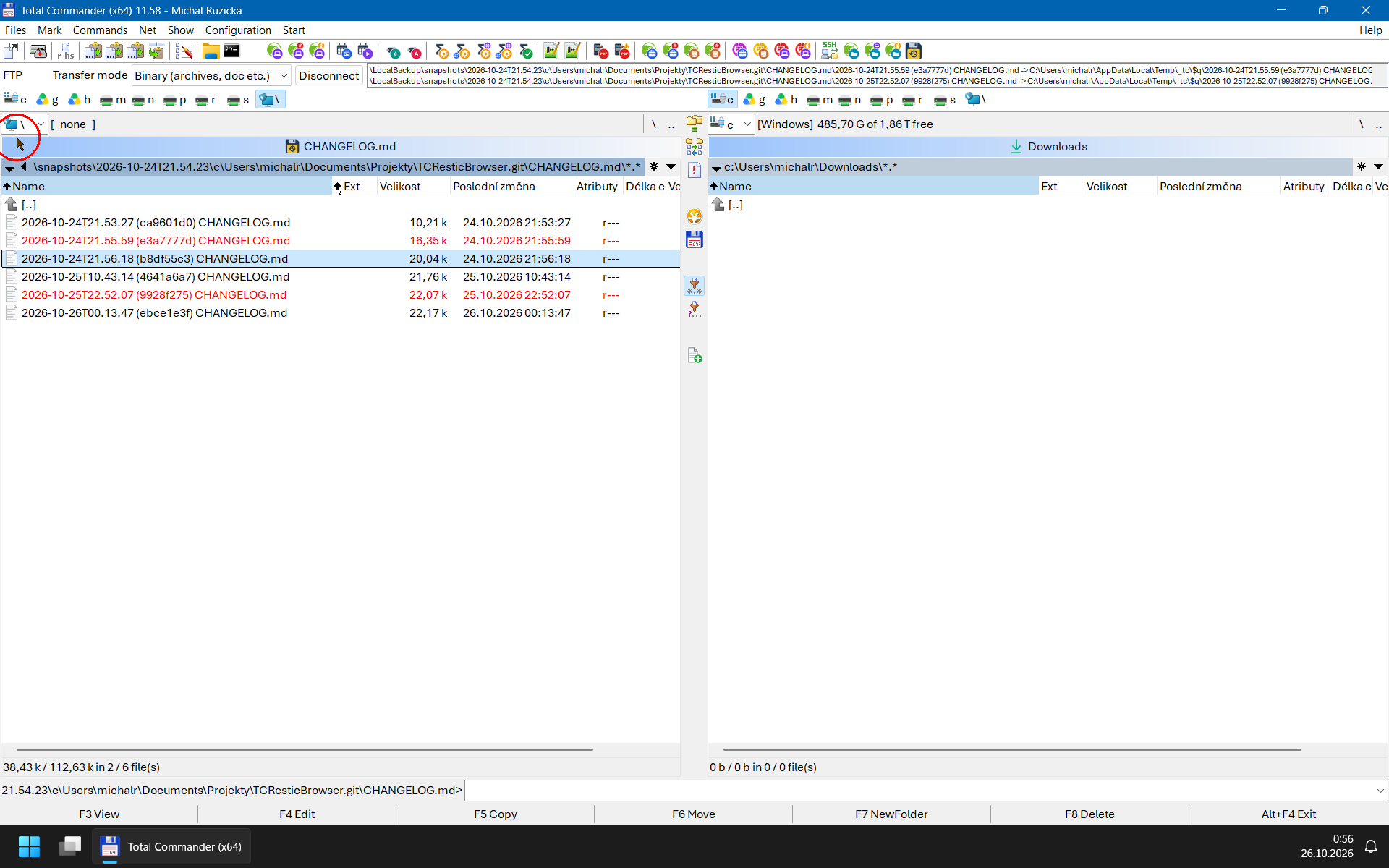
- File Versions and Snapshot Properties (Alt+Enter): Alt+Enter on a file inside a snapshot offers to go to a folder - the file's own path followed by \ - that lists every version of that file in the snapshots of the same host, named by its modification time and the short ID of the snapshot it was first backed up in (2026-10-17_14-02-11 (1a2b3c4d) report.docx), to view (F3) or copy (F5) like any file - one restic find instead of opening snapshot after snapshot. Alt+Enter on a snapshot or a folder in it shows the snapshot's details (host, user, paths, tags, size, files new and changed, data added, how long the backup took), and on a version the snapshots that hold it. See File Versions and Snapshot Properties.
- Strictly Read-Only by Design: Every Restic command runs with --no-lock. Repository modification entry points (FsPutFile, FsDeleteFile, FsRemoveDir, FsMkDir, FsRenMovFile) are intentionally not exported, and F6 (Move) is rejected.
- Zero Passwords on Disk: Repository passwords are requested interactively via Total Commander's native password dialog (RequestProcW), kept only in RAM per repository alias for 30 minutes by default (see Password Timeout), passed to restic.exe via an isolated environment block (RESTIC_PASSWORD), and wiped with SecureZeroMemory. Cached passwords are encrypted in memory (CryptProtectMemory), in pages locked out of the page file and excluded from Windows Error Reporting crash dumps, so a memory dump or the hibernation file does not reveal them. A repository can instead take its password from a file or a password manager's command, which restic reads itself, and S3 repositories can have their own access key, whose secret key is asked for and kept like a password (see Repository Settings).
- Responsive Cancellation (ESC): Long operations on remote backends can be aborted with ESC. Extraction uses a 30-minute inactivity timeout (so slow multi-gigabyte transfers are never cut off as long as bytes keep flowing); a folder listing is stopped after 30 minutes in total.
What’s new
## [v2.3.2] – 2026-10-27
### Fixed
- **A long error message from restic no longer ends in `�`.** Cut to
fit the dialog, it could be cut inside a non-ASCII character.
## [v2.3.1] – 2026-10-26
### Fixed
- **Backups of network shares are shown.** restic stores a share
backed up by its UNC path (`\\nas\media\Documents`, also given as
`//nas/media/Documents`) below one folder named `\\nas\media`,
backslashes included, which the plugin hid as not a single path
component (since v2.0.0), so such a snapshot looked empty or showed
only its drive letters. It is now shown as `UNC\nas\media`, next to
the drive letters, and browsed, copied and searched for versions like
a drive. A server or share name that could not be one folder (`..`,
`/`, `:` and the like) still hides its share. restic's own `restore`
fails on such snapshots on Windows, see
[restic issue #2807](https://github.com/restic/restic/issues/2807).
## [v2.3.0] – 2026-10-26
### Added
- **`snapshots.json` in every repository folder**, beside
`snapshots.csv`: the `restic snapshots --json` output the folders were
built from, byte for byte, for `jq` or a script; no extra restic run.
It is kept with the cached snapshot list, which takes that much more
memory.
- **File versions (`Alt+Enter` on a file inside a snapshot):** a dialog
shows the path of a folder, whose `Go to folder` button (the default)
opens it in the active panel and `Copy to clipboard` copies it: the
file's own path followed by `\`, which can also be typed by hand. The folder lists that file's versions across the snapshots of the
same host, named by their modification time, the short ID of the
oldest snapshot that holds the version (the backup it first appeared
in) and the file's name (`2026-10-17_14-02-11 (1a2b3c4d) report.docx`),
oldest first, which can be viewed and copied like files; a version is
copied from the snapshot its name carries. One `restic find --json`
for exactly the file's path finds them, only for a path that is a file
in the snapshot; its output is kept as long as the snapshot list for
listing, and as long as the password for copying a version.
`Alt+Enter` on a version lists the snapshots that hold it.
- **Snapshot details (`Alt+Enter` on a snapshot or a folder in it):** a
dialog with the snapshot's ID, time, host, user, paths, tags, and from
its summary the size, files and folders new, changed and unmodified,
data added (and stored), the backup's duration, the parent snapshot
and the restic version, from the snapshot list (a folder inside a
snapshot takes one `restic ls` until the snapshot has been read).
### Changed
- `Alt+Enter` (and *Properties* in the context menu) inside a snapshot
may now ask for the repository's password and run restic; above the
snapshots it still does nothing and asks for nothing.
- A file inside a snapshot opened as a folder (its path followed by `\`)
lists the file's versions instead of failing with "not found".
## [v2.2.0] – 2026-10-24
### Added
- **`snapshots.csv` has a `size` column** after `paths`: the size of each
snapshot as `restic snapshots` shows it (`1.234 GiB`), from the summary
restic 0.17 and later record with a snapshot; empty for older snapshots.
- **Settings per repository in `[Repository: ]` sections**, named
as restic names them:
- `PasswordFile=` and `PasswordCommand=` let restic read the password
from a file or a password manager's command, so the repository opens
without a password dialog and the plugin never sees the password.
`PasswordCommand=` is normally a plain path, like `ResticPath=`; with
arguments it is a command line as restic splits it, and one with an
unquoted backslash, where restic would cut a Windows path apart, is
refused with a hint. Both together go to restic, which refuses the
pair. A password from a file or command that restic rejects is
reported, not asked for.
- `AWS_ACCESS_KEY_ID=` gives an S3 repository its own access key; the
plugin asks for the secret access key in a dialog titled
` - S3 secret access key` (for password managers that pick an
entry by window title), before the password, and keeps it in memory
only, encrypted, as long as the password. `AWS_SHARED_CREDENTIALS_FILE=`
and `AWS_PROFILE=` select an AWS credentials file and profile instead;
`AWS_DEFAULT_REGION=` and the `RESTIC_AWS_ASSUME_ROLE_*=` variables
complete the S3 variables restic reads. A repository with S3 variables
does not inherit `AWS_*`, `MINIO_*` and `RESTIC_AWS_*` variables from
Total Commander's environment; repositories without them inherit them
as before.
- Any restic extended option is given as `.=`
(`s3.region=`, `s3.bucket-lookup=`, `rclone.program=`...) and passed as
`-o`, also to `restic dump`; names are lowercased as restic does, and
the first occurrence counts. `rclone.program=`, `sftp.command=`,
`rclone.args=` and `sftp.args=`, which restic splits into a command
line itself, are written and checked like `PasswordCommand=`.
- A setting that cannot be used (a missing file, a path relative to the
current folder, a broken command line) is reported when the repository
is opened, before any dialog or restic run.
- `🗑 Forget N Passwords` counts the repositories with a password or
secret key typed in; it also forgets that a password file or command
was accepted.
- **Refused S3 credentials are reported at once.** restic retries a
storage that refuses the credentials for 15 minutes, so a mistyped S3
secret key made Total Commander wait that long. The plugin ends restic
on the first such retry and asks for the secret key again, or shows the
storage's reason when the key was not typed in. Other retries (a server
that is down, say) appear in the connection log while restic waits.
- **`rclone:` and S3 repositories are tested end to end**, with the rclone
release pinned in CI: an `rclone:` repository through rclone's local
backend, and an S3 repository on `rclone serve s3`.
### Changed
- **The restic version is checked.** A `restic.exe` older than 0.17.1,
whose exit codes the plugin would misread, is refused with a message
before a repository is opened, instead of failing in confusing ways.
### Fixed
- **`ESC` ends restic's helper processes too.** restic now runs in a job
object, so cancelling, a timeout or closing Total Commander ends the
`rclone`, `ssh` or password command it started as well, instead of
leaving them running until they notice the closed pipe.
## [v2.1.0] – 2026-10-22
### Added
- **Folders of a snapshot open instantly once it has been read.** Every
`restic` run spends about a second (more on big or remote repositories)
before it lists anything, so entering a snapshot now also starts one
`restic ls` of the whole snapshot in the background; when it is done,
every folder of that snapshot is listed from memory without running
restic. Until then folders are listed one by one as before. The new
`SnapshotCacheMB=` setting limits the memory (default 512 MiB, about
five million files, `0` turns it off); the lists are dropped with the
repository's password.
- **Configurable snapshot folder names.** `SnapshotTimeFormat=` sets the
time format of the snapshot folders, with the placeholders `YYYY`, `YY`,
`MM`, `DD`, `hh`, `mm`, `ss` and the zone `zzzz`, documented in the sample
`TCResticBrowser.ini`; the default is restic's colon-free
`2006-01-02_15-04-05`.
- **Connection log.** The plugin appears in Total Commander's FTP
connections toolbar once a repository is used: its log window shows what takes time and why - passwords
accepted, refused and forgotten, snapshot lists and folders read by
restic with their durations, files copied, and the background work
(reading a whole snapshot, with progress every few seconds, and
re-reading the snapshot list) - and its Disconnect button forgets all
passwords and cached listings. Only Disconnect closes the toolbar again
(`🗑 Forget N Passwords` cannot); the new `ConnectionLog=no` keeps it
away.
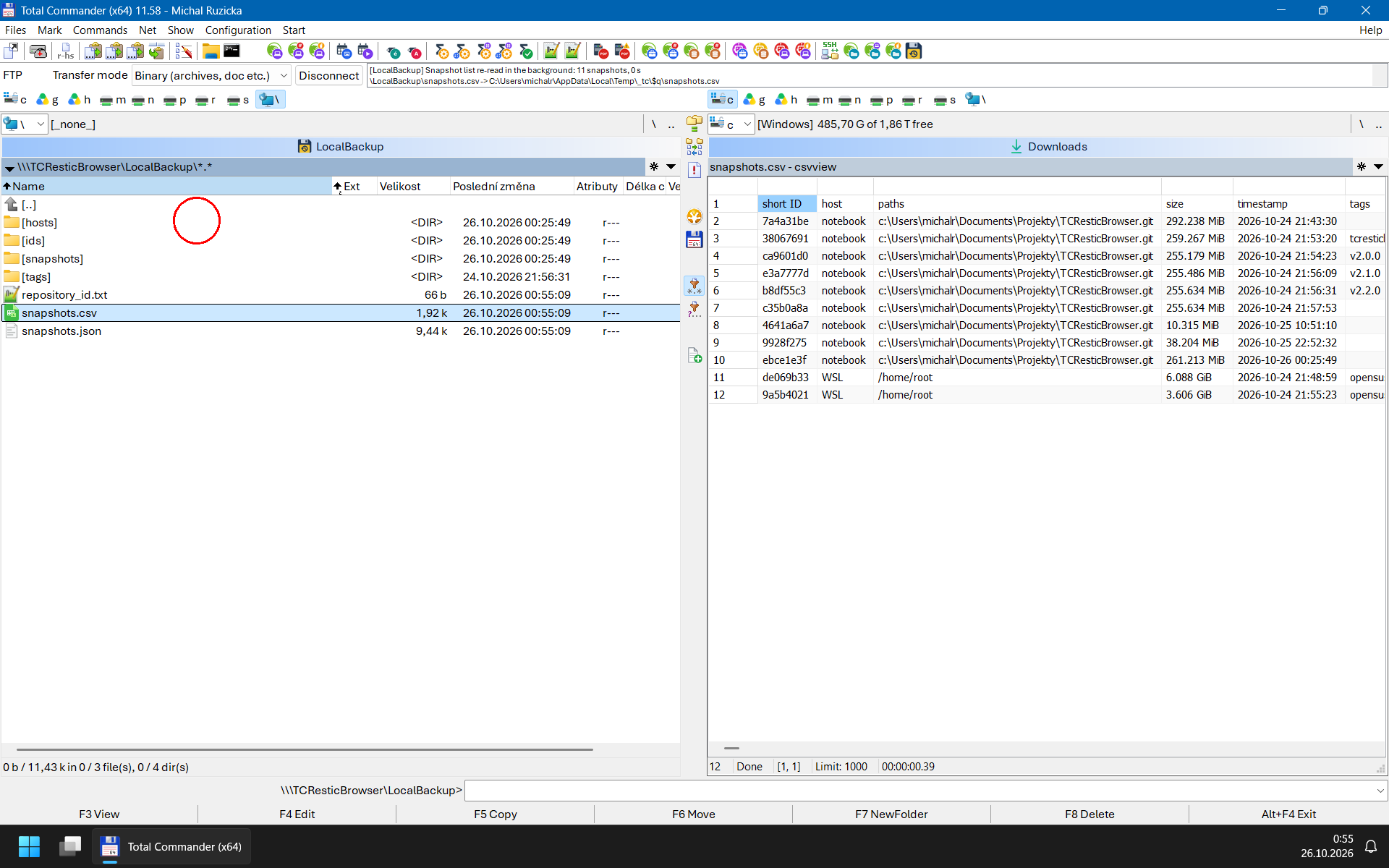
- **`snapshots.csv` in every repository folder.** A spreadsheet of all
snapshots - short ID, host, paths, time, tags and full ID, sorted by host
and paths regardless of case, then time - made from the snapshot list
already read and dated when restic listed the snapshots, as UTF-8 with a
byte-order mark for Excel. Columns are separated by the list separator of
the Windows regional settings, which Excel expects, or by the new
`CsvSeparator=` (`,`, `;`, `|` or `tab`).
- **`repository_id.txt` in every repository folder**, with the
repository's full ID (`restic cat config`) on one CRLF-terminated line,
dated when restic was asked for it; restic is asked only when the file
is viewed or copied.
- **The password dialog names the repository in its title**
(` - Restic repository password`), so password managers that
choose an entry by window title, such as KeePassXC Auto-Type, can fill
in the right password.
### Changed
- **Snapshots are arranged as `restic mount` shows them.** A repository now
holds `ids`, `snapshots`, `hosts` and `tags`, with snapshots by short ID,
by time, by host and by tag, and `latest` in every folder of snapshots,
following the rules of `restic mount` exactly (names `-1`, `-2`... for
equal times, tags such as `a/b` as `a_b`), plus `latest → ` and
`latest → ` next to every `latest`, the same snapshot named by
where `restic mount`'s `latest` link points and by its ID. The snapshot
list is read once per repository and then answered from memory; once it
is older than a minute (like `restic mount`, configurable with the new
`SnapshotListRefreshSeconds=`) it is re-read in the background while the
old list stays in use, so moving between these folders waits for restic
only for a snapshot the cached list does not know yet. The snapshot
folders of version 2.0 (`_[]`) are gone, so history and
hotlist entries that point into them need to be recreated.
- **A `ResticPath=` that does not work is now an error.** When the
configured `restic.exe` did not exist, the plugin silently fell back to
`restic.exe` in the plugin folder or in `PATH`, so a different restic
could run without the user knowing. Now the configured binary is used or
nothing is, and the message names the setting, the configuration file and
the path that was tried. The same applies to values relative to the
current drive or folder (`C:restic.exe`, `\tools\restic.exe`), which were
ignored before. A bare name without an extension is now also found in the
plugin folder (`ResticPath=restic-custom` -> `restic-custom.exe`), not
only in `PATH`.
- **A `restic.exe` that cannot be started is named in the error.** Instead
of "Failed to execute restic.exe.", the message gives the path of the
binary and the reason Windows reported. A file that is not a Windows
program at all (a truncated download, an HTML page saved as
`restic.exe`) is refused before it is started, instead of Windows
stopping Total Commander with its "Unsupported 16-Bit Application"
dialog.
- **Builds pin the Visual Studio release.** The v2.0.0 DLLs that CI built
differed from the released ones, which were built with Visual Studio
18.11.0 while CI installed the newest release, 18.11.1, whose installer
brings a newer servicing release of the Windows SDK. CI now installs
the pinned release (18.11.1) from its fixed-version installer, checked by
SHA-256, and `build.cmd` warns when the local Visual Studio is another
one. Reproducing the v2.0.0 ZIP itself takes Visual Studio 18.11.0 with
the Windows SDK it installed. Each build also writes
`build\fingerprint-x64.txt` and `build\fingerprint-x86.txt`, which show
where two builds differ; see *When the hashes differ* in CONTRIBUTING.md.
### Fixed
- **A damaged repository can no longer fill Total Commander's memory with
warnings.** restic's error output is now kept up to 1 MiB (far more than
any error message) and the rest is read and dropped; v2.0.0 kept all of it.
- **The diagnostic log lists every setting** with the configuration,
including `PasswordTimeoutSeconds`, `PasswordTimeoutResetOnUse` and the
new settings, which v2.0.0 left out.
### Security
- **`ResticPath=` can no longer name a batch file.** Windows runs `.bat`
and `.cmd` files through `cmd.exe`, which does not honour the quoting the
plugin applies to file names taken from a snapshot, so a crafted file
name in a backup could have run commands. Only Windows programs are
started now.
## [v2.0.0] – 2026-10-21
First release of the fork. Version 2.0.0 keeps its releases apart from the
upstream 1.x line.
### Added
- **32-bit plugin.** The release ZIP now contains `TCResticBrowser.wfx` for
32-bit Total Commander next to `TCResticBrowser.wfx64`; the auto-installer
picks the right one.
- **Configurable root folder name.** `RootName=` under `[Settings]` names the
plugin's folder in Network Neighborhood. Total Commander reads it only
while installing the plugin.
- **Password timeout.** Cached passwords are wiped 30 minutes after
restic first accepted them, even while Total Commander sits idle, and
asked for again on the next access. `PasswordTimeoutSeconds=` under
`[Settings]` changes the time; `0` keeps them until Total Commander exits,
as before. With `PasswordTimeoutResetOnUse=yes` each use starts the
interval again, so a short timeout keeps a password only while the
repository is in use.
- **`🗑 Forget N Passwords`** at the top of the plugin's root folder,
shown while passwords are remembered and named after their number:
pressing Enter on it wipes them all at once and re-reads the root
folder, so the entry goes away.
- **Optional diagnostic log**, like in the author's other Total Commander
plugins: `LogPath=` under `[Logging]` (off by default) records every
`restic` command line with its exit code, duration and error output, the
configuration in use, password prompts and error messages. Passwords are
never logged, only their length, and credentials in repository URLs are
masked.
- **Hint about invisible characters in a rejected password.** When restic
rejects a password that starts or ends with a space, tab or line break,
or contains a line break, tab, non-breaking space, zero-width or other
invisible character, the next password prompt says so (for example
"the password you entered ends with a space"), and the diagnostic log
notes it as well. Inner ordinary spaces of a passphrase are not reported,
and the password itself is never shown or logged.
- **Reproducible builds.** The same sources and pinned toolchain produce a
byte-identical ZIP (`/Brepro`, `/BREPRO`, `/pathmap`, pinned MSVC toolset
and Windows SDK, ZIP timestamps from `release-date=` in `pluginst.inf`).
The ZIP carries `sha256sums.sha256` for its files.
- **Continuous integration.** Every push is built and tested on GitHub
Actions for both bitnesses, including the Debug/CRT leak checks, MSVC
static analysis, AddressSanitizer and the live tests against a real
`restic.exe` (pinned by SHA-256).
### Changed
- **Windows-native build.** `build.cmd` drives CMake and MSVC; the Bash
wrapper, NMake Makefile and Python packaging step are gone. All build
inputs live under `src\`, and `version=` in `src\pluginst.inf` is the only
place the version is written.
- **Own JSON reader instead of cJSON.** The cJSON submodule is replaced by a
strict, read-only reader of about 370 lines (`src\json.c`), so the plugin
contains no third-party code. File sizes are now read as exact 64-bit
integers. See [*Why the Plugin Has Its Own JSON Reader*](README.md#why-the-plugin-has-its-own-json-reader)
in the README.
- **Configuration file renamed and looked up like in the author's other
Total Commander plugins.** `restic_plugin.ini` became `TCResticBrowser.ini`,
and `%APPDATA%\GHISLER\TCResticBrowser.ini` (per-user override) wins over
the file next to the plugin, which is only the shipped sample. Previously
the plugin-folder file won and the folder of Total Commander's
`wincmd.ini` was the fallback. **Upgrading from 1.x:** move the
`restic_plugin.ini` you edited to `%APPDATA%\GHISLER\TCResticBrowser.ini`;
the new version does not read the old name.
- **`TCResticBrowser.ini` is read as UTF-8**, like in the author's other
Total Commander plugins, so repository aliases and paths may contain any
characters. A UTF-8 or UTF-16 byte-order mark is honoured, and a file that
is not valid UTF-8 is still read in the ANSI code page, as before.
Entries too long for the plugin's buffers are now skipped instead of
being silently truncated.
- **New plugin icon.** The goals were a vector source, a design simple
enough to stay legible at the small sizes Total Commander shows it in, and
content that refers to both Total Commander and versioned backups. It is a
floppy disk, Total Commander's symbol, whose label carries a "history"
arrow around a clock, the time-machine sign for going back to earlier
versions. The sources are SVG files in `logo\`, including a separate
version fitted to the 16 px pixel grid; the detailed raster illustration
they replace was illegible at 16 px and had no editable source.
- **Plugin files renamed after the project**, like the author's other
Total Commander plugins: `restic.wfx`/`restic.wfx64` became
`TCResticBrowser.wfx`/`TCResticBrowser.wfx64`, and the auto-installer's
default folder is `plugins\wfx\TCResticBrowser` instead of
`plugins\wfx\restic`. **Upgrading from 1.x** therefore installs the plugin
next to the old one: after moving your configuration (see above), remove
the old `restic` entry under *Configuration → Options → Plugins → File
system plugins* and delete its folder.
- **Default root folder name is *TCResticBrowser*** instead of
*Restic Backups*, matching the plugin, its files and its configuration
file. To keep the old name, set `RootName=Restic Backups` before
installing the new version.
- **Release ZIP** is named `TCResticBrowser.vX.Y.Z.zip` and, like the
author's other Total Commander plugins, ships all the Markdown
documentation (README, CHANGELOG, CONTRIBUTING, AGENT, CLAUDE) and the
license, now `LICENSE.md` instead of `LICENSE`.
- **Documentation** restructured (README, CONTRIBUTING, this changelog), and
the Python project template and the Pi coding-agent tooling (scripts and
instructions in Italian) were removed.
### Fixed
- **A password is cached only once restic has accepted it.** After a
local write error, `ESC` or a timeout an unverified password was kept;
now the next attempt asks again. A password that worked before is not
affected, and "repository locked" no longer drops a correct one.
- **Remembered passwords of more than eight repositories.** The least
recently used one now makes room for a new one, instead of the next slot
in turn, which could be the password just entered. A wrong password
rejected on one panel no longer wipes a correct one that the other panel
stored in the meantime.
- **Snapshots in repositories with many snapshots.** Folder names carried
the 8-character short ID, which restic refuses once two snapshots share
it (likely from tens of thousands of snapshots on), so such snapshots
could not be opened. Their names now carry a longer, unique prefix.
- **Total Commander no longer closes** when `ResticPath` or a `PATH` entry
is longer than the plugin's path buffers; such a value is ignored.
- **`ESC` also works while restic prints a very long listing.**
- **A read-only target file stays read-only** when replacing it fails.
- **Documentation of a relative `ResticPath`.** It is resolved against the
plugin folder, not the folder of the configuration file as documented
before. The minimum restic version, 0.17.1, is now documented.
### Security
- **Snapshot entries whose name is not a single path component are no
longer listed.** Restic stores names from non-Windows systems verbatim, so
a snapshot could contain a file named, for example, `..\..\evil.exe`;
copying its folder with `F5` could then write outside the chosen target
directory. Names containing `\` or `/`, or consisting only of dots and
spaces, are now skipped.
- **A file is never restored under a name Windows would store as something
else.** Names from other systems such as `a:b`, `CON`, `nul.txt` or
`notes.` would have been written to an alternate data stream of `a`, to a
device, or over the file `notes`. Such files are still listed under their
original names, but copying them now fails with a write error; see
[File Names from Other Systems](README.md#file-names-from-other-systems).
- **`restic.exe` is never taken from the current directory**, which
follows the Total Commander panel. Relative `PATH` entries (such as `.`)
and drive- or root-relative `ResticPath` values (`C:restic.exe`,
`\tools\restic.exe`) could resolve to a `restic.exe` in the folder being
browsed; they are now ignored.
- **Cached passwords are protected in memory.** They are encrypted with
`CryptProtectMemory`, kept in pages locked out of the page file and
excluded from Windows Error Reporting crash dumps, so a memory dump or
the hibernation file no longer contains them in plain text.
- **Extraction never overwrites or follows an existing temporary file.**
The temporary file next to the target (`~rp.tmp`) is created
only if no file or link of that name exists; otherwise another name is
used.
## [v1.0.0] – 2026-10-18
Upstream release of [Restic WFX Plugin](https://github.com/goldfix/Restic_WFX_Plugin)
by Pietro Partescano, the base of this fork was commit [c8481b43c9ab2867eee824719e3a9c6785db6c61](https://github.com/goldfix/Restic_WFX_Plugin/commit/c8481b43c9ab2867eee824719e3a9c6785db6c61).
### Added
- **Read-only browsing of Restic repositories** in Total Commander's
Network Neighborhood: repositories from `restic_plugin.ini`, their
snapshots, and the snapshot directory trees, loaded one level at a time.
- **Extraction** of files and folders with `F5`, `F3` and `Ctrl+Q`, streamed
through `restic dump` with atomic replacement of the target file.
- **Passwords kept in memory only**, asked for through Total Commander's
password dialog and passed to `restic.exe` in an isolated environment
block.
### Fixed
- **A long error message from restic no longer ends in `�`.** Cut to
fit the dialog, it could be cut inside a non-ASCII character.
## [v2.3.1] – 2026-10-26
### Fixed
- **Backups of network shares are shown.** restic stores a share
backed up by its UNC path (`\\nas\media\Documents`, also given as
`//nas/media/Documents`) below one folder named `\\nas\media`,
backslashes included, which the plugin hid as not a single path
component (since v2.0.0), so such a snapshot looked empty or showed
only its drive letters. It is now shown as `UNC\nas\media`, next to
the drive letters, and browsed, copied and searched for versions like
a drive. A server or share name that could not be one folder (`..`,
`/`, `:` and the like) still hides its share. restic's own `restore`
fails on such snapshots on Windows, see
[restic issue #2807](https://github.com/restic/restic/issues/2807).
## [v2.3.0] – 2026-10-26
### Added
- **`snapshots.json` in every repository folder**, beside
`snapshots.csv`: the `restic snapshots --json` output the folders were
built from, byte for byte, for `jq` or a script; no extra restic run.
It is kept with the cached snapshot list, which takes that much more
memory.
- **File versions (`Alt+Enter` on a file inside a snapshot):** a dialog
shows the path of a folder, whose `Go to folder` button (the default)
opens it in the active panel and `Copy to clipboard` copies it: the
file's own path followed by `\`, which can also be typed by hand. The folder lists that file's versions across the snapshots of the
same host, named by their modification time, the short ID of the
oldest snapshot that holds the version (the backup it first appeared
in) and the file's name (`2026-10-17_14-02-11 (1a2b3c4d) report.docx`),
oldest first, which can be viewed and copied like files; a version is
copied from the snapshot its name carries. One `restic find --json`
for exactly the file's path finds them, only for a path that is a file
in the snapshot; its output is kept as long as the snapshot list for
listing, and as long as the password for copying a version.
`Alt+Enter` on a version lists the snapshots that hold it.
- **Snapshot details (`Alt+Enter` on a snapshot or a folder in it):** a
dialog with the snapshot's ID, time, host, user, paths, tags, and from
its summary the size, files and folders new, changed and unmodified,
data added (and stored), the backup's duration, the parent snapshot
and the restic version, from the snapshot list (a folder inside a
snapshot takes one `restic ls` until the snapshot has been read).
### Changed
- `Alt+Enter` (and *Properties* in the context menu) inside a snapshot
may now ask for the repository's password and run restic; above the
snapshots it still does nothing and asks for nothing.
- A file inside a snapshot opened as a folder (its path followed by `\`)
lists the file's versions instead of failing with "not found".
## [v2.2.0] – 2026-10-24
### Added
- **`snapshots.csv` has a `size` column** after `paths`: the size of each
snapshot as `restic snapshots` shows it (`1.234 GiB`), from the summary
restic 0.17 and later record with a snapshot; empty for older snapshots.
- **Settings per repository in `[Repository: ]` sections**, named
as restic names them:
- `PasswordFile=` and `PasswordCommand=` let restic read the password
from a file or a password manager's command, so the repository opens
without a password dialog and the plugin never sees the password.
`PasswordCommand=` is normally a plain path, like `ResticPath=`; with
arguments it is a command line as restic splits it, and one with an
unquoted backslash, where restic would cut a Windows path apart, is
refused with a hint. Both together go to restic, which refuses the
pair. A password from a file or command that restic rejects is
reported, not asked for.
- `AWS_ACCESS_KEY_ID=` gives an S3 repository its own access key; the
plugin asks for the secret access key in a dialog titled
` - S3 secret access key` (for password managers that pick an
entry by window title), before the password, and keeps it in memory
only, encrypted, as long as the password. `AWS_SHARED_CREDENTIALS_FILE=`
and `AWS_PROFILE=` select an AWS credentials file and profile instead;
`AWS_DEFAULT_REGION=` and the `RESTIC_AWS_ASSUME_ROLE_*=` variables
complete the S3 variables restic reads. A repository with S3 variables
does not inherit `AWS_*`, `MINIO_*` and `RESTIC_AWS_*` variables from
Total Commander's environment; repositories without them inherit them
as before.
- Any restic extended option is given as `.=`
(`s3.region=`, `s3.bucket-lookup=`, `rclone.program=`...) and passed as
`-o`, also to `restic dump`; names are lowercased as restic does, and
the first occurrence counts. `rclone.program=`, `sftp.command=`,
`rclone.args=` and `sftp.args=`, which restic splits into a command
line itself, are written and checked like `PasswordCommand=`.
- A setting that cannot be used (a missing file, a path relative to the
current folder, a broken command line) is reported when the repository
is opened, before any dialog or restic run.
- `🗑 Forget N Passwords` counts the repositories with a password or
secret key typed in; it also forgets that a password file or command
was accepted.
- **Refused S3 credentials are reported at once.** restic retries a
storage that refuses the credentials for 15 minutes, so a mistyped S3
secret key made Total Commander wait that long. The plugin ends restic
on the first such retry and asks for the secret key again, or shows the
storage's reason when the key was not typed in. Other retries (a server
that is down, say) appear in the connection log while restic waits.
- **`rclone:` and S3 repositories are tested end to end**, with the rclone
release pinned in CI: an `rclone:` repository through rclone's local
backend, and an S3 repository on `rclone serve s3`.
### Changed
- **The restic version is checked.** A `restic.exe` older than 0.17.1,
whose exit codes the plugin would misread, is refused with a message
before a repository is opened, instead of failing in confusing ways.
### Fixed
- **`ESC` ends restic's helper processes too.** restic now runs in a job
object, so cancelling, a timeout or closing Total Commander ends the
`rclone`, `ssh` or password command it started as well, instead of
leaving them running until they notice the closed pipe.
## [v2.1.0] – 2026-10-22
### Added
- **Folders of a snapshot open instantly once it has been read.** Every
`restic` run spends about a second (more on big or remote repositories)
before it lists anything, so entering a snapshot now also starts one
`restic ls` of the whole snapshot in the background; when it is done,
every folder of that snapshot is listed from memory without running
restic. Until then folders are listed one by one as before. The new
`SnapshotCacheMB=` setting limits the memory (default 512 MiB, about
five million files, `0` turns it off); the lists are dropped with the
repository's password.
- **Configurable snapshot folder names.** `SnapshotTimeFormat=` sets the
time format of the snapshot folders, with the placeholders `YYYY`, `YY`,
`MM`, `DD`, `hh`, `mm`, `ss` and the zone `zzzz`, documented in the sample
`TCResticBrowser.ini`; the default is restic's colon-free
`2006-01-02_15-04-05`.
- **Connection log.** The plugin appears in Total Commander's FTP
connections toolbar once a repository is used: its log window shows what takes time and why - passwords
accepted, refused and forgotten, snapshot lists and folders read by
restic with their durations, files copied, and the background work
(reading a whole snapshot, with progress every few seconds, and
re-reading the snapshot list) - and its Disconnect button forgets all
passwords and cached listings. Only Disconnect closes the toolbar again
(`🗑 Forget N Passwords` cannot); the new `ConnectionLog=no` keeps it
away.
- **`snapshots.csv` in every repository folder.** A spreadsheet of all
snapshots - short ID, host, paths, time, tags and full ID, sorted by host
and paths regardless of case, then time - made from the snapshot list
already read and dated when restic listed the snapshots, as UTF-8 with a
byte-order mark for Excel. Columns are separated by the list separator of
the Windows regional settings, which Excel expects, or by the new
`CsvSeparator=` (`,`, `;`, `|` or `tab`).
- **`repository_id.txt` in every repository folder**, with the
repository's full ID (`restic cat config`) on one CRLF-terminated line,
dated when restic was asked for it; restic is asked only when the file
is viewed or copied.
- **The password dialog names the repository in its title**
(` - Restic repository password`), so password managers that
choose an entry by window title, such as KeePassXC Auto-Type, can fill
in the right password.
### Changed
- **Snapshots are arranged as `restic mount` shows them.** A repository now
holds `ids`, `snapshots`, `hosts` and `tags`, with snapshots by short ID,
by time, by host and by tag, and `latest` in every folder of snapshots,
following the rules of `restic mount` exactly (names `-1`, `-2`... for
equal times, tags such as `a/b` as `a_b`), plus `latest → ` and
`latest → ` next to every `latest`, the same snapshot named by
where `restic mount`'s `latest` link points and by its ID. The snapshot
list is read once per repository and then answered from memory; once it
is older than a minute (like `restic mount`, configurable with the new
`SnapshotListRefreshSeconds=`) it is re-read in the background while the
old list stays in use, so moving between these folders waits for restic
only for a snapshot the cached list does not know yet. The snapshot
folders of version 2.0 (`_[]`) are gone, so history and
hotlist entries that point into them need to be recreated.
- **A `ResticPath=` that does not work is now an error.** When the
configured `restic.exe` did not exist, the plugin silently fell back to
`restic.exe` in the plugin folder or in `PATH`, so a different restic
could run without the user knowing. Now the configured binary is used or
nothing is, and the message names the setting, the configuration file and
the path that was tried. The same applies to values relative to the
current drive or folder (`C:restic.exe`, `\tools\restic.exe`), which were
ignored before. A bare name without an extension is now also found in the
plugin folder (`ResticPath=restic-custom` -> `restic-custom.exe`), not
only in `PATH`.
- **A `restic.exe` that cannot be started is named in the error.** Instead
of "Failed to execute restic.exe.", the message gives the path of the
binary and the reason Windows reported. A file that is not a Windows
program at all (a truncated download, an HTML page saved as
`restic.exe`) is refused before it is started, instead of Windows
stopping Total Commander with its "Unsupported 16-Bit Application"
dialog.
- **Builds pin the Visual Studio release.** The v2.0.0 DLLs that CI built
differed from the released ones, which were built with Visual Studio
18.11.0 while CI installed the newest release, 18.11.1, whose installer
brings a newer servicing release of the Windows SDK. CI now installs
the pinned release (18.11.1) from its fixed-version installer, checked by
SHA-256, and `build.cmd` warns when the local Visual Studio is another
one. Reproducing the v2.0.0 ZIP itself takes Visual Studio 18.11.0 with
the Windows SDK it installed. Each build also writes
`build\fingerprint-x64.txt` and `build\fingerprint-x86.txt`, which show
where two builds differ; see *When the hashes differ* in CONTRIBUTING.md.
### Fixed
- **A damaged repository can no longer fill Total Commander's memory with
warnings.** restic's error output is now kept up to 1 MiB (far more than
any error message) and the rest is read and dropped; v2.0.0 kept all of it.
- **The diagnostic log lists every setting** with the configuration,
including `PasswordTimeoutSeconds`, `PasswordTimeoutResetOnUse` and the
new settings, which v2.0.0 left out.
### Security
- **`ResticPath=` can no longer name a batch file.** Windows runs `.bat`
and `.cmd` files through `cmd.exe`, which does not honour the quoting the
plugin applies to file names taken from a snapshot, so a crafted file
name in a backup could have run commands. Only Windows programs are
started now.
## [v2.0.0] – 2026-10-21
First release of the fork. Version 2.0.0 keeps its releases apart from the
upstream 1.x line.
### Added
- **32-bit plugin.** The release ZIP now contains `TCResticBrowser.wfx` for
32-bit Total Commander next to `TCResticBrowser.wfx64`; the auto-installer
picks the right one.
- **Configurable root folder name.** `RootName=` under `[Settings]` names the
plugin's folder in Network Neighborhood. Total Commander reads it only
while installing the plugin.
- **Password timeout.** Cached passwords are wiped 30 minutes after
restic first accepted them, even while Total Commander sits idle, and
asked for again on the next access. `PasswordTimeoutSeconds=` under
`[Settings]` changes the time; `0` keeps them until Total Commander exits,
as before. With `PasswordTimeoutResetOnUse=yes` each use starts the
interval again, so a short timeout keeps a password only while the
repository is in use.
- **`🗑 Forget N Passwords`** at the top of the plugin's root folder,
shown while passwords are remembered and named after their number:
pressing Enter on it wipes them all at once and re-reads the root
folder, so the entry goes away.
- **Optional diagnostic log**, like in the author's other Total Commander
plugins: `LogPath=` under `[Logging]` (off by default) records every
`restic` command line with its exit code, duration and error output, the
configuration in use, password prompts and error messages. Passwords are
never logged, only their length, and credentials in repository URLs are
masked.
- **Hint about invisible characters in a rejected password.** When restic
rejects a password that starts or ends with a space, tab or line break,
or contains a line break, tab, non-breaking space, zero-width or other
invisible character, the next password prompt says so (for example
"the password you entered ends with a space"), and the diagnostic log
notes it as well. Inner ordinary spaces of a passphrase are not reported,
and the password itself is never shown or logged.
- **Reproducible builds.** The same sources and pinned toolchain produce a
byte-identical ZIP (`/Brepro`, `/BREPRO`, `/pathmap`, pinned MSVC toolset
and Windows SDK, ZIP timestamps from `release-date=` in `pluginst.inf`).
The ZIP carries `sha256sums.sha256` for its files.
- **Continuous integration.** Every push is built and tested on GitHub
Actions for both bitnesses, including the Debug/CRT leak checks, MSVC
static analysis, AddressSanitizer and the live tests against a real
`restic.exe` (pinned by SHA-256).
### Changed
- **Windows-native build.** `build.cmd` drives CMake and MSVC; the Bash
wrapper, NMake Makefile and Python packaging step are gone. All build
inputs live under `src\`, and `version=` in `src\pluginst.inf` is the only
place the version is written.
- **Own JSON reader instead of cJSON.** The cJSON submodule is replaced by a
strict, read-only reader of about 370 lines (`src\json.c`), so the plugin
contains no third-party code. File sizes are now read as exact 64-bit
integers. See [*Why the Plugin Has Its Own JSON Reader*](README.md#why-the-plugin-has-its-own-json-reader)
in the README.
- **Configuration file renamed and looked up like in the author's other
Total Commander plugins.** `restic_plugin.ini` became `TCResticBrowser.ini`,
and `%APPDATA%\GHISLER\TCResticBrowser.ini` (per-user override) wins over
the file next to the plugin, which is only the shipped sample. Previously
the plugin-folder file won and the folder of Total Commander's
`wincmd.ini` was the fallback. **Upgrading from 1.x:** move the
`restic_plugin.ini` you edited to `%APPDATA%\GHISLER\TCResticBrowser.ini`;
the new version does not read the old name.
- **`TCResticBrowser.ini` is read as UTF-8**, like in the author's other
Total Commander plugins, so repository aliases and paths may contain any
characters. A UTF-8 or UTF-16 byte-order mark is honoured, and a file that
is not valid UTF-8 is still read in the ANSI code page, as before.
Entries too long for the plugin's buffers are now skipped instead of
being silently truncated.
- **New plugin icon.** The goals were a vector source, a design simple
enough to stay legible at the small sizes Total Commander shows it in, and
content that refers to both Total Commander and versioned backups. It is a
floppy disk, Total Commander's symbol, whose label carries a "history"
arrow around a clock, the time-machine sign for going back to earlier
versions. The sources are SVG files in `logo\`, including a separate
version fitted to the 16 px pixel grid; the detailed raster illustration
they replace was illegible at 16 px and had no editable source.
- **Plugin files renamed after the project**, like the author's other
Total Commander plugins: `restic.wfx`/`restic.wfx64` became
`TCResticBrowser.wfx`/`TCResticBrowser.wfx64`, and the auto-installer's
default folder is `plugins\wfx\TCResticBrowser` instead of
`plugins\wfx\restic`. **Upgrading from 1.x** therefore installs the plugin
next to the old one: after moving your configuration (see above), remove
the old `restic` entry under *Configuration → Options → Plugins → File
system plugins* and delete its folder.
- **Default root folder name is *TCResticBrowser*** instead of
*Restic Backups*, matching the plugin, its files and its configuration
file. To keep the old name, set `RootName=Restic Backups` before
installing the new version.
- **Release ZIP** is named `TCResticBrowser.vX.Y.Z.zip` and, like the
author's other Total Commander plugins, ships all the Markdown
documentation (README, CHANGELOG, CONTRIBUTING, AGENT, CLAUDE) and the
license, now `LICENSE.md` instead of `LICENSE`.
- **Documentation** restructured (README, CONTRIBUTING, this changelog), and
the Python project template and the Pi coding-agent tooling (scripts and
instructions in Italian) were removed.
### Fixed
- **A password is cached only once restic has accepted it.** After a
local write error, `ESC` or a timeout an unverified password was kept;
now the next attempt asks again. A password that worked before is not
affected, and "repository locked" no longer drops a correct one.
- **Remembered passwords of more than eight repositories.** The least
recently used one now makes room for a new one, instead of the next slot
in turn, which could be the password just entered. A wrong password
rejected on one panel no longer wipes a correct one that the other panel
stored in the meantime.
- **Snapshots in repositories with many snapshots.** Folder names carried
the 8-character short ID, which restic refuses once two snapshots share
it (likely from tens of thousands of snapshots on), so such snapshots
could not be opened. Their names now carry a longer, unique prefix.
- **Total Commander no longer closes** when `ResticPath` or a `PATH` entry
is longer than the plugin's path buffers; such a value is ignored.
- **`ESC` also works while restic prints a very long listing.**
- **A read-only target file stays read-only** when replacing it fails.
- **Documentation of a relative `ResticPath`.** It is resolved against the
plugin folder, not the folder of the configuration file as documented
before. The minimum restic version, 0.17.1, is now documented.
### Security
- **Snapshot entries whose name is not a single path component are no
longer listed.** Restic stores names from non-Windows systems verbatim, so
a snapshot could contain a file named, for example, `..\..\evil.exe`;
copying its folder with `F5` could then write outside the chosen target
directory. Names containing `\` or `/`, or consisting only of dots and
spaces, are now skipped.
- **A file is never restored under a name Windows would store as something
else.** Names from other systems such as `a:b`, `CON`, `nul.txt` or
`notes.` would have been written to an alternate data stream of `a`, to a
device, or over the file `notes`. Such files are still listed under their
original names, but copying them now fails with a write error; see
[File Names from Other Systems](README.md#file-names-from-other-systems).
- **`restic.exe` is never taken from the current directory**, which
follows the Total Commander panel. Relative `PATH` entries (such as `.`)
and drive- or root-relative `ResticPath` values (`C:restic.exe`,
`\tools\restic.exe`) could resolve to a `restic.exe` in the folder being
browsed; they are now ignored.
- **Cached passwords are protected in memory.** They are encrypted with
`CryptProtectMemory`, kept in pages locked out of the page file and
excluded from Windows Error Reporting crash dumps, so a memory dump or
the hibernation file no longer contains them in plain text.
- **Extraction never overwrites or follows an existing temporary file.**
The temporary file next to the target (`~rp.tmp`) is created
only if no file or link of that name exists; otherwise another name is
used.
## [v1.0.0] – 2026-10-18
Upstream release of [Restic WFX Plugin](https://github.com/goldfix/Restic_WFX_Plugin)
by Pietro Partescano, the base of this fork was commit [c8481b43c9ab2867eee824719e3a9c6785db6c61](https://github.com/goldfix/Restic_WFX_Plugin/commit/c8481b43c9ab2867eee824719e3a9c6785db6c61).
### Added
- **Read-only browsing of Restic repositories** in Total Commander's
Network Neighborhood: repositories from `restic_plugin.ini`, their
snapshots, and the snapshot directory trees, loaded one level at a time.
- **Extraction** of files and folders with `F5`, `F3` and `Ctrl+Q`, streamed
through `restic dump` with atomic replacement of the target file.
- **Passwords kept in memory only**, asked for through Total Commander's
password dialog and passed to `restic.exe` in an isolated environment
block.