Ultra TC Editors 6.42 Final
Description
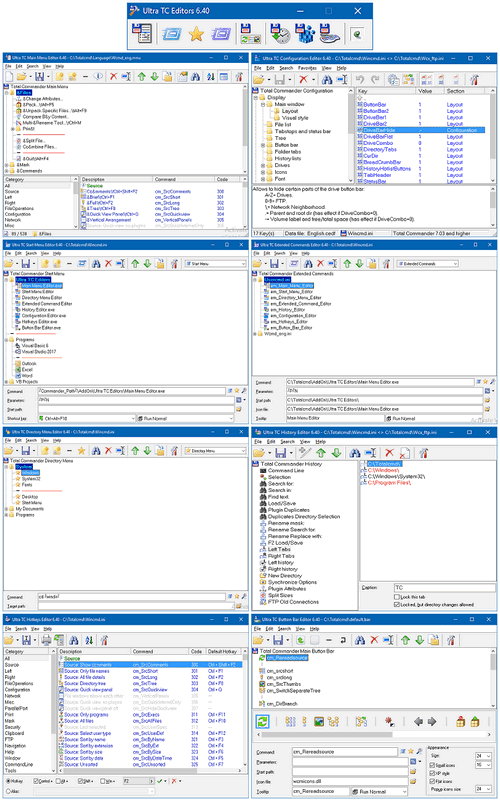
Please Donate 🌹Ultra TC Editors package include the following programs:
1. Main Menu Editor: for editing Total Commander main menu.
2. Start Menu Editor: for editing Total Commander start menu.
3. Directory Menu Editor: for editing Total Commander directory menu.
4. Extended Commands Editor: for editing Total Commander extended commands.
5. Button Bar Editor: for editing Total Commander main button bar.
6. Vertical Button Bar Editor: for editing Total Commander vertical button bar.
7. History Editor: for editing history sections in Total Commander configuration files (Wincmd.ini and Wcx_ftp.ini)
8. Configuration Editor: database for all Total Commander configuration keys.
9. Hotkeys Editor: for modifying Total Commander hotkeys.
Help files
Russian
Chinese
Dutch
What’s new
What's new in 6.42 Beta 10
-------------------------
================
Main Menu Editor
================
Added: Save menu file with different extension by selecting "All files (*.*)" in Save As dialog box.
Fixed: Minor bugs.
================
History Editor
================
Added: New command line parameter "/c" to close current Total Commander instance.
================
All Editors
================
Added: Find dialog: when "Use pattern matching" checked, auto enclose (internally) search word between two asterisks. (can be disabled by adding StrictPatternMatch=1 under [Common] section in "ultra tc editors.ini")
What's new in 6.42 Beta 9
-------------------------
Fixed: Minor bugs.
What's new in 6.42 Beta 8
-------------------------
History Editor
================
Added: Unlimited "Undo" and "Redo".
Changed: Shortcut for Move Down command changed to Ctrl+B instead of Ctrl+Y.
What's new in 6.42 Beta 7
-------------------------
Hotkeys Editor
================
Added: Unlimited "Undo" and "Redo".
Ultra TC Editors.exe
================
Added: Shift + Left mouse click Disable switching program mode when run Start, Directory, Extended and Button Bar Editor.
What's new in 6.42 Beta 6
-------------------------
Start Menu Editor
================
Added: Unlimited "Undo" and "Redo".
Changed: Shortcut for Move Down command changed to Ctrl+B instead of Ctrl+Y.
Button Bar Editor
================
Added: Unlimited "Undo" and "Redo".
Changed: Shortcut for Move Down command changed to Ctrl+B instead of Ctrl+Y.
Changed: Shortcut for Add Line Break command changed to Ctrl+K instead of Ctrl+B.
What's new in 6.42 Beta 5
-------------------------
Main Menu Editor
================
Added: Unlimited "Undo" and "Redo".
Added: New, Edit and Copy extended command dialog box accept drag drop file and folder.
Changed: Shortcut for Move Down command changed to Ctrl+B instead of Ctrl+Y.
What's new in 6.42 Beta 4
-------------------------
Main Menu Editor
================
Added: Many enhancement to edit extended command dialog box.
Ultra TC Editors:
================
Added: New option to close all opened Ultra TC Editors on exit
What's new in 6.42 Beta 3 (Hot fix)
-------------------------
Main Menu Editor
================
Fixed: The main window always start centered on screen.
What's new in 6.42 Beta 2
-------------------------
Main Menu Editor
================
Added: Show file and command name in delete extended command confirmation message.
Fixed: Definition command (Ctrl+D) stops working after deleting an extended command.
Button Bar Editor
================
Added: Support open *.bar file via command line.
All Editors
================
Added: "Donate..." command in Help menu.
Added: "Donate" button in About dialog box.
What's new in 6.42 Beta 1
-------------------------
Main Menu Editor
================
Added: New dialog box to create, edit, copy and delete extended commands. (Select any extended command, "Usercmd.ini" or "Wcmd_*.mnu" category to show New, Edit, Copy and Delete buttons.)
-------------------------
================
Main Menu Editor
================
Added: Save menu file with different extension by selecting "All files (*.*)" in Save As dialog box.
Fixed: Minor bugs.
================
History Editor
================
Added: New command line parameter "/c" to close current Total Commander instance.
================
All Editors
================
Added: Find dialog: when "Use pattern matching" checked, auto enclose (internally) search word between two asterisks. (can be disabled by adding StrictPatternMatch=1 under [Common] section in "ultra tc editors.ini")
What's new in 6.42 Beta 9
-------------------------
Fixed: Minor bugs.
What's new in 6.42 Beta 8
-------------------------
History Editor
================
Added: Unlimited "Undo" and "Redo".
Changed: Shortcut for Move Down command changed to Ctrl+B instead of Ctrl+Y.
What's new in 6.42 Beta 7
-------------------------
Hotkeys Editor
================
Added: Unlimited "Undo" and "Redo".
Ultra TC Editors.exe
================
Added: Shift + Left mouse click Disable switching program mode when run Start, Directory, Extended and Button Bar Editor.
What's new in 6.42 Beta 6
-------------------------
Start Menu Editor
================
Added: Unlimited "Undo" and "Redo".
Changed: Shortcut for Move Down command changed to Ctrl+B instead of Ctrl+Y.
Button Bar Editor
================
Added: Unlimited "Undo" and "Redo".
Changed: Shortcut for Move Down command changed to Ctrl+B instead of Ctrl+Y.
Changed: Shortcut for Add Line Break command changed to Ctrl+K instead of Ctrl+B.
What's new in 6.42 Beta 5
-------------------------
Main Menu Editor
================
Added: Unlimited "Undo" and "Redo".
Added: New, Edit and Copy extended command dialog box accept drag drop file and folder.
Changed: Shortcut for Move Down command changed to Ctrl+B instead of Ctrl+Y.
What's new in 6.42 Beta 4
-------------------------
Main Menu Editor
================
Added: Many enhancement to edit extended command dialog box.
Ultra TC Editors:
================
Added: New option to close all opened Ultra TC Editors on exit
What's new in 6.42 Beta 3 (Hot fix)
-------------------------
Main Menu Editor
================
Fixed: The main window always start centered on screen.
What's new in 6.42 Beta 2
-------------------------
Main Menu Editor
================
Added: Show file and command name in delete extended command confirmation message.
Fixed: Definition command (Ctrl+D) stops working after deleting an extended command.
Button Bar Editor
================
Added: Support open *.bar file via command line.
All Editors
================
Added: "Donate..." command in Help menu.
Added: "Donate" button in About dialog box.
What's new in 6.42 Beta 1
-------------------------
Main Menu Editor
================
Added: New dialog box to create, edit, copy and delete extended commands. (Select any extended command, "Usercmd.ini" or "Wcmd_*.mnu" category to show New, Edit, Copy and Delete buttons.)