TCbarGen 1.3
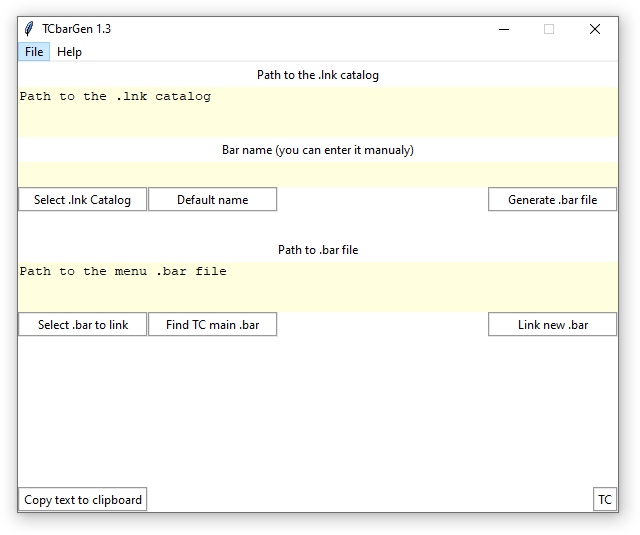
Description
The program for generating a *.bar file from the *.lnk files contained in the catalog.Instruction:
-First of all, place in one folder the shortcuts of the programs that you want to place on new panel.
-Select the directory containing *.lnk files ("Select catalog" Button). it doesn't matter how many *.lnk files will be selected. All shortcut files from the directory will be automatically taken.
By default *.bar filename is the same as the catalog name. You can give it manually in the yellow box.
-Generate bar file ("Generate" Button)
2 files will be created in the folder with shortcuts. *(file name)*.bar and *(file name)*.txt
Also the data for pasting the button by right-clicking will be copied to the clipboard.(After right-clicking on a TC panel select "Paste"). This will add the new panel as a menu.
If for some reason the necessary information is not copied to the clipboard, it can be copy manually from the bottom part of the TCbarGen program window, or from *(file name)*.txt file.
-You can also link the *(file name)*.bar file directly by drag&drop with mouse.
-If you just generated a *.bar file, then it can paste automatically into the current TC toolbar by select current clicking "Select *.bar" and add "Link to *.bar".
Button will be added to the end of the current toolbar.
-On first launch, the program creates the TCbarGen.ini settings file.
It will contain the last used path to *.lnk files and the path to *.bar file in which you added the new panel.
The shortcuts in the folder should point to executable files (*.exe) it's does not tested with other shortcuts
P.S. the program is provided for free use without any guarantees.
I made it for myself, If the program is in demand, then plans to add functionality.
What’s new
2020-12-06
added launch with parameters -p="%P%" in TC will set active TC panel as source path
2020-12-04 added the ability to automatically detect the main TC panel if the program is launched in the Total Commander (experiment)
minor fixes
added launch with parameters -p="%P%" in TC will set active TC panel as source path
2020-12-04 added the ability to automatically detect the main TC panel if the program is launched in the Total Commander (experiment)
minor fixes