Fontarium 1.8.0
Description
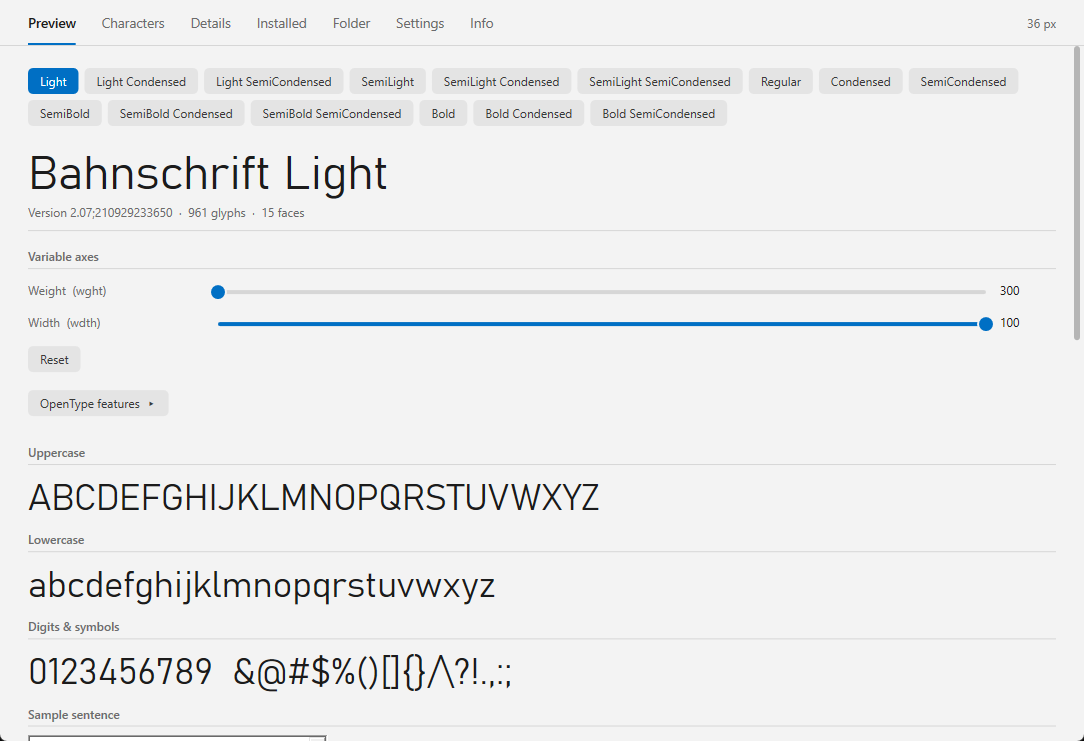
Fontarium - font viewer (Lister plugin), 32 and 64 bitShows TTF, OTF, TTC, WOFF and WOFF2 fonts in the Lister, drawn with DirectWrite (correct Persian, Arabic and other scripts).
- Preview with size ladder and multi-line custom text (own direction and language per line); a slider for every axis of variable fonts; OpenType features can be switched on and off
- Characters: Unicode blocks, coverage, "Show missing", glyph inspector
- Details: names, legal information, technical data, supported languages
- Installed and Folder tabs: install, uninstall, activate, deactivate fonts
- Light and dark design, English and German interface
Developer: Ali Naderi – digitalent.dev
Freeware: free to use and to pass on unmodified; selling is not allowed.
What’s new
1.8.0 (2026-11-14)
- New: the right-click menu of a character also copies the character name, glyph ID, CSS escape and UTF-8 bytes, copies the outline as SVG or as a PNG image, exports it as an SVG or PNG file and copies an @font-face rule
- Glyph names now come from the font itself (TrueType post table, CFF charset); fonts without names show uniXXXX
1.7.0 (2026-11-13)
- New: Windows bitmap fonts (.fon) are shown pixel by pixel in all tabs; files with several sizes get one button per size (vector .fon files are not supported)
- New: Left / Right (and PgUp / PgDn at the end of the page) open the previous / next font file of the folder (filenav=0 in Fontarium.ini turns it off)
1.6.0 (2026-11-12)
- New: "Nodes" button in the glyph view shows or hides the outline nodes; the setting is remembered (nodes=0/1 in Fontarium.ini)
1.5.0 (2026-11-12)
- New: Coverage tab - which writing systems the font can set, with percentages
- New: The glyph view shows the outline with on-curve and control points, metric lines, and the glyph numbers.
- New: "Go to" box in Characters - jump to a character or code (the character, 20AC or U+20AC)
- New: right-clicking on a character opens a copy menu (character, code point, glyph name, HTML entity).
- New: right-click on a value in Details: copy value or name and value
- New: preview size slider and an Install button on the Preview tab
- New: "Install for current user" and "Install for all users" wherever "Install" is offered
1.4.1 (2026-11-11)
- Fixed: Total Commander hung ("not responding") after closing the Lister and running cm_UnloadPlugins
- Fixed: Fontarium could fail to open again after the plugins were unloaded
1.4.0 (2026-11-10)
- Right-click a character in Characters copies it to the clipboard
1.3.0 (2026-11-10)
- New ini setting starttab (in Fontarium.ini): open on the Characters tab (or Details, Installed, Folder) instead of Preview; 0 Preview, 1 Characters, 2 Details, 3 Installed, 4 Folder
1.2.0 (2026-11-09)
- Details tab: a click on a value (name, version, file size, ...) copies it to the clipboard; the text briefly lights up as confirmation
1.1.1 (2026-11-07)
- The scroll bar of the font lists (Installed / Folder tab) can now be dragged with the mouse; clicking the track jumps there.
- Fixed color emoji sometimes turning monochrome after switching to another font
1.1.0 (2026-11-07)
- Color emoji: color glyphs (e.g., Segoe UI Emoji) are now drawn in color in the Characters grid and character panel, not only in the preview. New setting Color glyphs (on/off).
- "All" button: the Characters tab starts with All, which shows every character of the font in one grid. The Unicode blocks are still available next to it.
- Interface size: new setting Interface size (100% to 200%) scales text, buttons and the character grid.
- New: the right-click menu of a character also copies the character name, glyph ID, CSS escape and UTF-8 bytes, copies the outline as SVG or as a PNG image, exports it as an SVG or PNG file and copies an @font-face rule
- Glyph names now come from the font itself (TrueType post table, CFF charset); fonts without names show uniXXXX
1.7.0 (2026-11-13)
- New: Windows bitmap fonts (.fon) are shown pixel by pixel in all tabs; files with several sizes get one button per size (vector .fon files are not supported)
- New: Left / Right (and PgUp / PgDn at the end of the page) open the previous / next font file of the folder (filenav=0 in Fontarium.ini turns it off)
1.6.0 (2026-11-12)
- New: "Nodes" button in the glyph view shows or hides the outline nodes; the setting is remembered (nodes=0/1 in Fontarium.ini)
1.5.0 (2026-11-12)
- New: Coverage tab - which writing systems the font can set, with percentages
- New: The glyph view shows the outline with on-curve and control points, metric lines, and the glyph numbers.
- New: "Go to" box in Characters - jump to a character or code (the character, 20AC or U+20AC)
- New: right-clicking on a character opens a copy menu (character, code point, glyph name, HTML entity).
- New: right-click on a value in Details: copy value or name and value
- New: preview size slider and an Install button on the Preview tab
- New: "Install for current user" and "Install for all users" wherever "Install" is offered
1.4.1 (2026-11-11)
- Fixed: Total Commander hung ("not responding") after closing the Lister and running cm_UnloadPlugins
- Fixed: Fontarium could fail to open again after the plugins were unloaded
1.4.0 (2026-11-10)
- Right-click a character in Characters copies it to the clipboard
1.3.0 (2026-11-10)
- New ini setting starttab (in Fontarium.ini): open on the Characters tab (or Details, Installed, Folder) instead of Preview; 0 Preview, 1 Characters, 2 Details, 3 Installed, 4 Folder
1.2.0 (2026-11-09)
- Details tab: a click on a value (name, version, file size, ...) copies it to the clipboard; the text briefly lights up as confirmation
1.1.1 (2026-11-07)
- The scroll bar of the font lists (Installed / Folder tab) can now be dragged with the mouse; clicking the track jumps there.
- Fixed color emoji sometimes turning monochrome after switching to another font
1.1.0 (2026-11-07)
- Color emoji: color glyphs (e.g., Segoe UI Emoji) are now drawn in color in the Characters grid and character panel, not only in the preview. New setting Color glyphs (on/off).
- "All" button: the Characters tab starts with All, which shows every character of the font in one grid. The Unicode blocks are still available next to it.
- Interface size: new setting Interface size (100% to 200%) scales text, buttons and the character grid.
Previous versions
- 1.7.0 13 Nov 2026 Download 556 KB
- 1.6.0 12 Nov 2026 Download 535 KB
- 1.5.0 12 Nov 2026 Download 535 KB
- 1.4.1 11 Nov 2026 Download 497 KB
- 1.4.0 10 Nov 2026 Download 497 KB
- 1.3.0 10 Nov 2026 Download 495 KB
- 1.2.0 9 Nov 2026 Download 495 KB
- 1.1.1 7 Nov 2026 Download 493 KB
- 1.1.0 7 Nov 2026 Download 493 KB
- 1.0.0 7 Nov 2026 Download 486 KB