TreeView 1.0.0
Description
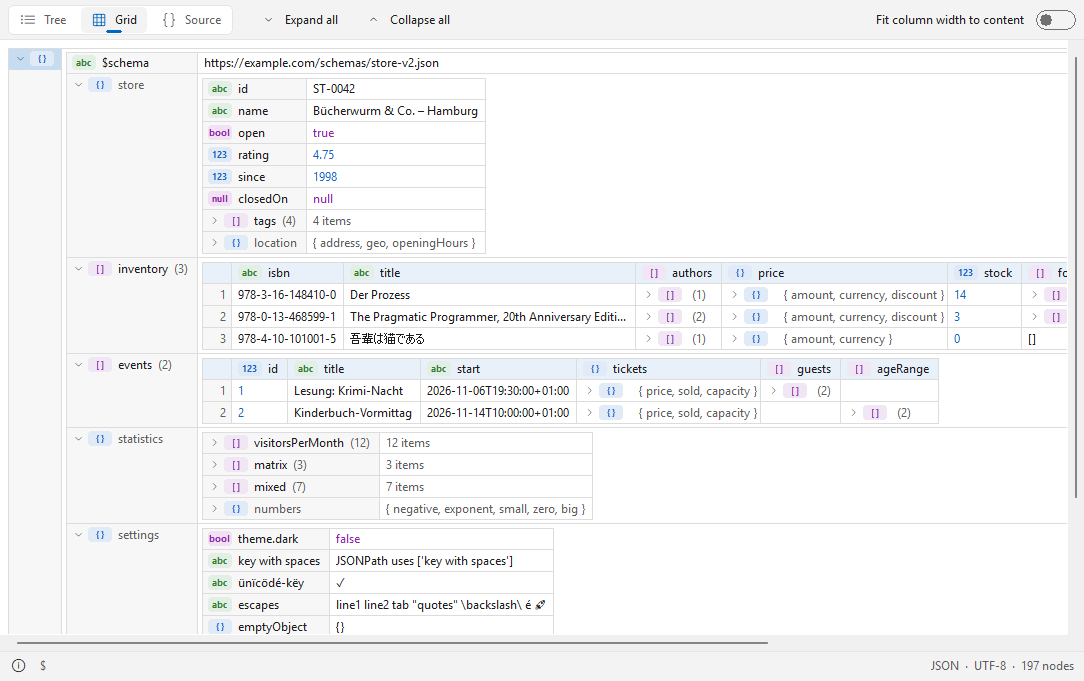
TreeView 1.0.0 – XML, JSON and YAML viewer (Lister plugin) for Total Commander, 32 and 64 bitTreeView shows structured data files in Total Commander's Lister (F3) in three views: as a tree (like XML Notepad), as a nested grid (like XMLSpy) and as formatted, coloured source code. Large files open quickly, broken files still show everything up to the error. Native, no runtime, nothing to install besides the plugin.
Supported files
- XML and its dialects: .xml, .xsd, .xsl, .xslt, .svg, .config, .csproj, .vbproj, .vcxproj, .fsproj, .props, .targets, .nuspec, .resx, .plist, .rss, .atom, .wsdl, .kml, .gpx, .xaml, .manifest, .xlf, .xliff, .fb2, .rdf, .owl, .opml, .gml, .graphml, .bpmn, .wxs, .wxi, .wxl, .appxmanifest, .vsixmanifest, .vstemplate, .pubxml, .runsettings, .ruleset, .slnx, .user, .rdl, .rdlc, .dtsx, .tmx, .xbrl, .xmi, .dae, .xib, .storyboard, .musicxml, .opf, .ncx, .xspf
- JSON: .json, .jsonc, .json5, .geojson, .topojson, .webmanifest, .har, .arb (tolerant: comments, trailing commas, single quotes)
- JSON Lines: .jsonl, .ndjson
- YAML: .yaml, .yml (anchors and aliases, merge keys, tags, several documents in one file)
- TOML: .toml
- Windows registry exports: .reg
Features
- Tree (Ctrl+1): names and values side by side, type badges (text, number, bool, null, object, array), optional count of child nodes.
- Grid (Ctrl+2): nested tables; arrays of similar objects become one table with a column per key; column widths can be fitted to the content.
- Source (Ctrl+3): pretty-printed, syntax-coloured source; the selected node stays selected when switching views.
- Expand all (Ctrl+plus), collapse all (Ctrl+minus), expand a subtree (*).
- Copy value, name, path (XPath for XML, JSONPath for JSON) or a whole node as XML/JSON/YAML from the context menu.
- Path of the selected node in the status bar, plus format, encoding and node count.
- Syntax errors are reported with line number; everything read up to the error is still shown.
- Search with Total Commander's Find (F7).
- Selectable font; light and dark design (automatic like Windows, or fixed) in the Windows 11 look.
- Text encodings: UTF-8, UTF-16 (with or without BOM), Windows-1252 and the XML encoding declaration.
- User interface in English and German (follows the Windows language).
Installation
Open TreeView.zip in Total Commander and confirm the installation. Settings are stored in TreeView.ini next to the plugin.
Requirements
Total Commander 32 or 64 bit, Windows 10 or 11.
Developer: Ali Naderi – digitalent.dev
Freeware: free to use and to pass on unmodified; selling is not allowed.